
Content Management Systems: Comparing Leading Platforms
Table of Contents
Content management systems are the software most businesses rely on to run a website, though few owners know the full extent of what their platform can and cannot do. Pick the wrong one, and you’ll face slow page speeds, security headaches, a content team that avoids the editor, or a full rebuild two years down the line. Pick the right one and your site becomes an asset your team actually uses.
At ProfileTree, a Belfast-based web design and digital marketing agency, we help businesses across Northern Ireland, Ireland, and the UK choose, build, and manage their digital presence every day. This guide draws on that experience to compare the leading CMS platforms with honest UK pricing, explain the key architectural choices, and give you a clear framework for making the right decision for your business.
What Is a Content Management System (CMS)?
A content management system is software that lets you create, edit, organise, and publish digital content through a visual interface without writing or managing code directly. The platform handles the technical infrastructure, so you’re free to focus on your content and strategy. In plain terms: a CMS is the layer between your content and your website’s code, and understanding that distinction is most of what the “what is a CMS” question is actually asking.
At its core, a CMS separates content from presentation. Your text, images, and media are stored in a database. The CMS then retrieves that content and applies design templates to display it on your website for visitors. This architecture means you can update a page, publish a blog post, or change a product description in minutes, from anywhere with an internet connection.
It’s worth distinguishing a CMS from a Document Management System (DMS). A CMS manages public-facing web content: pages, blog posts, product listings, and media. A DMS manages internal business documents such as contracts, invoices, and reports. They serve different purposes, and conflating the two often leads businesses to buy the wrong tool.
How Does a Content Management System Work?
Understanding the mechanics of a content management system helps you make better decisions about which platform suits your needs. The system has two core components working together behind the scenes.
The Content Management Application (CMA): The CMA is the editor you interact with day to day: the dashboard, the text editor, the media library, and the publishing controls. It’s designed for non-technical users. When you write a blog post, upload an image, or update a service page, you’re working within the CMA.
The Content Delivery Application (CDA): The CDA is the engine that stores your content in a database and retrieves it when a visitor lands on your site. It applies your chosen design template, assembles the page, and sends it to the browser. This all happens within milliseconds.
In a traditional CMS such as WordPress, the CMA and CDA are tightly coupled: the system both manages your content and delivers it to the browser via its own templating engine. In a headless CMS, the CDA delivers content via an API, allowing a separate front-end system to handle the presentation. More on that distinction below.
ProfileTree’s web development services include full CMS setup, configuration, and ongoing technical management, so your team can focus on content rather than infrastructure.
Core Features Every Modern CMS Must Have
Not all content management systems are built equally. Before comparing specific platforms, it’s worth establishing the baseline features that any system you consider should include.
Content Creation and Editing Tools: A visual editor (often called a WYSIWYG editor) lets you format text, insert images, and build page layouts without touching code. The quality of this interface varies considerably between platforms. WordPress’s block editor (Gutenberg) gives granular control over layouts. Wix uses a drag-and-drop canvas. Contentful, a headless CMS, strips the editor back to structured fields, prioritising content portability over visual design.
SEO and Performance Capabilities: A CMS should give you control over page titles, meta descriptions, URL structures, and image alt text as a minimum. Better platforms support schema markup, canonical tags, and XML sitemaps natively or through established plugins. For UK businesses, page speed is also a direct ranking factor; your CMS must serve pages quickly without excessive bloat from themes or plugins.
A thorough SEO audit of your website will identify whether your current CMS is holding back your search performance, and where technical improvements would have the biggest impact.
User Roles and Permissions: Any CMS used by more than one person needs clear role management: a junior content writer should be able to draft posts without access to global settings or the ability to delete pages. WordPress handles this natively with roles from Subscriber through to Administrator.
Security and Backup: A secure CMS provides two-factor authentication, regular software updates, and reliable backup options. Open-source platforms like WordPress and Drupal rely on you to apply updates promptly. Hosted platforms like Shopify and Wix manage security centrally, which reduces that burden but also limits your control.
Traditional CMS vs Headless CMS: What Is the Difference?
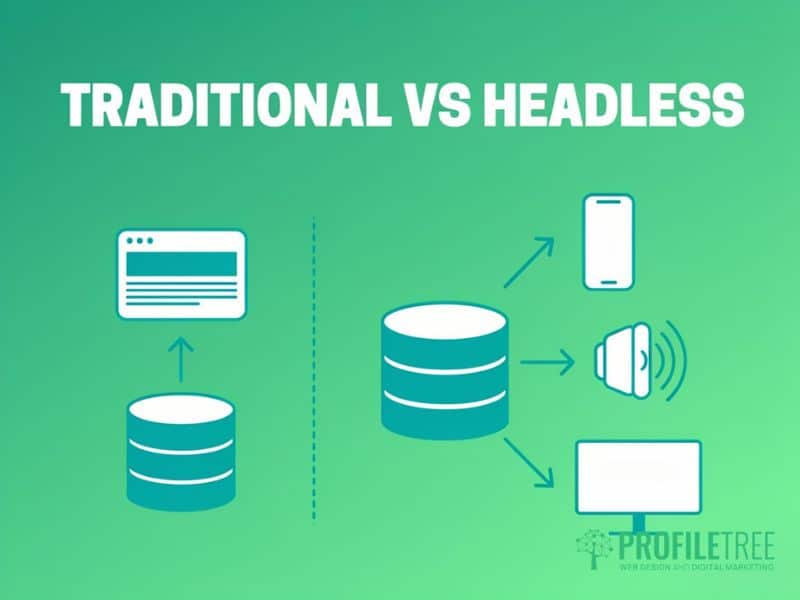
This is the architectural question that most businesses overlook until they hit a limitation they can’t solve. The distinction matters more as your digital presence grows across websites, apps, and other channels.
| Traditional CMS | Headless CMS | |
|---|---|---|
| How it works | CMS manages both content and front-end delivery via templates | CMS manages content; a separate application handles delivery via API |
| Best for | Websites, blogs, standard business sites | Multi-channel delivery: web, app, digital signage, voice |
| Skill level | Lower, manageable by non-technical teams | Higher requires developer resources to build the front end |
| Examples | WordPress, Wix, Squarespace | Contentful, Sanity, Strapi |
| Flexibility | Good within the platform’s design system | Very high, front end is completely custom |
| Time to launch | Fast, templates and plugins accelerate build time | Slower, the front end must be built separately |
A traditional content management system is the right choice for most UK SMEs. It allows your team to manage content independently without developer involvement, and modern platforms like WordPress can handle considerable traffic and complexity.
A headless CMS makes sense when you need to publish the same content to multiple channels simultaneously: a website, a mobile app, an in-store display, and a voice assistant. The trade-off is higher upfront development costs and the ongoing need for developer support.
There’s also a middle ground worth knowing about, sometimes called a decoupled or hybrid CMS. Platforms like Webflow or WordPress configured with their REST API keep a familiar editorial interface while allowing a separate front end to be built in something like React. This suits teams that want more design flexibility than a traditional CMS allows, without committing to a fully custom headless build.
At the larger end of the market sit Digital Experience and Enterprise CMS platforms, such as Adobe Experience Manager, Sitecore, and Microsoft SharePoint. These represent a different type of CMS from the traditional, headless, and hybrid options above: built for audience segmentation, A/B testing, and strict governance, and aimed at organisations with dedicated development teams and compliance requirements well beyond most SME needs.
Between traditional, headless, hybrid, and this enterprise tier, which covers the main types of CMS most businesses will encounter, unless you’re operating at enterprise scale, a traditional or hybrid CMS will do the job better and for a fraction of the cost.
Comparing the Leading Content Management Systems
The right platform depends on your specific requirements: your team’s technical skills, content volume, e-commerce needs, and budget. Below is a structured comparison of the five most widely used content management systems, with UK-relevant pricing.
| Platform | Ideal for | Skill level | Starting cost (GBP) | Small business/portfolios |
|---|---|---|---|---|
| WordPress.org | Most business websites | Medium | £5–£15/mo hosting | 5 / 5 |
| Shopify | Online retail | Low–medium | From £25/mo + fees | 4 / 5 |
| Wix | Small business/portfolios | Low | From £9/mo | 3 / 5 |
| Contentful | Multi-channel / enterprise | High | Free tier; paid from ~£300/mo | 3 / 5 (depends on front end) |
| Drupal | Large or complex sites | High | Free; hosting from £20/mo | 4 / 5 |
All pricing in GBP is approximate and subject to exchange rate changes. UK VAT at 20% may apply.
WordPress: WordPress powers more than 40% of all websites on the internet (W3Techs, 2025). Its open-source model means the software itself is free; you pay for hosting, a domain name, and any premium themes or plugins you choose. For a standard business site, a reliable managed WordPress host costs between £5 and £20 per month in the UK.
Its real strength is flexibility. The plugin library covers everything from advanced SEO tools to e-commerce, booking systems, membership areas, and multilingual content. This extensibility comes with a maintenance responsibility: you’ll need to keep WordPress core, themes, and plugins up to date to avoid security vulnerabilities.
For most SMEs, WordPress CMS remains the strongest all-round choice: the best combination of SEO capability, design flexibility, community support, and total cost of ownership.
Shopify: Shopify is built specifically for e-commerce. Its interface is clean and accessible for non-technical users, and it handles payments, inventory, and shipping out of the box. UK merchants should factor in transaction fees: Shopify charges between 0.5% and 2% on sales unless you use Shopify Payments. Plans start from around £25 per month, with hosting and security managed centrally. Its SEO capabilities are solid but less configurable than WordPress; you have limited control over URL structures.
If you’re planning an online retail build, our development team can help you assess whether Shopify or a WooCommerce-on-WordPress approach better fits your sales volume.
Wix: Wix is the most beginner-friendly option in this comparison. Its drag-and-drop interface requires no technical knowledge, and plans start from around £9 per month. It suits sole traders and small service businesses that need a professional online presence quickly.
The key limitation is lock-in: Wix sites can’t be migrated to another platform without starting from scratch, and its SEO capabilities still lag behind WordPress. If you expect material growth in traffic or content volume, building on Wix now creates a costly problem later.
Contentful: Contentful is the leading headless CMS for enterprise and multi-channel use cases. Content is stored as structured data and delivered via API to any front-end your developers build, making it ideal for publishing to a website, a mobile app, and other digital touchpoints simultaneously.
Paid plans start at approximately £300 per month. The investment in front-end development makes Contentful unsuitable for most SMEs unless you have in-house developer resources or a dedicated agency relationship.
Drupal: Drupal suits large, complex sites requiring granular control over content types, permissions, and custom data structures. It’s open-source and free to download; costs come from hosting (from around £20 per month) and developer time, which is considerable given its steep learning curve.
Government bodies, universities, and large media organisations choose Drupal for its security record and ability to handle high-traffic architectures. For an SME without a dedicated developer, the maintenance overhead is a real barrier.
When a custom-built CMS makes sense: Occasionally, a business’s requirements don’t fit any off-the-shelf platform well: unusual data structures, a bespoke customer portal, or integration needs that no plugin covers cleanly. In these cases, a custom-built CMS, developed specifically around your workflow, can be worth the investment. This suits a small minority of businesses; for most, an established platform configured properly will do the job at a fraction of the cost. ProfileTree’s website development team can advise on whether your requirements genuinely warrant a bespoke build or whether an established platform, properly configured, will do the job.
Choosing a CMS for Marketing Teams
Marketing teams searching for “the best CMS for marketers” are usually asking a narrower question than the general comparison above answers: can the team publish, integrate, and report on content without pulling in a developer for routine work? That’s a different lens from a general platform comparison, and it changes which criteria matter most.
For a marketing-led evaluation, weigh:
- Self-serve publishing. Can a marketer draft, schedule, and publish without developer involvement for anything beyond genuinely custom layouts?
- Integration with your existing stack. Does the CMS connect cleanly to the CRM, email platform, and analytics tools you already use, or will you be exporting and re-importing data by hand?
- Content workflow. Are staging environments, scheduled publishing, and approval steps built in or bolted on through plugins?
- Local support. Is there a UK or Irish agency or developer community you can draw on when you need help?
- Migration path. If you outgrow the platform, how difficult is it to move content and preserve SEO value?
Against these criteria, HubSpot CMS is worth including alongside the five platforms above for marketing teams already using HubSpot’s CRM. Its main strength is the depth of integration: content, email, forms, workflows, and analytics sit in one system, removing a layer of manual data matching that exists on other platforms. It also embeds SEO tools that go beyond basic metadata, including topic-cluster mapping and content performance reporting. The trade-off is cost: HubSpot CMS sits well above WordPress or Webflow on price, and its value is strongest for businesses already committed to the wider HubSpot suite rather than those evaluating it as a standalone CMS.
It’s worth being clear on one point of confusion that comes up often: a content management system and a content marketing platform are not the same thing. A CMS is the software that stores, edits, and publishes your content.
A content marketing platform (or the content marketing function within a CMS like HubSpot) is about planning, distributing, and measuring that content against campaign goals. Most businesses need both, but they’re solving different problems, and no CMS on its own replaces a content marketing strategy. If content strategy, not just the publishing tool, is the gap, ProfileTree’s content marketing services sit alongside any CMS built to cover that side of the work.
Key Considerations for UK and Irish Businesses

UK and Irish businesses face specific regulatory and commercial factors that most content management system comparison guides, written for a US audience, do not cover. These considerations should inform your platform decision from the outset.
UK GDPR and Data Residency: Under UK GDPR, you have obligations around where personal data is processed and stored. If your CMS or hosting provider stores visitor data on servers outside the UK or EU, you’ll need a lawful basis for that transfer, and you must be transparent about it in your privacy policy.
Hosted platforms like Shopify and Wix may store data on servers in the United States. Check each provider’s data processing agreement and select EU or UK server locations where possible. Self-hosted WordPress gives you full control, provided you choose a UK or EU-based hosting provider. Among the platforms covered here, HubSpot offers an EU data hosting option (typically on higher-tier plans), and Contentful offers EU data residency at the enterprise level; confirm current terms directly with each vendor, as plans and regions change.
ProfileTree’s website development team can advise on GDPR-compliant builds, covering data residency, cookie consent implementation, and privacy policy requirements for UK businesses.
True Cost of Ownership in GBP: Most CMS pricing guides quote in US dollars. For UK businesses, also factor in: the sterling equivalent at current exchange rates, UK VAT at 20% where applicable, UK-based hosting costs, and developer or agency fees for setup and support.
A WordPress site on a managed UK host typically costs between £600 and £1,500 to build, plus £50 to £150 per month for hosting and maintenance. Shopify’s monthly fees are predictable, but transaction fees accumulate; switching to Shopify Payments eliminates them at meaningful sales volumes.
Digital Sustainability: An increasing number of UK businesses have Environmental, Social, and Governance (ESG) commitments that extend to their digital infrastructure. A database-driven CMS generates a server request on every page load; well-cached WordPress installations and static site generators are considerably more energy-efficient than plugin-heavy setups. If your organisation has carbon-reduction targets, ask your hosting provider whether it runs on renewable energy. Several UK hosts now do.
How to Choose the Right CMS: A Practical Framework
With dozens of platforms available, choosing the right content management system is straightforward once you focus on your actual requirements rather than market share or features you’ll never use.
“Most businesses come to us focused on what a CMS looks like rather than what it needs to do in three years. We always start with growth goals first, because the right content management system for where you are today isn’t always the right one for where you’re going,” says Ciaran Connolly, founder of ProfileTree.
Step 1: Define Your Primary Use Case: Are you primarily publishing editorial content? Selling products? Running a service business that needs enquiry forms and local visibility? Your dominant use case should drive your shortlist. E-commerce needs to point towards Shopify or WooCommerce. Content-heavy sites suit WordPress or Drupal. Simple service sites are well served by WordPress or, for the smallest businesses, Wix.
Step 2: Assess Your Technical Resource: Be honest about who will manage the site day to day. WordPress can be managed by a non-technical marketing manager with minimal training, but it does require occasional developer support. Drupal and headless systems need ongoing developer involvement. With no in-house technical resource and no agency relationship, a fully hosted platform removes that burden, though at the cost of some flexibility.
Step 3: Calculate Total Cost of Ownership: Don’t base your decision solely on the monthly subscription fee. Factor in setup costs, plugin purchases, developer time, training, and ongoing maintenance. An open-source CMS that needs heavy developer support each year often costs more than a hosted platform your team manages independently.
Step 4: Test Before You Commit: Every major platform offers a free trial or demo environment. Spend time in the editor with a member of your content team before making a decision. A CMS that daily users find confusing will be underused regardless of its technical capabilities.
Step 5: Plan for Growth: Consider where your business will be in three to five years. A platform that meets your needs today but can’t scale will force an expensive migration later. WordPress scales well with the right hosting. Wix and Squarespace do not.
Choosing the Right Content Management System for Your Business
Selecting a content management system is one of the most consequential decisions you’ll make for your website. Get it right and your team can publish, update, and grow with confidence. Get it wrong, and you’ll face performance problems, security risks, or a costly migration.
For most SMEs in Northern Ireland and across the UK, WordPress CMS remains the strongest all-round choice: flexible, well-supported, and capable of excellent search performance when properly configured. Shopify is the right call for e-commerce-first businesses; an e-commerce CMS must handle payments and inventory reliably, and both Shopify and WooCommerce deliver that. Wix suits the smallest operations needing a quick, simple presence. A headless CMS belongs in the conversation only when you have genuine multi-channel requirements and developer resources to match.
The framework in this guide gives you the questions to ask before you commit. If you’d like ProfileTree to assess your current platform or advise on a new build, our team works with businesses across Belfast and Northern Ireland on CMS selection, website development, and ongoing management.
FAQs
1. What are three examples of a content management system?
WordPress, Shopify, and Wix are three of the most widely used content management systems. WordPress suits most business websites and blogs, and Shopify is built for e-commerce. Wix targets beginners who want a straightforward site without technical complexity.
2. Is WordPress a CMS or a website builder?
WordPress.org is a self-hosted, open-source CMS: you install the software on a hosting server and have full control over the code and database. WordPress.com is a hosted service that runs the same software but restricts plugins and customisation. When people refer to WordPress as a CMS, they mean WordPress.org.
3. Which CMS is easiest to use for beginners with no technical experience?
Wix is the most accessible option: its drag-and-drop editor needs no technical knowledge, and hosting is included. Squarespace sits in a similar tier for design-led beginners. Both trade long-term SEO flexibility for that simplicity, so businesses expecting real growth are usually better off starting on WordPress with a managed host.
4. Can I change my CMS later without losing my Google rankings?
Yes, but it requires careful planning. Implement 301 redirects from every old URL to its new equivalent to transfer your existing authority. A migration plan that includes a content audit, a redirect map, and post-launch monitoring in Google Search Console is strongly recommended.
5. What is the difference between a CMS and a content marketing platform?
A CMS stores, edits, and publishes your content. A content marketing platform plans, distributes, and measures that content against campaign goals. Most businesses need both, and some tools like HubSpot blend the two, but they solve different problems.