
What Is A Breadcrumb and Why It Matters for Your Website
Table of Contents
What is a breadcrumb, and does your website actually need one? In plain terms, a breadcrumb is a small row of links near the top of a page that shows visitors where they sit within your site and how to get back to broader sections. Most people never consciously notice it. The absence of a clear trail, though, creates friction that shows up in bounce rates, weaker search visibility and lost sales.
This guide answers what is a breadcrumb from a practical angle. It covers the working definition, why breadcrumb navigation matters for usability, how it supports SEO, and where it fits into the buying journey. ProfileTree, a Belfast web design and SEO agency, builds breadcrumbs into client sites as a standard part of information architecture, because the payoff shows up across user experience, crawlability and conversions.
By the end you will know what a breadcrumb does, the main types worth using, how the schema works, and the mistakes that quietly cost traffic.
What Is A Breadcrumb in Web Design?
A breadcrumb is a secondary navigation aid that reveals a page’s location within a site’s hierarchy. Unlike the main menu, which lists top-level sections, a breadcrumb shows the specific path from the homepage down to the page a visitor is reading. The name comes from the Hansel and Gretel story, where the children dropped breadcrumbs to trace their route home. On a website it does the same job: it answers “where am I, and how do I go back?” So when someone asks what is a breadcrumb, the shortest honest answer is that it is a signpost, and a set of links, rolled into one.
Where Breadcrumbs Sit on the Page
A typical trail appears just below the main navigation and above the page heading, in a format like Home > Category > Subcategory > Current Page. Every item except the current page is a link, so a visitor can jump back a level without hunting through the menu or hitting the browser back button. The current page usually appears in the trail too, but as plain text rather than a link, which signals “you are here”. Get this layout right and most visitors absorb what is a breadcrumb telling them without a second thought, which is exactly the point of a good one.
How Breadcrumbs Reduce Cognitive Load
Understanding what is a breadcrumb from a usability point of view means thinking about mental effort. When a visitor lands deep inside your site, often straight from a search result, they have no context for where that page fits. A breadcrumb supplies that context in a single glance, which lowers the effort needed to make sense of the page. Less effort means the visitor is more likely to stay, look around, and act rather than leave. That payoff is why breadcrumbs belong in the planning stage of any web design project, rather than being added as an afterthought.
Why Breadcrumbs Matter for Usability and SEO

Knowing what is a breadcrumb is one thing; knowing why it earns its place is what matters for a business. Breadcrumbs pull weight in three areas at once: orientation for the visitor, cleaner internal linking for search engines, and a smoother route toward the pages that make you money. That combination is why breadcrumbs sit inside the SEO services and digital strategy ProfileTree runs for clients across Northern Ireland. If your site involves several service pages or a growing blog, adding a breadcrumb is one of the higher-value structural fixes available, and it takes far less effort than most people expect.
Orientation for Search Visitors
Search visitors rarely arrive on your homepage. They land on a product page, a service page or a single article, whether they came from Google or from a campaign run through social media marketing, having bypassed your top-level structure entirely. For these side-door arrivals, a breadcrumb is the first thing that explains the wider site. Without it, an unsuitable landing page leaves the visitor with two poor options: hit back, or leave. A clear trail gives them a third, better option: move up a level and keep exploring.
Fewer Dead Ends, More Pages Per Visit
Breadcrumbs quietly encourage people to look at related content. By putting a category page one click away, you make comparison and discovery easy, which lifts pages per session and time on site. Both are healthy engagement signals. On a well-built site, clear breadcrumbs and a sensible menu work together to keep visitors moving instead of bouncing back to the results page, and that is a large part of what is a breadcrumb doing for you behind the scenes.
Internal Linking and Crawl Efficiency
Every breadcrumb trail is a set of internal links using descriptive anchor text, and it is one of the few places where keyword-rich anchors read as completely natural. Those links pass authority from deep pages back up to categories and the homepage, and they help search engines build an accurate map of your content. On larger sites, that internal map improves how often deep pages get crawled and indexed. Getting it right is part of solid website development, where the trail is wired into templates so every new page inherits it automatically.
The Main Types of Breadcrumb Navigation
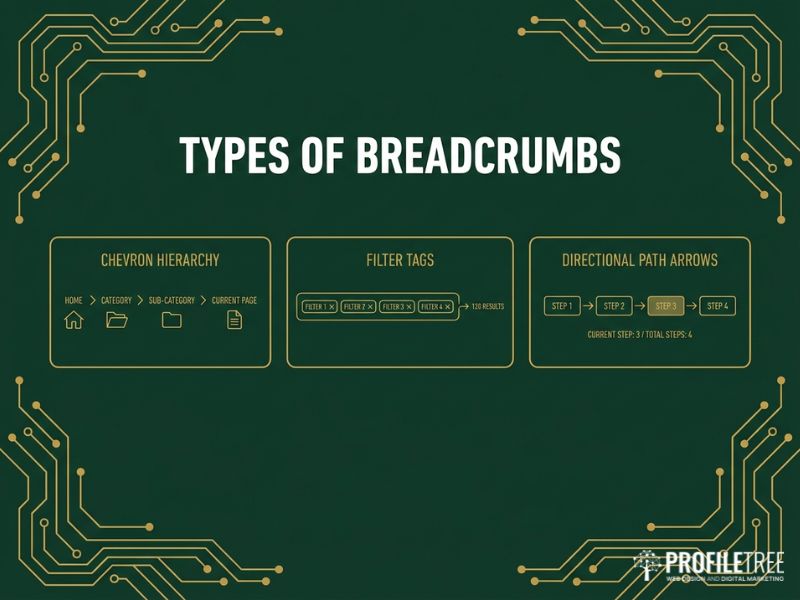
There is no single correct breadcrumb; the right type depends on how your site is organised. Three formats cover almost every case, and picking the wrong one can confuse both visitors and crawlers. Answering what is a breadcrumb for your particular site starts with matching the type to your structure. In practice that choice is a website design decision as much as a technical one.
Hierarchy-based Breadcrumbs
Hierarchy-based breadcrumbs show a page’s fixed position in the site’s permanent structure, for example Home > Fresh Food > Fresh Fruit > Grapes. The trail stays the same no matter how a visitor reached the page, which makes it the standard choice for content sites, service businesses and most e-commerce stores. It reinforces parent-child relationships, so search engines understand that “Grapes” sits under “Fresh Fruit”, which sits under “Fresh Food”. A short explainer, of the kind produced for video marketing, can make this structure obvious to a first-time visitor.
“Breadcrumbs should never be an afterthought in web design. When we build sites for clients, we map out the breadcrumb structure during the planning stage, because it shapes how both people and search engines understand your site,” says Ciaran Connolly, founder of ProfileTree.
Attribute-based Breadcrumbs
Attribute-based breadcrumbs show the filters a visitor has applied rather than a fixed hierarchy, for example Home > Property to Rent > 2+ Bedrooms > Belfast. They suit property portals, job boards and fashion stores with heavy filtering. Northern Ireland property sites such as PropertyPal use this pattern so people can widen a search by removing one filter at a time. The main risk is technical: if every filter combination creates its own URL, you can generate thousands of near-duplicate pages, which is why canonical tags and careful technical SEO are needed to point variations back to the main category.
History-based Breadcrumbs
History-based breadcrumbs track the actual click path a visitor took, so two people can see different trails for the same page. That is exactly why search engines cannot use them to understand structure, and why the browser back button already does the job. For standard content and e-commerce sites, skip these. The only sensible use is a multi-step workflow inside a web application, where showing progress through a process genuinely helps.
How Breadcrumbs Support SEO
Breadcrumbs do not act as a direct ranking factor, yet they improve SEO through several indirect routes: clearer site structure, better internal linking, lower bounce rates and richer search listings. For anyone weighing up what is a breadcrumb worth in practice, the SEO side is where the return becomes measurable over time, and it is worth building into wider strategy support rather than treating it as a one-off fix.
Rich Results and Google’s Mobile Change
With the right markup, breadcrumbs can appear in Google’s desktop results in place of a raw URL, which gives searchers context before they click and can lift click-through on those listings. There is an important recent shift to account for: Google has stopped showing breadcrumbs on mobile search results across all regions and languages, displaying only the root domain there, while desktop listings still show the full trail. The practical takeaway is that breadcrumbs were never only about how a listing looks. Their value in site structure, internal linking and crawlability carries on regardless of the mobile display change.
Breadcrumblist Schema and Json-ld
To be eligible for breadcrumb rich results, you add BreadcrumbList structured data, and JSON-LD is the format Google recommends. A valid list needs at least two items, and every item requires a position and a name, with links pointing to full canonical URLs rather than parameter-heavy ones. You can read the exact requirements in Google’s breadcrumb guidance and the underlying schema.org BreadcrumbList type. Include the current page in the markup even where it is not clickable on screen, and keep the schema identical to the visible trail, since a mismatch reads as manipulation.
Reducing Crawl Depth on Large Sites
Search engines allocate a crawl budget to each site, and pages many clicks from the homepage get visited less often. Breadcrumbs create direct links from deep pages back up to categories and the homepage, which shortens the effective distance and helps those pages get crawled and refreshed more regularly. On a store with thousands of products, that means thousands of contextual links added automatically, with no manual internal-linking effort, provided the site’s hosting and management keeps those pages fast and available for crawlers. This is where knowing what is a breadcrumb pays off at scale.
Breadcrumbs and AI Search
AI-driven search tools read structure, not just keywords, when they decide how pages relate to one another. A clear breadcrumb trail gives these systems a tidy signal about where a page sits, so a page on JavaScript SEO carries more context when its path reads Home > Technical SEO > JavaScript. The same clean signals help on-site tools such as AI chatbots point people to the right page, and they support broader use of AI marketing across a site. It is another reason the question of what is a breadcrumb keeps mattering as search shifts toward generative results rather than ten blue links.
Breadcrumbs, Conversions and Accessibility
The commercial case for breadcrumbs goes beyond crawlers. They smooth the path from interest to action, and they help a site meet accessibility standards that matter both legally and practically. Framed this way, what is a breadcrumb becomes a question about revenue and inclusion, not just tidy navigation.
Helping Visitors Compare and Decide
Consider someone researching a purchase who wants to weigh up three options. Clear breadcrumbs let them step back to the category, review alternatives, and return without losing their place. That ease of comparison moves people through the consideration stage with less friction, which tends to reduce abandonment. Well-built breadcrumbs also read as a sign of a professional, carefully made site, and for service businesses where trust drives the decision, small signals like this add up. Once a visitor does convert, keeping them close through channels such as email marketing turns a single sale into a longer relationship.
Meeting Accessibility Standardsv
Accessible breadcrumbs follow WCAG guidance so that screen reader and keyboard users get the same orientation as everyone else. In practice that means wrapping the trail in a <nav> element with an aria-label of “Breadcrumb”, using an ordered list, and marking the current page with aria-current=”page”. Focus states on each link must be clearly visible for keyboard users. The W3C’s breadcrumb pattern sets out the exact markup, and teams that pick this up through digital training tend to build it in from the start rather than retrofitting it later. Answering what is a breadcrumb properly means treating it as something every visitor can use, not only sighted mouse users.
How to Add Breadcrumbs the Right Way
Good breadcrumbs are quiet. They guide without competing with the content or the main menu. A few design and technical choices separate a helpful trail from one that adds clutter, and getting them right is the last piece of answering what is a breadcrumb for your own build.
Visual Design and Separators
Place the trail near the top of the page, below the main navigation. Keep the text smaller than body copy, usually 12 to 14 pixels, in a muted grey so it reads as secondary. For hierarchy-based trails, greater-than symbols or chevrons work best; reserve forward slashes for attribute-based trails showing filters. Make the current page visually distinct, either non-clickable, bolder, or a different colour, so people can see where they are at a glance.
Mobile Breadcrumb Strategies
Small screens are where breadcrumbs most often break. For deep hierarchies, truncate the middle levels with an ellipsis that expands on tap, or allow the trail to scroll horizontally so the full path stays available. A single “Back to parent” link is simpler but loses most of the context, so use it only where space is very tight. Whatever the visible design, keep the full hierarchy in the BreadcrumbList schema, since hiding levels in the markup weakens the structural signal.
Mistakes That Undermine Breadcrumbs
A handful of errors show up again and again. Orphaned pages with no clear parent confuse both people and crawlers, so every page bar the homepage should sit under a parent. Circular loops, where a trail folds back on itself, usually come from mixing types; hierarchy trails should always move from specific to general. Inconsistent labels, where the menu, the trail and the page title all use different wording for the same section, waste a visitor’s attention. And the most common miss of all is skipping the schema: attractive breadcrumbs with no BreadcrumbList markup leave the search benefit on the table when the hard work is already done.
Test the Markup Before You Launch
Even a correct-looking trail can fail silently, so treat validation as part of the build rather than an optional extra. Run the page through Google’s Rich Results Test to confirm the BreadcrumbList parses cleanly, then check it again in the Schema.org validator. On a larger build this validation sits within development support, so fixes ship with the next release rather than waiting. After launch, keep an eye on the breadcrumb report in Search Console and fix any warnings promptly. This last step is often what separates a breadcrumb that earns a richer desktop listing from one that never appears, and it is the practical end of understanding what is a breadcrumb: build it, mark it up, and verify it works.
FAQs
What is a breadcrumb on a website?
It is a small row of links near the top of a page that shows where the page sits in the site and lets visitors move back up through parent sections.
What is a breadcrumb trail used for?
It orients visitors who arrive on deep pages from search and gives search engines a clear map of your site structure through natural internal links.
Do breadcrumbs help SEO?
Not as a direct ranking factor, but they improve crawlability, internal linking and click-through from desktop rich results, which supports rankings indirectly.
Should the current page be clickable in a breadcrumb?
No. Keep the current page as plain text on screen, but still include it in the BreadcrumbList schema with its full URL.
What type of breadcrumb should most sites use?
Hierarchy-based breadcrumbs suit most content and service sites, since they show a fixed structure that both people and search engines can rely on.
Do breadcrumbs still show on mobile search results?
No. Google now shows only the root domain on mobile listings, though breadcrumbs still appear on desktop and the schema still works.
Are breadcrumbs worth adding to a small website?
On a one-page or very shallow site, no, because there is no hierarchy to show. On any site with categories or a blog, yes.