
Non-Copyrighted Images for UK Web Design: The Complete Legal Guide
Table of Contents
Visuals drive engagement, build trust, and communicate faster than text alone. For UK web designers, marketers, and business owners, finding the right images whilst staying on the right side of copyright law can feel like navigating a legal minefield. The stakes are high: using copyrighted material without permission can result in hefty fines, legal action, and reputational damage. Yet the internet is awash with images, many labelled “free,” leaving professionals confused about what they can use for commercial projects.
This comprehensive guide cuts through the confusion. We’ll explain what “non-copyrighted” means, demystify licensing terms from Creative Commons to royalty-free, and provide curated sources for high-quality, legally sound imagery. Whether building client websites, producing video content, or crafting digital marketing campaigns, you’ll gain the knowledge and practical tools needed to source, optimise, and deploy images with complete confidence.
Understanding Image Licensing: What Non-Copyrighted Really Means

The term “non-copyrighted images” gets thrown around freely online, but it’s often misunderstood. For UK professionals working on commercial projects, clarity on licensing isn’t just advisable—it’s essential for protecting your business and clients.
Copyright Basics: The UK Legal Framework
Copyright protection in the UK automatically applies to original creative works the moment they’re created. Governed by the Copyright, Designs and Patents Act 1988, this protection grants creators exclusive rights over how their work is used, distributed, and reproduced. This means that practically every photograph, illustration, or graphic you encounter online is copyrighted from creation.
Using a copyrighted image without the rights holder’s permission constitutes infringement, regardless of whether a copyright symbol appears on the image. Many people mistakenly believe that images without visible watermarks or copyright notices are free to use—this is categorically false. The absence of a notice doesn’t diminish copyright protection.
In the UK, copyright typically lasts the creator’s lifetime plus 70 years. After this period, works enter the public domain, which can be freely used without restriction. However, determining whether an image is genuinely in the public domain requires careful verification of creation dates and creator information.
Public Domain vs Copyright-Free: Critical Distinctions
Accurate “copyright-free” images are primarily those in the public domain. Intellectual property rights don’t protect these works, meaning anyone can use, modify, and distribute them freely for commercial or personal purposes without seeking permission or providing attribution.
Works enter the public domain through several routes: copyright expiration (70 years after the creator died in the UK), explicit dedication to the public domain by the creator, or because they were never eligible for copyright protection in the first place. The UK government works, and certain historical archives fall into this category.
However, finding high-quality, contemporary public domain images suitable for modern web design and marketing presents genuine challenges. Most professional-grade imagery requires either licensing agreements or falls under Creative Commons frameworks.
Royalty-Free: What It Actually Means for Commercial Use
Here’s where significant confusion arises. “Royalty-free” and “copyright-free” are fundamentally different concepts yet frequently conflated. This distinction is critical for UK agencies and businesses working on commercial projects.
Royalty-free (RF) images are still copyrighted by their creators. What “royalty-free” actually signifies is a licensing model: you pay a one-time fee (or gain access through a subscription service) to use the image multiple times across various projects without paying additional royalties for each use.
For example, purchasing a royalty-free image from platforms like Adobe Stock or Shutterstock grants you a broad usage licence. You can deploy that image across client websites, marketing materials, social media campaigns, and printed collateral—all without recurring per-use fees. However, these licences invariably come with terms and conditions:
- Commercial use parameters: Most RF licences permit commercial use, but may restrict particularly sensitive applications
- Distribution limits: You can’t resell or redistribute the image as a standalone product
- Modification rights: Generally allowed, but check specific licence terms
- Attribution requirements: Usually not required for RF images, unlike some Creative Commons licences
For UK web design agencies and marketing professionals, royalty-free images often provide the most straightforward path to legally compliant commercial use. The upfront cost delivers clarity, protection, and professional-quality visuals that genuine public domain sources rarely match.
“When selecting images for client projects, we always verify the licensing terms explicitly,” notes Ciaran Connolly, Director at ProfileTree. The small investment in royalty-free images protects our agency and clients from potential legal complications while ensuring we deliver professional-grade visual content.”
Creative Commons Licensing: A Practical Breakdown for UK Professionals
Creative Commons (CC) licences offer a flexible middle ground between full copyright and the public domain. These licences allow creators to grant specific permissions in advance, enabling unrestricted use under defined conditions. For UK web developers and marketers, CC licences provide access to vast image libraries—but only if you understand and respect the specific terms.
Using a CC-licensed image without adhering to its conditions constitutes copyright infringement, just as using a fully copyrighted image without permission would. Here’s what each licence type means for commercial projects:
CC BY (Attribution): The most permissive licence for commercial use. You can use, distribute, and modify the work for any purpose, including commercial projects, provided you credit the creator appropriately. This is generally excellent for web design, requiring only a simple attribution link.
CC BY-SA (Attribution-ShareAlike): Similar to CC BY, but any adaptations you create must be shared under the same licence. This can complicate commercial projects where you’re combining multiple assets or creating proprietary derivative works.
CC BY-ND (Attribution-NoDerivs): You can use and redistribute the work commercially, but cannot modify it. This licence proves highly restrictive for web design, where cropping, resizing, and colour adjustments are standard practice.
CC BY-NC (Attribution-NonCommercial): You can use and adapt the work only for non-commercial purposes. This is a major red flag for client websites, e-commerce platforms, or marketing campaigns. Using BY-NC images in commercial contexts—including most business websites—constitutes a clear violation.
CC BY-NC-SA (Attribution-NonCommercial-ShareAlike): Restricts commercial use and requires sharing adaptations under identical terms. Generally unsuitable for professional web design and marketing.
CC BY-NC-ND (Attribution-NonCommercial-NoDerivs): The most restrictive CC licence prohibiting commercial use and modifications. This is rarely appropriate for professional digital projects.
The key takeaway for UK agencies and businesses is straightforward: scrutinise the licence type before deployment. The “NC” (NonCommercial) designation is critical to flag—these images cannot be used on commercial websites, in marketing materials, or for business promotion.
Model Releases and Property Rights: Essential Legal Considerations
Additional legal considerations may apply even when an image is licensed commercially. This is particularly relevant for UK businesses concerned with privacy laws and proper permissions.
Model releases are permissions from identifiable people appearing in photographs, granting the right to use their likeness commercially. If you’re using an image featuring recognisable individuals in your marketing materials or on client websites, you need confirmation that proper model releases exist.
Most reputable stock image platforms ensure model releases are in place for commercial-use images. However, if you’re sourcing from free image platforms or using user-generated content, the presence of model releases can’t be assumed. Using images of identifiable people without proper releases can result in privacy law violations and legal claims.
Property releases serve a similar function for private properties, landmarks, or branded items that appear in images. Whilst UK law is generally more permissive about photographing properties visible from public spaces, commercial use of such images can still present complications, particularly if the property is distinctly identifiable or the image is used in ways that might imply endorsement.
When selecting images for commercial projects, prioritise sources that explicitly confirm model and property releases are in place. This additional layer of legal protection is crucial for UK businesses operating under GDPR and privacy regulations.
Finding High-Quality, Legally Sound Images for UK Web Projects

Knowing the licensing landscape is only half the battle. The next challenge is finding high-quality, relevant images that align with your project needs while maintaining legal compliance. The good news is that excellent sources exist for every budget and project type.
Top-Tier Free Stock Photo Platforms
Several platforms have established themselves as go-to sources for high-quality, free-to-use imagery. These sites offer generous licensing terms, though verifying specific conditions for each image is essential.
Unsplash has built a reputation for stunning, high-resolution photography from a global community of photographers. All images are released under the Unsplash Licence, which permits unrestricted use for commercial and non-commercial purposes without attribution required (though it’s appreciated). The platform excels in contemporary, visually striking imagery perfect for modern web design and marketing materials.
Search functionality is robust, with filtering options for orientation, colour, and collections curated by topic. For UK professionals, searching for location-specific terms can yield relevant imagery, though most content has an international focus.
Pexels offers over 3 million free stock photos and videos, all released under the Pexels Licence. Like Unsplash, images can be used freely for commercial purposes without attribution. The platform’s strength lies in its volume and variety, with regular additions from contributing photographers.
Pexels provides integration with design tools and offers curated collections organised by theme, making it efficient for finding relevant imagery quickly. Video content is a particular strength, with thousands of clips suitable for web backgrounds and marketing projects.
Pixabay hosts over 1.7 million free images, vectors, and illustrations, all released under the Pixabay Licence (formerly Creative Commons CC0). Commercial use is permitted without attribution, though the platform’s community guidelines prohibit creating misleading associations or using images in defamatory ways.
Pixabay’s vector and illustration collection sets it apart from photo-focused platforms, making it valuable for web designers seeking icons, graphics, and stylised imagery. Search filters enable image type, orientation, colour, and size refinement.
These three platforms form a solid foundation for UK web designers and marketers sourcing free imagery. However, always review the specific licence terms for each image, as platforms occasionally modify their licensing frameworks.
Specialised and UK-Specific Image Sources
Beyond the major platforms, niche sources can provide unique imagery and UK-relevant content that helps your projects stand out.
Creative Commons Search (search.creativecommons.org) aggregates content from multiple sources, including Flickr, Wikimedia Commons, and various museums and cultural institutions. This meta-search tool enables filtering by licence type, making it efficient to find images that match your specific usage requirements.
The platform’s strength lies in accessing cultural heritage imagery and specialist collections that aren’t indexed on mainstream stock platforms. This proves invaluable for UK businesses seeking historical imagery or region-specific content.
Wikimedia Commons hosts over 80 million freely usable media files, including a substantial collection of UK-specific imagery. From historical photographs to contemporary landmarks, the platform offers unique content unavailable elsewhere. However, licensing varies by image, so careful verification of specific terms is essential.
The UK Government Open Data and Archives provide another underutilised source. The National Archives, Historic England, and various UK museums have made portions of their collections available for reuse. These sources are particularly valuable for projects requiring authentic UK historical imagery or region-specific content.
Local council image libraries occasionally offer photography of UK cities and regions under permissive licences. While coverage varies by location, these sources can provide unique imagery of UK settings.
When to Invest in Paid Royalty-Free Images
Free platforms offer impressive resources, but paid royalty-free services provide advantages that often justify the investment for commercial projects.
Adobe Stock integrates seamlessly with Creative Cloud applications, enabling direct licensing and placement of images within your design workflow. The platform offers extensive filtering options, AI-powered visual search, and premium content unavailable elsewhere. Licensing is straightforward, with explicit commercial use permissions and confirmed proper model releases.
Shutterstock provides one of the largest commercial image libraries, with over 400 million assets including photos, vectors, illustrations, and videos. Subscription plans make sense for agencies with high-volume needs, whilst on-demand pricing suits occasional users.
Getty Images represents the premium end of stock photography, offering exclusive content and editorial imagery unavailable elsewhere. Getty’s pricing reflects its exclusive positioning for brands requiring unique visuals or specific celebrity/news imagery.
The investment in paid royalty-free images delivers several benefits: higher quality control, more extensive model and property release verification, unique content that competitors won’t use, and crystal-clear commercial licensing that eliminates ambiguity.
For UK agencies and businesses, deciding between free and paid sources often concerns project requirements. Client websites representing established brands typically warrant investment in premium imagery, whilst internal projects or startups may function perfectly well with carefully curated free content.
AI-Generated Images: Opportunities and Legal Complexities
Artificial intelligence image generation represents a rapidly evolving frontier in visual content creation. Tools like Midjourney, DALL-E, Stable Diffusion, and platforms like Canva AI enable users to generate custom imagery through text prompts.
The advantages are compelling: unique visuals unavailable in stock libraries, customisation to exact specifications, cost efficiency for high-volume needs, and rapid iteration without photographer coordination.
However, legal and ethical considerations remain complex and unsettled. Copyright law hasn’t caught up with AI generation, leaving questions about ownership, licensing, and usage rights in flux. Some AI platforms claim copyright over generated images, others grant users full rights, while others occupy an uncertain middle ground.
For UK businesses, AI-generated images present both opportunity and risk. If deploying AI visuals in commercial projects, verify the specific platform’s terms regarding commercial use and intellectual property rights. Be aware that AI training data controversies may affect public perception of brands using AI-generated content.
As the technology and legal framework mature, AI image generation will likely become a standard tool for UK web designers and marketers. For now, approach with informed caution, particularly for high-stakes commercial applications.
Optimising Images for Performance and Accessibility
Finding legally compliant images is only part of the equation. For UK web designers and digital marketers, how you implement those images directly impacts site performance, user experience, and accessibility—all of which affect search rankings and conversion rates.
Web Performance: Speed Optimisation for UK Audiences
Site speed is a confirmed Google ranking factor and a critical determinant of user experience. Research consistently shows that slow-loading sites suffer higher bounce and lower conversion rates. Images typically constitute the most significant component of page weight, making optimisation essential.
File Format Selection: Choose the correct format for each use case. WebP offers superior compression compared to JPEG and PNG, delivering smaller file sizes with equivalent visual quality. However, ensure fallback options are available for older browsers. JPEG remains the standard for photographs requiring good quality at reasonable file sizes. PNG is necessary for images requiring transparency or containing text and graphics. SVG is perfect for logos, icons, and simple graphics, offering infinite scalability without quality loss.
Compression Techniques: Balance visual quality against file size. Tools like TinyPNG, Squoosh, and ImageOptim enable substantial file size reduction with minimal perceptible quality loss. For WordPress sites, plugins like ShortPixel or Imagify automate compression across your entire media library.
For above-the-fold content, aim for images under 100KB where possible. Hero images may require larger files, but even these should be compressed and optimised before deployment.
Lazy Loading: Implement lazy loading to defer loading of below-the-fold images until users scroll to them. This dramatically reduces initial page load time. Modern browsers support native lazy loading through the loading="lazy" attribute, making implementation straightforward.
Content Delivery Networks (CDNs): For UK businesses serving national or international audiences, CDNs cache images on servers geographically distributed to reduce load times. Services like Cloudflare, BunnyCDN, or integrated WordPress solutions significantly improve image delivery speed.
Responsive Images: Flawless Display Across All Devices
UK web traffic increasingly comes from mobile devices, making responsive image implementation non-negotiable. Serving desktop-sized images to mobile users wastes bandwidth and slows loading times, whilst serving mobile-optimised images to desktop users compromises visual quality.
The srcset Attribute: This HTML attribute enables browsers to select the most appropriate image size based on device characteristics. By providing multiple image sizes, you enable optimal delivery for each context:
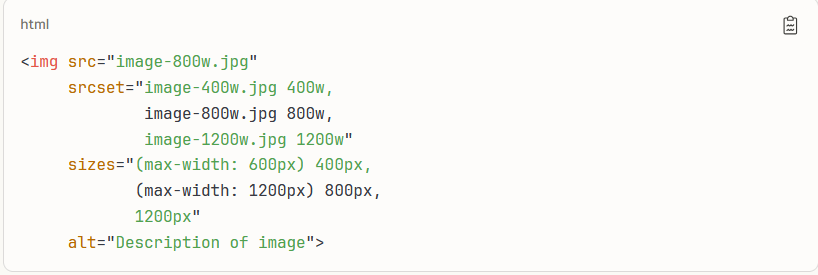
This approach ensures mobile users receive images of an appropriate size whilst desktop users get higher resolution versions.
The Picture Element: For art direction scenarios where different crops or entirely different images suit different viewports, the picture element provides precise control:
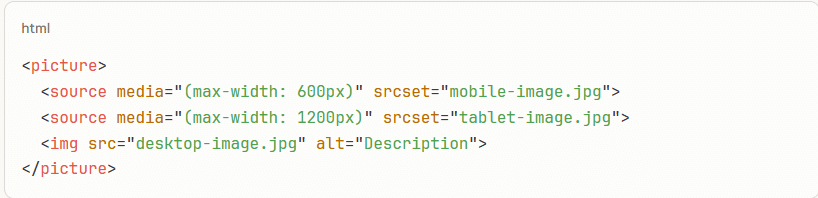
This technique is particularly valuable for hero images where composition matters across different viewport sizes.
Accessibility: Ensuring Inclusive Web Experiences
Web accessibility isn’t just an ethical practice—it’s a legal requirement under UK equality legislation. The Equality Act 2010 requires service providers to make reasonable adjustments for disabled users, which extends to digital properties.
Descriptive Alt Text: Alternative text serves multiple purposes: it describes images to users employing screen readers, displays when images fail to load, and provides context for search engines. Effective alt text is concise, descriptive, and contextually relevant.
For decorative images that don’t convey meaningful content, use empty alt attributes (alt="") to prevent screen readers from announcing them unnecessarily. For functional images like buttons or links, describe the action rather than the image: “Submit form” rather than “Blue button icon.”
For complex images like infographics or charts, provide concise alt text and longer descriptions through accompanying text or aria-describedby attributes.
Colour Contrast: When overlaying text on images, maintain sufficient colour contrast to meet WCAG 2.1 standards. Text should have a contrast ratio of at least 4.5:1 against backgrounds. Tools like WebAIM’s Contrast Checker enable quick verification.
Consider using text shadows, semi-transparent overlays, or gradient backgrounds to improve the legibility of text over images.
Context and Caption: Where images convey essential information, they are supplemented with visible captions or surrounding text. This benefits all users, not just those using assistive technologies.
UK-Specific Visual Considerations
Visual representation matters for UK businesses and clients. Stock imagery often skews toward North American settings and demographics, which can feel inauthentic to UK audiences.
Diverse Representation: Modern UK society is multicultural and diverse. Select imagery that reflects this reality, avoiding tokenistic representation or stereotypical depictions. This isn’t just ethical—it resonates better with contemporary UK audiences and builds trust.
Avoiding Generic Stock Aesthetics: Overused stock imagery (particularly those featuring impossibly enthusiastic office workers or staged handshakes) undermines credibility. Invest time sourcing authentic-feeling imagery or commission custom photography for key brand touchpoints.
Local Context: Where relevant, choose imagery featuring recognisable UK settings, architecture, or cultural references. This builds a connection with UK audiences and reinforces local relevance.
Ethical and Legal Best Practices for UK Professionals
Beyond technical implementation and licensing compliance, several practical and ethical considerations should guide your image usage. These practices protect your business, respect creators’ rights, and build professional credibility.
Attribution Best Practices: Giving Credit Appropriately
When licence terms require attribution (as with many Creative Commons images), provide credit clearly and thoroughly. Effective attribution typically includes the creator’s name, image title, source platform, and specific licence type with a link.
For web projects, attribution can be handled in several ways: directly beneath or beside the image in a caption, in a footer credits section, or on a dedicated attribution page. The specific approach depends on design considerations and the volume of attributed images.
Example attribution format: “[Image Title] by [Creator Name], available under [Licence Type with link] via [Platform]”
Even when attribution isn’t legally required (as with royalty-free images from platforms like Unsplash or Pexels), providing credit is courteous and supports the creative community.
Image Management: Organisational Systems for Efficiency
Professional web designers and agencies handle hundreds or thousands of images across multiple projects. Implementing systematic organisation prevents confusion, duplication, and potential licensing mistakes.
Naming Conventions: Develop consistent file naming, including descriptive keywords, project identifiers, and size indicators. For example: “profiletree-hero-desktop-2400w.jpg” immediately communicates purpose and dimensions.
Folder Structures: Organise images by project, then by purpose (e.g., client-name/hero-images/, client-name/blog-images/, client-name/product-images/). This logical structure enables quick location and prevents mixing assets from different projects.
Metadata and Documentation: Record source, licence type, and usage restrictions for each image. For Creative Commons images requiring attribution, maintain this information alongside the file. Digital asset management (DAM) systems can automate this tracking for larger operations.
Version Control: When creating multiple sizes or variations of images, maintain clear version labelling to prevent the deployment of incorrect variants.
Avoiding Overused Images: Standing Out from Competitors
While valuable, free stock image platforms present a challenge: popular images appear across countless websites, and users encountering the same stock photo repeatedly undermines authenticity and brand distinctiveness.
To avoid this trap:
Dig Deeper: Move beyond the first page of search results. Platforms often prominently showcase their most popular (and therefore most overused) imagery. Explore secondary pages and use specific, narrow search terms to find less-discovered content.
Edit Thoughtfully: Cropping, colour grading, or subtle filtering can make common images feel more unique. However, respect licence restrictions on modifications.
Mix Sources: Combine images from multiple platforms rather than relying solely on one source. This naturally diversifies your visual palette.
Invest Selectively: Consider commissioning custom photography or illustration for hero images and key brand touchpoints. This investment delivers completely unique visuals that competitors cannot replicate.
Video Content: Platforms like Pexels and Pixabay offer free stock video alongside photography. Video backgrounds and animated content are less commonly deployed, making them feel fresher than static imagery.
For UK web design agencies building multiple client sites, avoiding image repetition across your portfolio maintains the distinctive identity of each brand you represent.
Video Content and Copyright: Applying the Same Principles
Video presents similar copyright considerations to static imagery, though finding non-copyrighted video can be more challenging. Video production requires greater resources than photography, meaning truly free, high-quality video is less abundant.
Free Video Sources: Pexels, Pixabay, and Videvo offer collections of free stock video clips under permissive licences. Coverage is more limited than static imagery, but sufficient for many needs—background clips, establishing shots, and generic B-roll.
Music and Audio: Remember that video copyright extends beyond visuals to audio tracks. Using copyrighted music in videos, even for business websites, risks takedown notices and legal claims. Platforms like YouTube Audio Library, Bensound, and Incompetech provide royalty-free music tracks, whilst others require attribution.
YouTube and Social Media: For UK businesses creating video content for YouTube or social platforms, respect copyright on all elements—visuals, music, graphics, and any third-party footage. Platforms employ automated copyright detection that can flag violations, resulting in content removal or channel penalties.
For video production services, ProfileTree maintains strict protocols for rights clearance, ensuring all video elements—from footage to music to graphics—carry appropriate licences for intended use. This protects both our agency and our clients from potential copyright complications.
GDPR and Privacy Considerations for UK Businesses
The UK’s continued alignment with GDPR principles adds another layer to image compliance. Images featuring identifiable individuals may constitute personal data under privacy regulations.
Whilst stock platforms with model releases generally provide adequate protection, user-generated content or images sourced from social media require additional consideration. Using images of identifiable people without proper permissions can violate privacy rights, particularly if those images are deployed in commercial contexts.
For UK businesses, the safest approach combines proper licence verification with confirmed model releases for images featuring people in commercial applications.
Copyright Infringement: Risks and Consequences
The consequences of copyright infringement can be severe for UK businesses. Rights holders can pursue several remedies: financial compensation for damages, statutory damages (which can significantly exceed actual harm), legal costs and fees, injunctions preventing further use, and reputational damage from public legal disputes.
A single copyright claim can prove financially devastating for small businesses and agencies. The uncertainty of operating without proper licences creates ongoing legal risk that can be easily avoided through adequate image sourcing and verification.
“We’ve seen competitors face legal action for unlicensed image use,” notes Ciaran Connolly of ProfileTree. “The cost of proper licensing or the time to source free alternatives is trivial compared to potential legal exposure. It’s not worth the risk, particularly when excellent legally compliant options exist.”
Practical Application: Your Pre-Launch Image Checklist
Before publishing any web project, run through this verification checklist:
Licence Verification
- Confirm the specific licence type for each image
- Verify commercial use permissions for business websites
- Check modification restrictions for any edited images
- Document source and licence information
Attribution Requirements
- Provide required attribution for CC-licensed images
- Format attribution according to licence terms
- Include functional links to creators and licences
- Position attribution appropriately
Technical Optimisation
- Compress images to appropriate file sizes
- Implement responsive images using srcset or picture elements
- Enable lazy loading for below-the-fold images
- Verify images load correctly across devices
- Add descriptive alt text to all meaningful images
- Use empty alt attributes for decorative images
- Verify colour contrast for text over images
- Test with screen readers where possible
Legal Protection
- Confirm model releases for identifiable people
- Verify property releases where applicable
- Ensure images align with UK privacy considerations
- Document permissions for custom or commissioned imagery
Taking Action: Building Your Compliant Image Workflow
Implementing proper image practices doesn’t require overhauling your entire workflow—it requires establishing clear procedures and building them into your standard processes.
Start by auditing current projects. Identify any images with uncertain or undocumented licensing. Verify permissions and replace any images lacking proper commercial licences.
For ongoing projects, integrate licence verification into your asset selection process. Before downloading any image, confirm and document its licence type, usage permissions, and attribution requirements. This takes moments during asset selection but prevents complications later.
Agencies producing regular content should consider subscriptions to paid stock platforms. The cost justifies itself through time saved and peace of mind regarding licensing compliance.
Build image optimisation into your technical workflow. Compress images before upload, implement responsive images systematically, and verify accessibility considerations during quality assurance.
Conclusion: Confidence Through Compliance
Navigating image licensing doesn’t have to be intimidating. With a clear understanding of licensing frameworks, curated sources for quality imagery, and systematic workflows for verification, UK professionals can confidently deploy compelling visuals across all digital projects.
Investing in proper practices delivers legal protection from copyright claims, professional-quality imagery that enhances brand perception, technical optimisation that improves performance and search rankings, accessibility compliance that expands your audience, and ethical practices that respect creators’ rights.
Whether building websites, producing video content, or managing digital marketing campaigns, the principles remain consistent: verify before use, optimise performance, and respect legal requirements and creative communities.
At ProfileTree, we integrate these practices throughout our web design, development, and digital marketing services, delivering visually compelling experiences that withstand legal scrutiny while driving business results for UK clients.