
WordPress Speed Optimisation: Get 100 PageSpeed Score
Table of Contents
Achieving a perfect PageSpeed score while maintaining a beautiful design and rich functionality isn’t about following generic checklists. Real WordPress optimisation requires understanding the trade-offs between performance metrics and business goals. A sterile, text-only site might score 100 easily, but it won’t convert visitors or showcase your brand effectively. Professional WordPress speed optimisation balances technical excellence with commercial reality, delivering sites that load in under 2 seconds while maintaining the visual impact and functionality modern businesses demand.
Understanding PageSpeed Scores and Real-World Performance
PageSpeed metrics provide valuable insights, but don’t tell the complete story about website effectiveness. Understanding these measurements helps prioritise optimisation efforts appropriately.
What PageSpeed Actually Measures
Google PageSpeed Insights measures specific technical metrics, not actual user experience. Core Web Vitals form the foundation: Largest Contentful Paint (LCP) tracks loading performance, First Input Delay (FID) measures interactivity, and Cumulative Layout Shift (CLS) assesses visual stability. These metrics matter for SEO, but they don’t tell the complete story about your site’s effectiveness.
The scoring algorithm weighs different factors according to Google’s priorities. Performance accounts for the majority of your score, followed by accessibility, best practices, and SEO. A site scoring 85 might actually provide better user experience than one scoring 95 if it includes valuable features like video backgrounds, interactive elements, or comprehensive image galleries that users expect.
Lab data versus field data reveals important distinctions. PageSpeed Insights runs tests on standardised hardware with throttled connections, simulating average conditions. Your actual visitors might have faster connections and devices, experiencing much better performance. Conversely, rural Northern Ireland visitors on mobile networks might experience worse performance than tests indicate. Understanding these nuances prevents over-optimisation at the expense of functionality.
Balancing Speed with Design and Functionality
Professional website development acknowledges that clients need websites that sell, not just score well. Hero videos communicate brand stories powerfully. Image galleries showcase products comprehensively. Animation adds sophistication and engagement. Interactive calculators provide valuable tools. These elements affect scores but deliver business value that justifies their performance cost.
The key lies in intelligent implementation rather than elimination. A full-screen video background might reduce your score by 10-15 points, but if it increases conversions by 30%, it’s worth keeping. The solution involves optimising the video properly: compressed formats, lazy loading, facade patterns, and mobile alternatives. This approach maintains impact while minimising performance penalties.
Client education becomes crucial during optimisation discussions. Showing real-world loading times often matters more than abstract scores. A site loading in 2.5 seconds with rich media might serve business goals better than a 1.5-second site without personality. Our web design process involves demonstrating these trade-offs, helping clients make informed decisions about their priorities.
Server-Side Optimisation Fundamentals
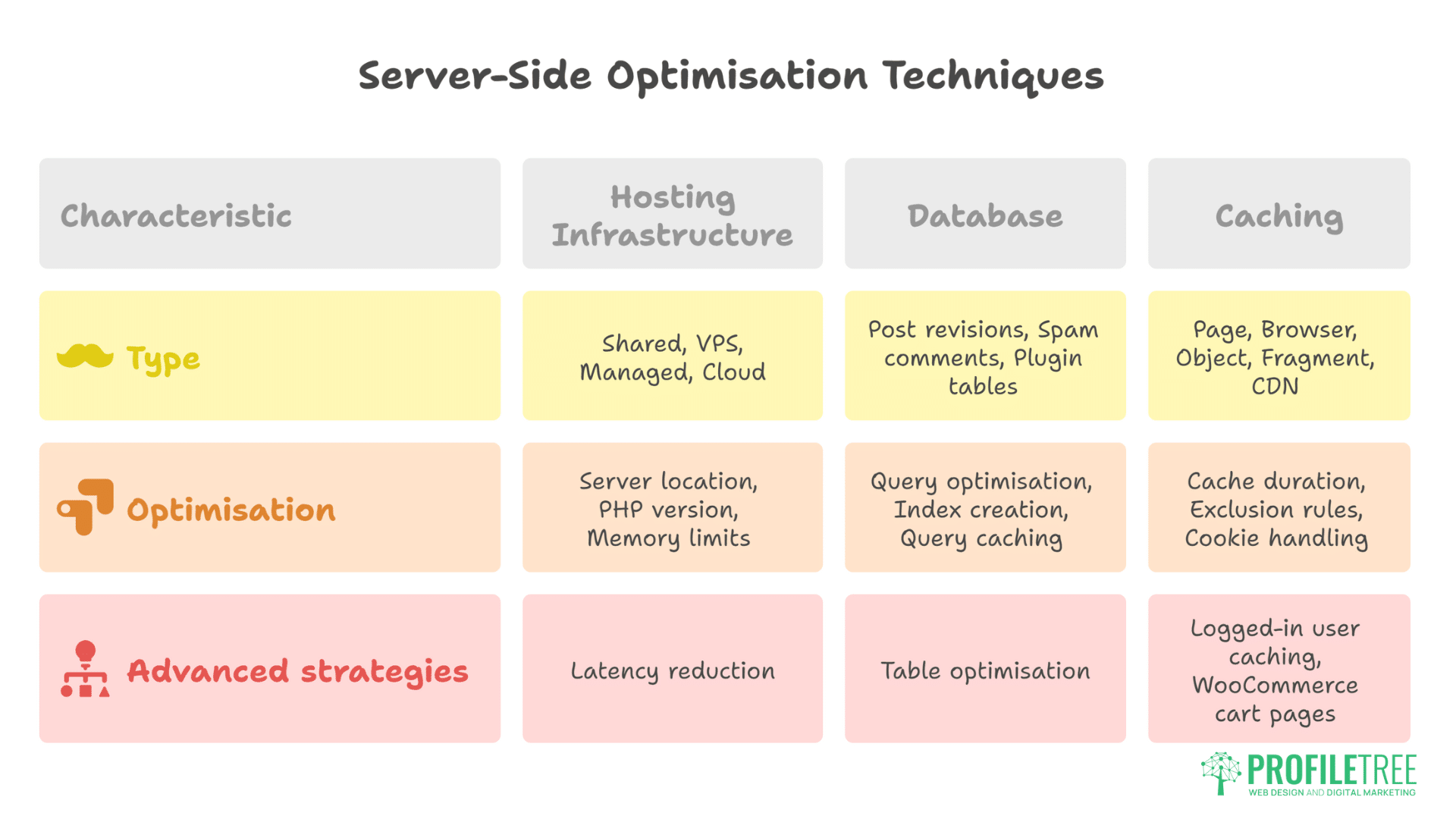
Server-level performance forms the foundation for all other optimisation efforts. Without proper hosting infrastructure, front-end optimisation techniques cannot achieve their full potential.
Hosting Infrastructure and Configuration
WordPress hosting quality fundamentally determines potential performance. Shared hosting on budget providers creates insurmountable limitations. VPS solutions offer more control but require technical management. Managed WordPress hosting provides an optimal balance for most businesses. Cloud infrastructure scales with traffic demands. The foundation must be solid before any other optimisation matters.
Server location affects speed significantly for regional businesses. Belfast businesses serving Northern Ireland customers benefit from UK-based servers. Dublin servers work well for all-Ireland operations. CDN integration becomes essential for international audiences. Multi-region deployment might be necessary for global businesses. Latency reduction at the server level provides gains no amount of front-end optimisation can match.
PHP version selection impacts performance dramatically. PHP 8.1 performs 30-50% faster than PHP 7.4. OPcache configuration reduces compilation overhead. Memory limits need proper sizing for your specific plugins. Max execution time prevents timeout errors. Worker processes should match the expected concurrent users. These server-level configurations require professional hosting management to optimise properly.
Database Optimisation Techniques
WordPress databases accumulate overhead through normal operation. Post revisions multiply the database size unnecessarily. Spam comments waste storage and slow queries. Transient data persists beyond usefulness. Plugin tables remain after uninstallation. This digital debris progressively degrades performance until addressed systematically.
Query optimisation provides immediate improvements. Slow query logs reveal problematic database calls. Index creation accelerates frequent searches. Query caching reduces repetitive database hits. Persistent object caching through Redis or Memcached dramatically improves dynamic content delivery. Database table optimisation should occur monthly for active sites.
-- Clean up post revisions (keep last 3)
DELETE FROM wp_posts
WHERE post_type = 'revision'
AND ID NOT IN (
  SELECT ID FROM (
    SELECT ID, ROW_NUMBER() OVER (PARTITION BY post_parent ORDER BY post_modified DESC) as rn
    FROM wp_posts
    WHERE post_type = 'revision'
  ) ranked
  WHERE rn <= 3
);

-- Remove orphaned post meta
DELETE pm FROM wp_postmeta pm
LEFT JOIN wp_posts p ON p.ID = pm.post_id
WHERE p.ID IS NULL;

-- Optimise all tables
OPTIMISE TABLE `wp_posts`, `wp_postmeta`, `wp_options`, `wp_terms`, `wp_term_relationships`;
Caching Strategy Implementation
Caching transforms WordPress performance when implemented comprehensively. Page caching serves static HTML versions of dynamic pages. Browser caching reduces repeat visitor load. Object caching accelerates database queries. Fragment caching handles dynamic elements within cached pages. CDN caching distributes content globally. Each layer multiplies performance gains.
Page caching configuration requires careful consideration. Cache duration balances freshness with performance. Exclusion rules prevent caching sensitive pages. Cookie handling maintains personalisation. Mobile cache separation serves appropriate versions. Query string handling preserves tracking parameters. WP Rocket, W3 Total Cache, and LiteSpeed Cache offer different strengths.
Advanced caching strategies address edge cases. Logged-in user caching requires special handling. WooCommerce cart pages need exclusion. Comment forms demand fragment caching. Search results pages benefit from shorter cache times. API endpoints bypass caching entirely. Understanding these nuances prevents functionality breaking while maximising performance.
Front-End Performance Optimisation
Client-side optimisation techniques directly impact Core Web Vitals and user experience. These front-end improvements often provide the most dramatic PageSpeed score improvements.
Critical CSS and Render-Blocking Resources
Render-blocking resources devastate PageSpeed scores and actual performance. Traditional WordPress themes load entire stylesheets before displaying anything. JavaScript files block parsing. Web fonts delay text rendering. The browser waits, users wait, and scores plummet. Eliminating render-blocking resources requires fundamental changes to resource loading.
Critical CSS extraction identifies styles needed for above-the-fold content. These styles inline directly in HTML, allowing immediate rendering. Remaining CSS loads asynchronously without blocking. Tools like Critical or PurgeCSS automate extraction, though manual refinement often improves results. This technique alone can improve scores by 20-30 points.
<!-- Inline critical CSS -->
<style>
  /* Critical above-the-fold styles */
  body { margin: 0; font-family: -apple-system, BlinkMacSystemFont, sans-serif; }
  .header { background: #fff; padding: 20px; }
  .hero { min-height: 400px; background: #f5f5f5; }
  /* More critical styles... */
</style>

<!-- Load non-critical CSS asynchronously -->
<link rel="preload" href="/wp-content/themes/theme/style.css" as="style" onload="this.onload=null;this.rel='stylesheet'">
<noscript><link rel="stylesheet" href="/wp-content/themes/theme/style.css"></noscript>
JavaScript Optimisation and Deferral
JavaScript handling significantly impacts Core Web Vitals, particularly First Input Delay. WordPress sites often load dozens of scripts from plugins, themes, and third-party services. Each script potentially blocks rendering or delays interactivity. Strategic JavaScript optimisation improves both scores and actual performance.
Script deferral and async loading prevent render blocking. Defer allows HTML parsing to continue while scripts download. Async loads scripts in parallel but executes immediately upon completion. Understanding when to use each prevents functionality issues. Interactive elements need defer. Analytics can use async. Critical functionality might need neither.
Code splitting reduces initial payload size. Loading only necessary JavaScript for each page type improves efficiency. Contact form scripts only load on contact pages. Slider code loads only where sliders exist. WooCommerce scripts stay off blog posts. This selective loading requires careful dependency management but delivers substantial gains.
Image Optimisation Beyond Basics
Image optimisation extends far beyond simple compression. Modern formats like WebP and AVIF provide superior compression. Responsive images serve appropriate sizes per device. Lazy loading delays off-screen image loading. Progressive enhancement loads low-quality placeholders first. Each technique contributes to better scores and user experience.
Professional image optimisation requires a systematic approach:
<!-- Modern responsive image implementation -->
<picture>
  <source
    type="image/avif"
    srcset="image-400.avif 400w, image-800.avif 800w, image-1200.avif 1200w"
    sizes="(max-width: 600px) 100vw, (max-width: 1200px) 50vw, 600px">
  <source
    type="image/webp"
    srcset="image-400.webp 400w, image-800.webp 800w, image-1200.webp 1200w"
    sizes="(max-width: 600px) 100vw, (max-width: 1200px) 50vw, 600px">
  <img
    src="image-800.jpg"
    srcset="image-400.jpg 400w, image-800.jpg 800w, image-1200.jpg 1200w"
    sizes="(max-width: 600px) 100vw, (max-width: 1200px) 50vw, 600px"
    alt="Descriptive alt text"
    loading="lazy"
    decoding="async"
    width="800"
    height="600">
</picture>
Automated image optimisation workflows save time while ensuring consistency. Build processes compress images automatically. CDN transformation services resize on demand. WordPress plugins handle conversion and serving. Quality settings balance file size with visual fidelity. The goal: maximum visual impact with minimum performance cost.
Advanced WordPress Performance Techniques
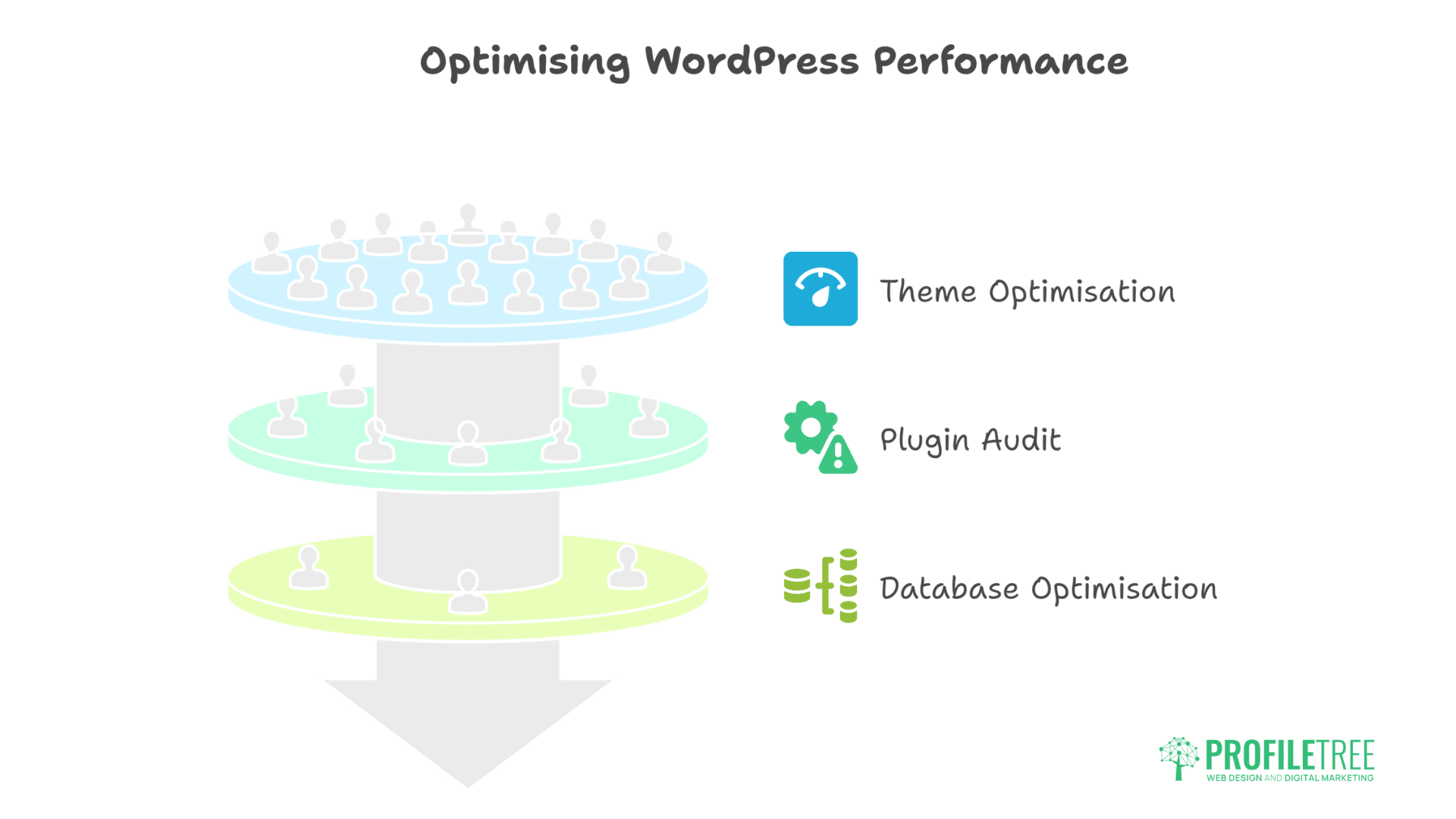
WordPress-specific optimisation requires understanding the platform’s unique challenges and opportunities. These advanced techniques address performance bottlenecks that generic optimisation approaches miss.
Theme Optimisation and Custom Development
Theme selection fundamentally constrains performance potential. Multi-purpose themes include thousands of features you’ll never use. Page builders add layers of complexity. Premium themes often prioritise features over performance. Starting with a lightweight, performance-focused theme provides advantages that no amount of optimisation can overcome with bloated alternatives.
Custom theme development offers ultimate control over performance. Building exactly what’s needed eliminates overhead. Modern development practices like component-based architecture improve maintainability. Build tools optimise assets automatically. Version control tracks changes systematically. This approach requires more initial investment but delivers superior long-term results.
Block theme development with Full Site Editing represents WordPress’s future. Block patterns reduce database queries. Theme.json configuration eliminates inline styles. Global styles consolidate CSS. Block-based layouts improve content management. Early adoption provides competitive advantages while improving performance.
Plugin Audit and Optimisation
Plugin bloat kills WordPress performance. Each active plugin adds database queries, loads scripts, includes styles, and processes hooks. A site with 30+ plugins faces a mathematical impossibility in achieving excellent performance. Strategic plugin auditing identifies necessities versus nice-to-haves.
Performance profiling reveals resource-hungry plugins. Query Monitor exposes database query counts. P3 Plugin Profiler measures load time impact. Browser developer tools show script sizes. GTmetrix waterfall charts display loading sequences. Data-driven decisions replace assumptions about plugin impact.
Plugin replacement strategies improve performance:
- Replace multiple single-purpose plugins with comprehensive solutions
- Choose lightweight alternatives for heavy plugins
- Develop custom functionality for simple features
- Use code snippets instead of plugins for minor modifications
- Implement features at theme level when appropriate
Database and Query Optimisation
WordPress database queries multiply with content growth and plugin additions. A typical page might execute 50-100 queries. Complex pages with multiple loops, widgets, and dynamic content can exceed 200 queries. Each query adds latency, particularly on shared hosting with slower database servers.
Query reduction techniques provide immediate benefits:
// Bad: Multiple queries
foreach ($posts as $post) {
    $author = get_user_by('ID', $post->post_author);
    $categories = get_the_category($post->ID);
    $tags = get_the_tags($post->ID);
}

// Good: Single query with joins
global $wpdb;
$results = $wpdb->get_results("
    SELECT p.*, u.display_name, GROUP_CONCAT(DISTINCT t.name) as categories
    FROM {$wpdb->posts} p
    LEFT JOIN {$wpdb->users} u ON p.post_author = u.ID
    LEFT JOIN {$wpdb->term_relationships} tr ON p.ID = tr.object_id
    LEFT JOIN {$wpdb->term_taxonomy} tt ON tr.term_taxonomy_id = tt.term_taxonomy_id
    LEFT JOIN {$wpdb->terms} t ON tt.term_id = t.term_id
    WHERE p.post_status = 'publish'
    GROUP BY p.ID
");
Persistent object caching through Redis or Memcached transforms database performance. Frequently accessed data stays in memory. Expensive queries cache their results. Transient API usage improves with proper caching. Session data moves from database to memory. These improvements compound for logged-in users and dynamic sites.
Core Web Vitals Optimisation
Google’s Core Web Vitals represent the most important performance metrics for SEO and user experience. Optimising these specific measurements requires targeted approaches.
Largest Contentful Paint (LCP) Improvements
LCP measures loading performance, specifically when the largest content element becomes visible. Target: under 2.5 seconds. Common culprits include hero images, video posters, large text blocks, and background images. Optimising LCP often provides the biggest score improvements.
Preloading critical resources ensures the fastest possible LCP:
<!-- Preload hero image -->
<link rel="preload" as="image" href="/hero-image.webp" type="image/webp">

<!-- Preload critical fonts -->
<link rel="preload" as="font" href="/fonts/main.woff2" type="font/woff2" crossorigin>

<!-- DNS prefetch for external resources -->
<link rel="dns-prefetch" href="//fonts.googleapis.com">
<link rel="preconnect" href="//fonts.googleapis.com" crossorigin>
Server-side optimisation accelerates LCP significantly. Fast hosting reduces initial response time. CDN usage brings content closer to users. Optimised images load quicker. Efficient caching serves instant responses. These foundational improvements provide gains that front-end optimisation cannot achieve alone.
First Input Delay (FID) and Interaction to Next Paint (INP)
FID measures interactivity delay when users first interact with your page. Google is transitioning to INP (Interaction to Next Paint), which measures all interactions, not just the first. JavaScript execution blocks the main thread, preventing responsiveness. Heavy scripts from plugins, tracking codes, and interactive features cause poor FID scores.
JavaScript optimisation strategies for better interactivity:
- Break long tasks into smaller chunks using requestIdleCallback
- Defer non-critical JavaScript execution
- Remove unused JavaScript through tree-shaking
- Implement code splitting for route-based loading
- Use web workers for heavy computations
- Optimise third-party scripts through facade patterns
Third-party script management requires special attention. Chat widgets, analytics, social media embeds, and marketing tools significantly impact FID. Loading these scripts after user interaction or using facade patterns maintains functionality while improving scores. Sometimes, removing problematic scripts entirely proves necessary.
Cumulative Layout Shift (CLS) Prevention
CLS measures visual stability – how much page content shifts during loading. Scores below 0.1 are good. Common causes include images without dimensions, dynamically injected content, web fonts causing text shifts, and advertisements. Users find layout shifts frustrating, making CLS optimisation crucial for user experience.
Preventing layout shifts requires defensive coding:
/* Reserve space for images */
.image-container {
  aspect-ratio: 16 / 9;
  width: 100%;
  background: #f0f0f0;
}

/* Prevent font swap layout shift */
@font-face {
  font-family: 'Custom Font';
  src: url('/fonts/custom.woff2') format('woff2');
  font-display: optional; /* or swap with proper fallback metrics */
  size-adjust: 105%; /* Match fallback font metrics */
}

/* Fixed dimensions for dynamic content */
.ad-container {
  min-height: 250px;
  width: 100%;
}
WordPress-Specific Performance Solutions
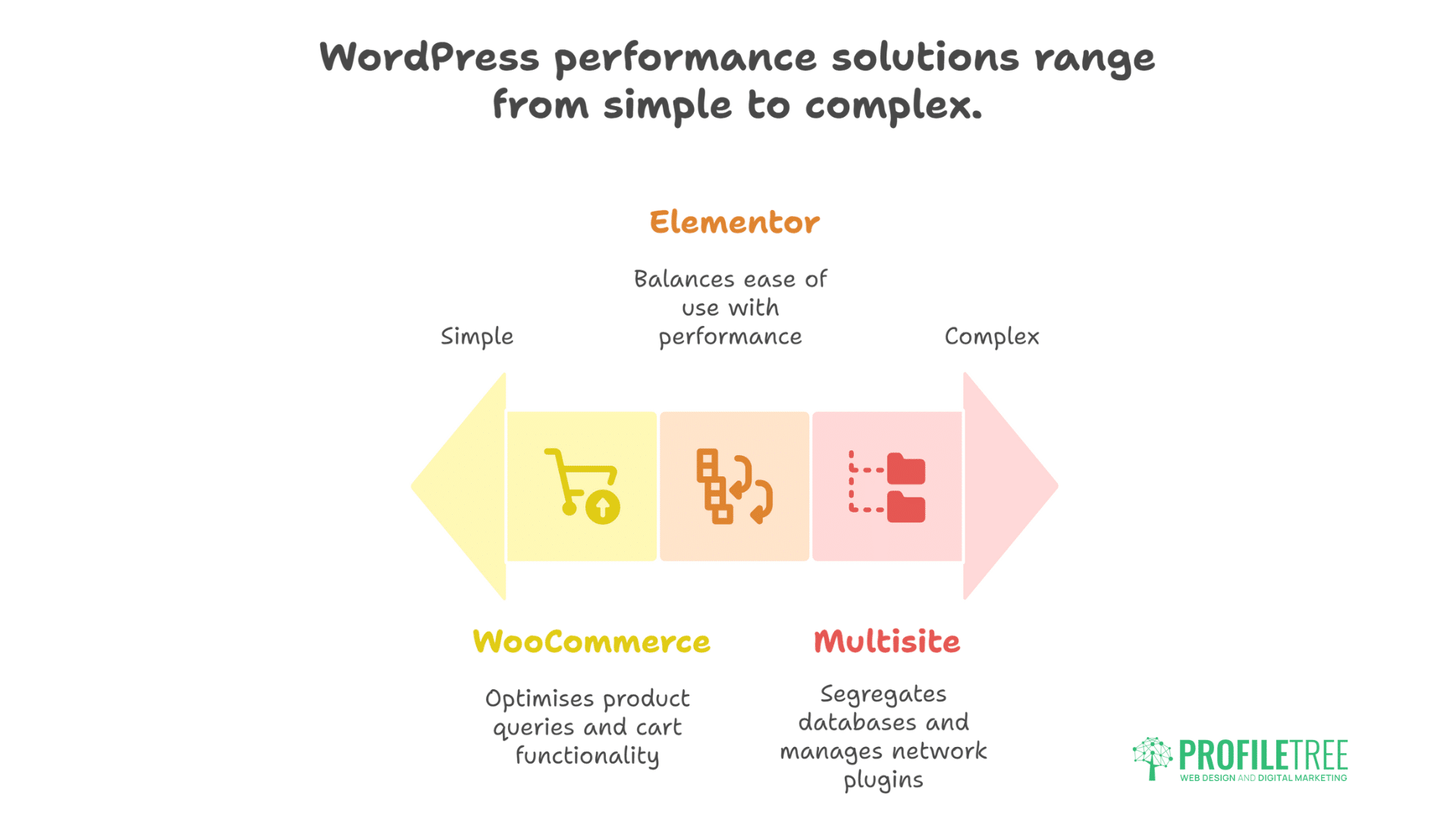
Different WordPress use cases present unique performance challenges requiring specialised solutions. Understanding these specific scenarios enables more effective optimisation strategies.
WooCommerce Performance Optimisation
WooCommerce adds significant complexity to WordPress performance. Product queries multiply the database load. Cart functionality requires dynamic content. Checkout processes can’t be cached. Payment gateways add external dependencies. Professional e-commerce optimisation balances functionality with speed.
Product page optimisation requires specific strategies. Limit related products displayed. Lazy load product galleries. Optimise variation swatches. Cache price calculations. Defer reviews loading. Implement AJAX add-to-cart. These improvements maintain the shopping experience while improving performance.
Cart and checkout optimisation focuses on critical paths. Minimise plugin loading on checkout. Optimise payment gateway scripts. Implement address autocomplete. Remove unnecessary fields. Cache shipping calculations where possible. Every millisecond saved during checkout increases conversion rates.
Elementor and Page Builder Optimisation
Page builders trade performance for ease of use. Elementor, Divi, and similar tools generate verbose HTML, inline styles, and multiple JavaScript files. Achieving good PageSpeed scores with page builders requires aggressive optimisation and accepting some limitations.
Elementor optimisation techniques that actually work:
- Enable Improved Asset Loading in Elementor settings
- Use containers instead of sections/columns
- Minimise widget usage – combine where possible
- Avoid animations and effects on mobile
- Generate Critical CSS for Elementor styles
- Implement Instant Page preloading
- Use static HTML blocks for repeated elements
Professional development teams often rebuild critical pages with custom code while maintaining page builders for client editing flexibility. Landing pages, home pages, and high-traffic templates benefit from hand-coded optimisation. Fewer critical pages remain editable through page builders. This hybrid approach balances performance with maintainability.
Multi-Site and Enterprise Optimisation
WordPress Multisite installations face unique performance challenges. Shared database tables create bottlenecks. Plugin activation affects all sites. Media libraries grow exponentially. User management becomes complex. Network-activated plugins impact every site. These challenges require enterprise-level solutions.
Database segregation improves Multisite performance. HyperDB enables multiple database servers. Table prefixing isolates site data. Read replicas distribute query load. Dedicated caching layers serve each site. CDN configuration handles multiple domains. These architectural decisions require planning during initial setup.
Ciaran Connolly, ProfileTree founder, notes: “Achieving 90-100 PageSpeed scores isn’t about blindly following every recommendation. It’s about understanding which optimisations provide real value for your specific situation. A Belfast restaurant needs fast mobile loading more than perfect scores. B2B sites might prioritise detailed product information over speed. We help clients find the right balance between performance metrics and business objectives.”
Tools and Testing Methodology
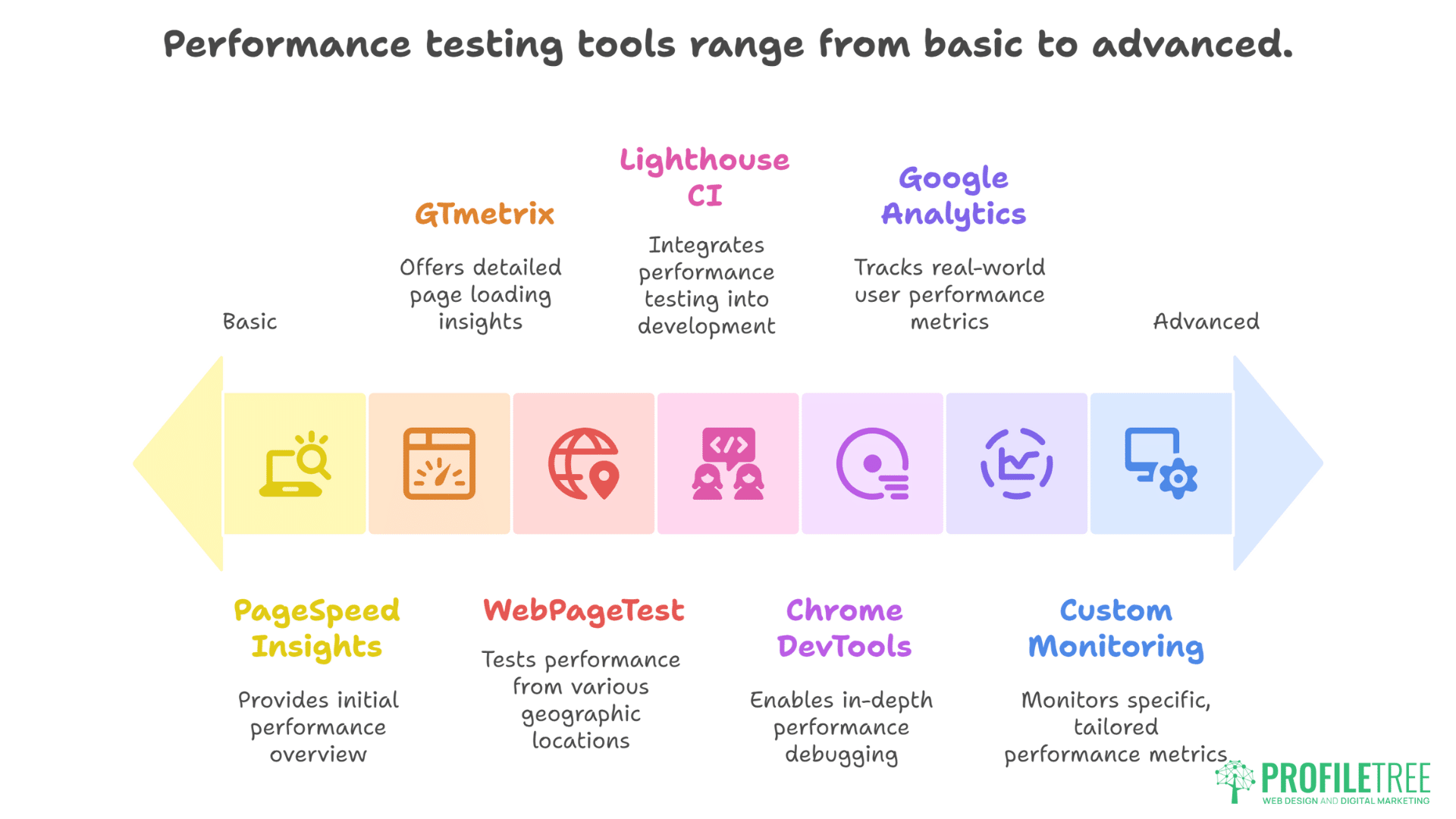
Effective optimisation requires systematic measurement and testing approaches. Professional tools and methodologies ensure optimisation efforts produce measurable improvements.
Performance Testing Tools Beyond PageSpeed
PageSpeed Insights provides starting points, not complete pictures. GTmetrix offers waterfall analysis and video recordings. WebPageTest enables testing from multiple locations. Lighthouse CI integrates into development workflows. Chrome DevTools provides deep debugging capabilities. Each tool reveals different optimisation opportunities.
Real user monitoring provides actual performance data. Google Analytics tracks Core Web Vitals for real visitors. Search Console shows field data performance. Custom monitoring solutions track specific metrics. Heatmaps reveal user frustration points. Session recordings show performance impact on behaviour. This data guides optimisation priorities.
SEO services include comprehensive performance monitoring. Monthly performance reports track improvements. Competitive analysis reveals opportunities. Technical audits identify new issues. Continuous monitoring prevents degradation. Proactive maintenance maintains optimal performance.
Local Testing and Development Workflows
Local development environments enable safe performance testing. Docker containers replicate production servers. Local testing tools measure performance changes. Git workflows track optimisation progress. Automated testing prevents performance regressions. Professional development workflows prevent production surprises.
Performance budgets establish acceptable thresholds:
- Total page weight under 2MB
- JavaScript budget of 300KB
- Main thread work under 4 seconds
- LCP under 2.5 seconds
- FID under 100ms
- CLS under 0.1
Build processes enforce performance standards. Webpack bundles and minifies assets. Image optimisation happens automatically. Critical CSS generation runs during builds. Performance tests block deployments exceeding budgets. Automation maintains standards without constant vigilance.
Maintaining Performance Over Time
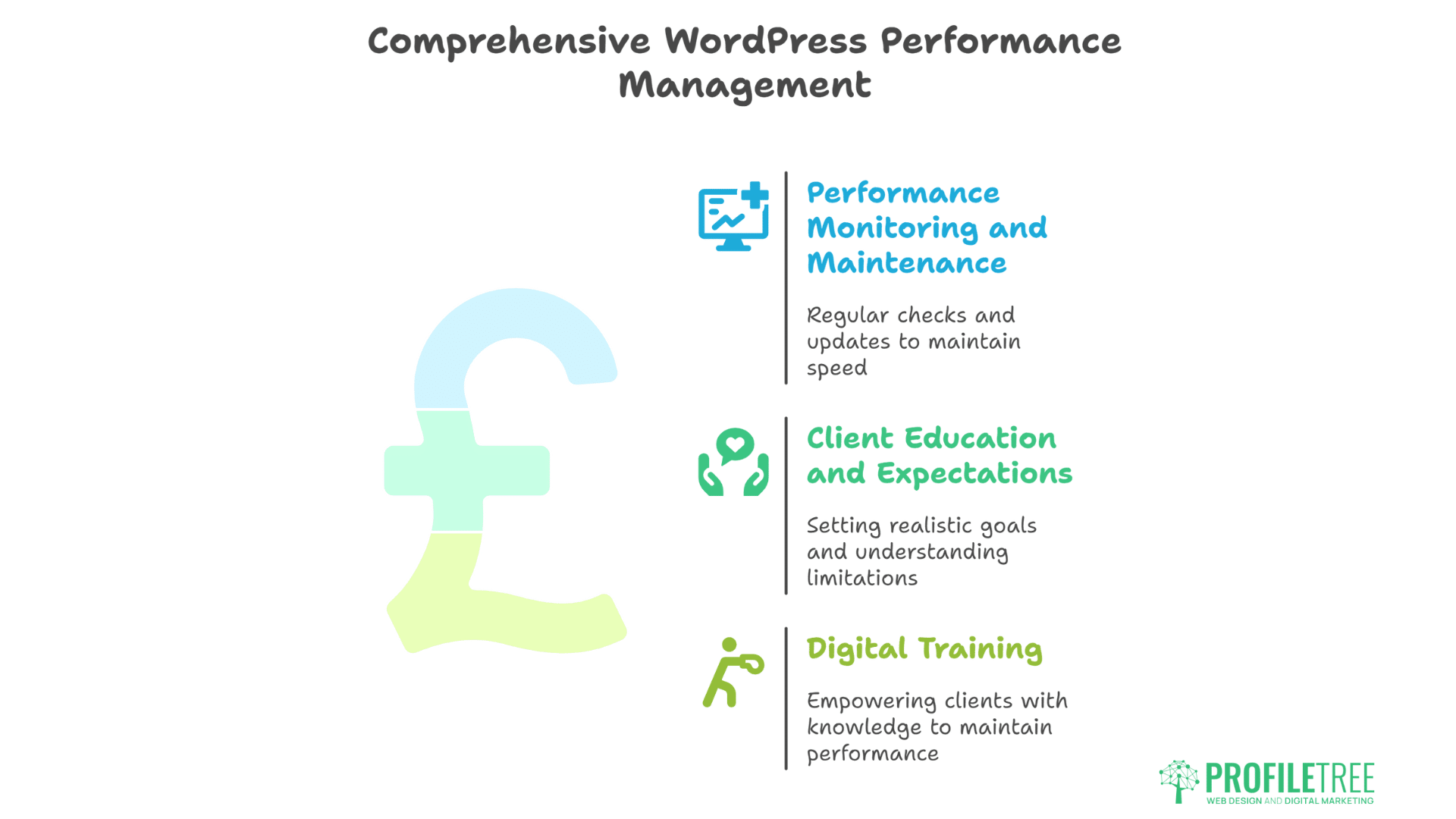
WordPress performance naturally degrades without ongoing attention and maintenance. Systematic monitoring and regular optimisation preserve initial improvements long-term.
Performance Monitoring and Maintenance
WordPress performance degrades without active maintenance. Database tables accumulate overhead. Plugin updates introduce new scripts. Content additions increase page weight. Server resources become constrained. Traffic growth stresses infrastructure. Regular monitoring catches degradation early.
Monthly performance audits should include:
- PageSpeed Insights score tracking
- Core Web Vitals monitoring
- Database optimisation
- Plugin performance profiling
- Server resource utilisation
- CDN cache hit rates
- Error log analysis
- Security scan results
Website hosting and management services include performance maintenance. Automated monitoring alerts detect issues. Regular optimisation maintains speed. Plugin updates get tested first. Database maintenance runs scheduled. Server resources scale with growth. Professional management preserves optimisation investments.
Client Education and Expectations
Setting realistic expectations prevents disappointment. Perfect scores with rich media remain challenging. Video backgrounds will impact performance. Comprehensive galleries need optimisation. Complex functionality requires trade-offs. Helping clients understand these realities enables informed decisions.
Digital training empowers clients to maintain performance. Understanding image optimisation prevents degradation. Content creation best practices maintain speed. Plugin selection knowledge avoids problems. Basic troubleshooting identifies issues. Educated clients make better decisions.
Training documentation should cover:
- Image sizing and format guidelines
- Content structuring best practices
- Plugin evaluation criteria
- Performance impact awareness
- When to seek professional help
FAQs: WordPress Speed Optimisation
Can WordPress sites really achieve 100 PageSpeed scores?
Yes, WordPress sites can achieve perfect scores, but it often requires sacrificing design elements and functionality that provide business value. Simple blogs with minimal images score 100 easily. Business sites with videos, galleries, and interactive features typically score 85-95 while delivering better user experience and conversion rates.
Which hosting providers best support WordPress performance in the UK?
Premium managed WordPress hosts like WP Engine, Kinsta, and SiteGround provide excellent performance infrastructure. UK-based providers like 34SP and Nimbus offer local servers benefiting Northern Ireland businesses. The best choice depends on specific needs, budget, and technical requirements rather than universal rankings.
How much do page builders like Elementor affect PageSpeed scores?
Page builders typically reduce PageSpeed scores by 10-25 points due to additional CSS, JavaScript, and DOM complexity. However, modern versions include performance optimisations, making 85+ scores achievable. Professional optimisation can achieve 90+ scores even with page builders, though custom development performs better.
Should I prioritise mobile or desktop PageSpeed scores?
Mobile scores matter more for SEO since Google uses mobile-first indexing. However, know your audience – B2B sites might have 70% desktop traffic deserving optimisation attention. Focus on mobile performance first, then optimise desktop, where it doesn’t compromise mobile scores.
What’s the realistic timeframe for WordPress speed optimisation?
Basic optimisation (caching, image compression, plugin cleanup) takes 1-2 days and improves scores by 20-30 points. Comprehensive optimisation, including server upgrades, code refactoring, and advanced techniques, requires 1-2 weeks but can achieve 90+ scores. Ongoing maintenance preserves improvements long-term.
Conclusion: Pragmatic Performance Excellence
WordPress speed optimisation isn’t about chasing perfect PageSpeed scores at any cost. Professional optimisation balances technical excellence with business requirements, delivering fast-loading sites that also convert visitors and showcase brands effectively. The goal remains creating websites that serve business objectives while providing excellent user experience, with PageSpeed scores as indicators rather than absolute targets.
Real-world optimisation acknowledges that clients need functional, beautiful websites that drive results. A video background might reduce scores but increase engagement. Product galleries might slow loading, but boost sales. Interactive calculators add weight but provide value. Professional developers optimise these elements rather than eliminating them, finding the sweet spot between performance and functionality.
The techniques detailed here provide pathways to 90-100 PageSpeed scores when implemented comprehensively. Server optimisation provides the foundation. Caching strategies multiply gains. Front-end optimisation eliminates bottlenecks. Advanced techniques squeeze out final improvements. Regular maintenance preserves achievements. This systematic approach delivers sustainable performance improvements.
For businesses serious about WordPress performance, ProfileTree’s website development services deliver optimised sites that balance speed with functionality. Our Belfast team achieves 90+ PageSpeed scores for client sites while maintaining rich features and beautiful designs. We understand that performance matters, but business results matter more – and we deliver both.