
Video Production Process: From Concept to Distribution
Table of Contents
A working Video Production Process turns a vague idea into footage that earns its budget. Most brands treat it as three steps, write, film, edit, and wonder why the result underwhelms. The gap usually sits at the two ends nobody plans for: the strategy before the camera arrives, and the distribution after the export renders.
This guide walks the full Video Production Process as a lifecycle, from goal-setting through post-production and measurement. It is written for marketing managers, founders, and creative leads who want professional output without the guesswork, with UK context throughout.
Why the Three-Phase Model Falls Short
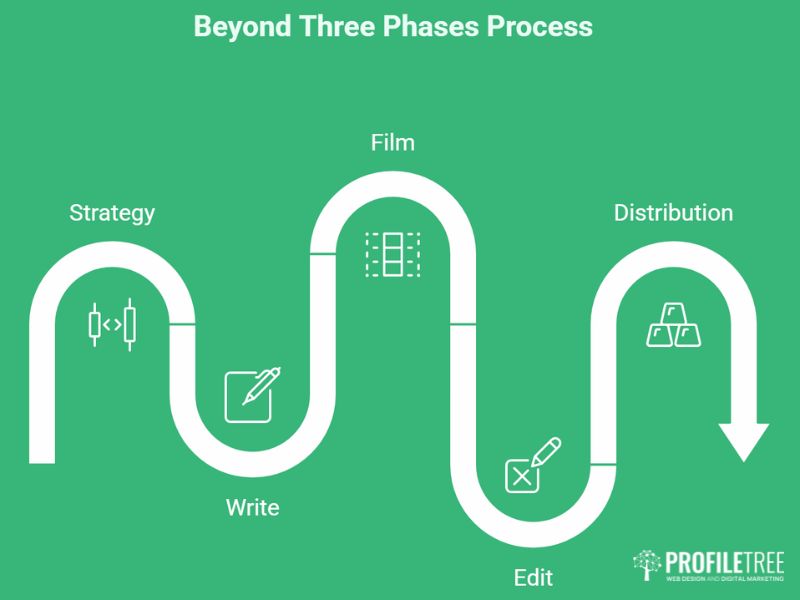
The classic model, pre-production, production, post-production, describes the craft well enough but skips the parts that decide commercial outcome. A video can be shot and cut flawlessly and still fail because nobody defined what it was for or where it would live.
A stronger Video Production Process brackets the craft with two business stages. Phase zero sets the objective and the metric. The final phase handles distribution, search visibility, and review. Treating filming as the middle of a longer chain, rather than the whole job, is what separates content that moves numbers from content that simply exists. ProfileTree, a Belfast-based digital agency, structures client work this way because the brief and the distribution plan tend to predict results better than the shoot day does. Its video marketing team treats every project as a lifecycle rather than a single shoot.
Ideation and Goal Setting
Every stage of the Video Production Process depends on decisions made here. Defining purpose, audience, and a single success metric at the start keeps creative choices aligned with what the business actually needs, whether that is awareness, engagement, or a measurable lead.
Defining the Job the Video Has to Do
Start by naming the one thing this video must achieve. Are you educating buyers about a product, telling a brand story, or demonstrating a process? Pick the core objective and the key indicators that prove it worked, such as view count, watch time, or conversions. A LinkedIn awareness clip and a product-page conversion video are built differently from the first line of script, so the goal has to come before the format.
Write down the audience profile too. Tech-led buyers, public-sector procurement leads, and time-poor SME owners each respond to different pacing, tone, and depth. Knowing who is watching shapes the whole production.
Brainstorming Concepts
With purpose fixed, gather the people who will make the video and explore angles, storylines, and formats. A session like this might produce a customer testimonial series, an animated explainer, or a behind-the-scenes piece. Keep every suggestion on record, since the looser ideas often spark the angle that works.
Drafting an Elevator Pitch
Condense the concept into one sentence the whole team can repeat: a two-minute brand story on sustainable packaging, mixing interviews with product shots. A shared one-liner stops misalignment before it reaches the more expensive stages of the Video Production Process. This is also where a clear digital strategy service pays off, because the video sits inside a wider plan rather than standing alone. Briefs like this often connect to wider AI marketing support when concepts are stress-tested before filming begins.
The Script and Storyboard Phase
This part of the Video Production Process converts the concept into a plan the crew can shoot. The script carries the narrative; the storyboard shows how each scene looks and flows. Done properly, both documents cut guesswork on set and protect the budget.
Crafting the Script
A script sets the narrative arc: dialogue, voiceover, and on-screen text. Some videos need very little, a lifestyle montage scored to music, for instance. Others, like product demos or brand stories, need a full script covering every voiceover line and scene transition.
Keep three things in view. Format should cover scene descriptions, on-screen action, and spoken lines. Tone should match the brand voice, whether that is instructional or warm. Length should stay tight; most brand videos sit between 60 seconds and three minutes, though tutorials can run longer when the content earns it.
A note on accessibility: most social video is watched on mute. Scripting captions and on-screen text from the outset, rather than bolting them on later, widens reach and suits how people actually watch.
Storyboard Visualisation
A storyboard is the visual map of the shoot, a sequence of frames showing camera angles, transitions, and rough composition. It lets the crew picture the finished flow before anyone sets up a light. Frames do not need polished artwork, only enough clarity that the director and camera operators understand the intended setup, the shot size (wide, medium, close), and any action notes such as “presenter picks up the product, looks to camera.”
Refining the Concept with Stakeholders
Once script and storyboard exist, bring in the people whose sign-off matters: marketing leads, brand managers, or the client. Collect feedback on messaging and pacing now. Changes agreed at this point cost a conversation. The same changes mid-shoot cost a day’s crew hire.
Pre-Production Logistics
Pre-production is the operational backbone of the Video Production Process. Budget, schedule, locations, cast, crew, and equipment all get locked down here so the shoot runs without surprises. Good planning at this stage is the cheapest insurance against delays.
Budgeting and Scheduling
With the creative direction agreed, set the practical parameters. The budget needs to account for location fees, equipment hire, cast and crew, props, travel, editing, and a contingency, usually 10 to 15 per cent of the total. The timeline should map writing completion, shoot days, editing windows, and final approval, with realistic buffers for weather or availability.
A useful UK split is roughly 40 per cent on strategy and pre-production, 20 per cent on the shoot, and 40 per cent on post-production and distribution. Filming has become the cheaper part as kit has improved, so over-investing at the two ends tends to produce better return than pouring everything into shoot days.
Location Scouting
For on-site or outdoor filming, check candidate locations for lighting, background noise, power access, permits, and general fit. A room that looks right but echoes can ruin your audio, and permission to film in a public or commercial space often takes longer to arrange than people expect. Scout early.
Casting and Crew
Casting might mean professional actors and voiceover artists, or it might mean real staff and customers, which often reads as more authentic for B2B work. Assess each option for on-camera confidence as well as fit.
Crew scales with ambition. A simple shoot needs a videographer and a director. A larger production adds camera operators, lighting and sound technicians, and possibly a makeup artist or set designer. Define each role’s responsibilities before the day so nobody is improvising their job on set.
Equipment and Gear
Kit ranges from mirrorless cameras through to cinema rigs, supported by tripods, gimbals, lighting, and microphones. Audio gear matters as much as the camera, since poor sound reads as poor production faster than imperfect picture does. If the brief calls for a cinematic look, budget for the right glass and lighting or hire it from a production house.
Call Sheets and Shot Lists
Finalise a shot list breaking down every scene, angle, and action. From that, produce call sheets: daily schedules with location addresses, call times, roles, and contacts. Distributed in advance, they mean everyone arrives in the right place at the right time, which keeps the Video Production Process on schedule.
The Production Phase
Production is where the plan becomes footage. Every decision from pre-production now gets executed as the crew lights scenes, directs talent, and captures the material the editor will need. This stage rewards coordination and discipline more than improvisation.
Setting Up Scenes
On shoot days the crew arrives early to rig lights, cameras, and sound. A crew that knows the storyboard wastes far less time. Watch continuity carefully: props and set dressing must stay consistent across takes, or the edit will expose the gaps.
Directing Talent
Whether you are working with actors or staff, talent needs direction on pacing, delivery, and body language, and the director’s job is to hold that consistent across takes. Keep communication open. If a delivery feels off, fix it on set rather than hoping post-production can rescue it.
Capturing Coverage
Even short scenes usually need several takes from different angles. Shooting wide, medium, and close-up versions, known as coverage, gives the editor choices and makes for a cleaner cut. This is not the place to rush; good footage makes editing faster and the final result stronger.
Sound Recording
Clear audio is non-negotiable. Use lapel or shotgun microphones to keep dialogue clean and free of echo and background noise. Record room tone for the editor, and use a treated space for voiceover work. Audiences forgive a lot visually; they switch off the moment the sound is hard to follow.
Managing Time and Morale
Long days tire people, and tired crews make mistakes. Provide breaks and refreshments, keep the mood steady, and ask any observing clients to give feedback through the director rather than directly to talent. A calm set produces better takes than a rushed one.
Post-Production: Editing, Sound, and Visual Effects
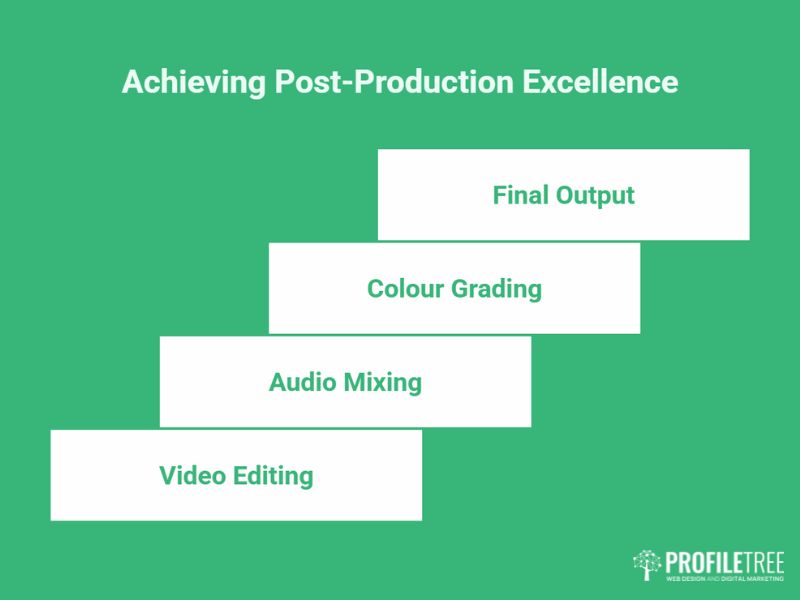
Post-production is where the Video Production Process delivers the finished piece. Editing assembles the story, sound design cleans and balances the audio, and graphics or effects add polish. Careful work here is what makes the difference between raw footage and a video ready to publish.
Logging and Rough Cuts
Footage transfers to the editor, who logs each take for reference and assembles a rough cut in script order. This early version shows structure without refined transitions, colour, or final audio. It is the right moment for stakeholders to react to shape before detail work begins.
Colour Correction and Grading
Colour correction balances white balance, brightness, and saturation across shots so they match. Grading then applies a deliberate look, warm and cinematic or cool and clinical, that unifies the piece and supports its tone.
Audio Editing and Soundtrack
An audio engineer removes noise, balances levels, and syncs voiceover and dialogue. Sound effects and a licensed or royalty-free score set the mood. The final mix has to be clean, well-levelled, and easy on the ear across phone speakers and headphones alike.
Motion Graphics and Animation
Motion graphics lift production values through brand intros, lower-third titles, and animated callouts. An overlay walking through software steps keeps viewers oriented, for example. Keep all of it within brand guidelines, colours, fonts, and style, so the video reinforces rather than dilutes the brand.
AI-Augmented Editing
AI tools now handle parts of post-production that used to eat hours: generating rough cuts, flagging the best takes, cleaning minor audio, and drafting captions. Used inside a human-in-the-loop workflow, they shorten turnaround. The creative calls, continuity, pacing, and brand judgement, still belong to the editor, and that is unlikely to change soon. Teams adopting these tools often benefit from hands-on digital training courses so the workflow is used well rather than bolted on.
Revisions and Sign-Off
Editors present the cut, gather notes on pacing and shot selection, and refine toward a fine cut. A second or third round catches the last details. Once approved, the video exports in the formats each channel needs, MP4 for web, higher-resolution versions for events.
Distribution, Optimisation, and ROI
A finished video earns nothing sitting on a hard drive. This final stage of the Video Production Process puts the work in front of the right audience, optimises it for discovery, and measures whether it did its job. Distribution deserves as much planning as filming.
Choosing Platforms
Match the platform to the goal. YouTube suits broad reach, search visibility, and channel building. Vimeo works for polished showreels and internal use. Instagram, LinkedIn, TikTok, and Facebook take short cuts and teasers. Your website gains from embedded video that holds visitors longer, so a well-built website design service should plan for video placement from the start, and email campaigns can carry clickable thumbnails. Pairing video with a planned email marketing programme extends each piece to an audience that has already opted in. A focused social media marketing plan decides which cuts go where, rather than posting the same export everywhere.
Video SEO
Optimise titles, descriptions, and tags around the terms your audience actually searches. Transcripts and closed captions help engines index the content and improve accessibility at the same time. On YouTube, a strong custom thumbnail lifts click-through more than almost any other single change. Google’s video best practices documentation sets out how engines find and index video, and it is worth following closely. This is the point where video and search engine optimisation overlap, and treating them together tends to produce better discovery than handling either in isolation. Pairing distribution with a planned content marketing approach keeps each cut working toward the same business goal.
Measuring Impact
Track the metric you chose in phase zero. For awareness, watch reach and shares. For demos, follow click-throughs to the purchase page. Tools like YouTube Analytics and platform stats show watch time and drop-off points, which tell you where attention slips and what to fix next time. Feeding those signals into AI enhancing marketing work helps sharpen the next brief from real viewer behaviour. Tying video data back to the sales funnel is where the Video Production Process proves its commercial worth. Embedding cuts cleanly into a fast page often calls for proper website development work, backed by reliable website hosting and management so heavy video files load without slowing the site.
Repurposing Content
One long-form video can become short social cuts, teasers, a blog embed, and behind-the-scenes clips. Repurposing stretches the production budget across more touchpoints and audiences, which is usually where the strongest return hides. A coordinated social media marketing service decides how those cuts roll out across each channel.
“A good video production process is mostly planning and judgement. The shoot is the visible part, but the brief at the start and the distribution at the end are what decide whether a video earns its place,” says Ciaran Connolly, founder of ProfileTree.
Common Challenges and Practical Fixes
Every Video Production Process runs into friction. Anticipating the usual problems, budget, time, consistency, and editing bottlenecks, keeps a project on track and protects the result.
Budget Overruns
Costs climb when scenes overrun or reshoots become necessary. Detailed pre-production, realistic buffers, and locking the script before the shoot keep spend in check. A modest, well-executed video beats an ambitious one that runs out of money halfway.
Time Constraints
Senior people rarely have much filming time. Schedule their scenes tightly, stay flexible, and gather enough B-roll to cover gaps when availability slips.
Brand Consistency
Larger teams and external production houses risk drifting from the brand. Supply a style guide covering colours, fonts, and tone, and share reference videos so the director understands the look you want.
Editing Bottlenecks
Editing stalls when feedback is contradictory or the final style is unclear. Name a single approver and use a review tool that centralises comments, so the editor works from one clear set of notes rather than several conflicting ones. For teams producing regularly, structured video marketing services remove much of this friction by standardising the workflow.
Where Video Production Is Heading
The Video Production Process keeps shifting as tools and platforms change. A few directions are worth planning around now rather than reacting to later.
Vertical, short-form content continues to dominate social feeds, so building productions that pivot quickly to vertical cuts is close to essential. Interactive and 360-degree formats stand out for product demos and location showcases, though they cost more. AI-assisted editing has matured into a genuine time-saver for rough cuts and audio cleanup, while human editors keep the creative decisions. Personalised video, embedding viewer data at scale, can impress when handled carefully and feel intrusive when not, so privacy judgement matters. The same caution applies when video sits alongside AI chatbot tools that respond to viewer questions in real time.
None of these replace the fundamentals. A clear goal, solid planning, and a real distribution plan still decide whether a video works, whatever the format, and a disciplined Video Production Process remains the constant beneath every trend.
FAQs
What are the stages of the video production process?
There are five working stages: strategy and goal-setting, scripting and storyboarding, pre-production, production, and post-production with distribution. Many guides collapse these into three.
How long does the video production process take?
A straightforward brand video typically takes four to six weeks from brief to delivery. Complex productions with multiple shoot days or heavy post-production take longer.
How much should I budget for video production?
Budgets vary widely by scope. A common UK split is around 40 per cent on strategy and pre-production, 20 per cent on filming, and 40 per cent on post-production and distribution.
What is pre-production in video?
Pre-production is the planning stage: budgeting, scheduling, location scouting, casting, crew, and equipment. It happens after scripting and before filming.
Do I need a script for a short video?
Usually yes, even a brief one. A short script keeps the message focused and the shoot efficient, though a music-led montage may need only a shot list.
How do I measure if a video succeeded?
Pick one primary metric before filming, such as watch time, reach, or click-throughs, and measure against it. Without a defined goal, you cannot judge the result.