
Email Segmentation Tools: How to Choose for UK Businesses
Table of Contents
Most guides to email segmentation tools are written for marketing teams sitting on lists of fifty thousand contacts and a budget to match. If you run a shop in Belfast, a salon in Cork, or a consultancy serving clients across the UK, that advice can do more harm than good. Splitting a list of 600 subscribers into a dozen tiny groups leaves you with segments too small to learn anything from, and campaigns that take longer to build than they are worth.
This guide takes a different line. It compares the email segmentation software worth your attention, then sets out a realistic framework for choosing and using it when your list is small and your time is short. There is also a section on staying on the right side of UK GDPR and PECR, which the US-built guides tend to skip entirely.
Three things to take away first
The best email segmentation tool is the one your team will actually use, not the one with the longest feature list. A platform you understand and operate confidently beats a powerful one that sits half-configured.
For lists under 1,000 subscribers, fewer segments work better. Two or three broad groups deliver most of the gain without draining your week. Over-segmentation is the most common mistake small businesses make.
Segmentation in the UK is a consent question as much as a marketing one. Under UK GDPR and PECR, how you collect the data behind a segment matters as much as the segment itself.
Why email list segmentation matters for smaller lists
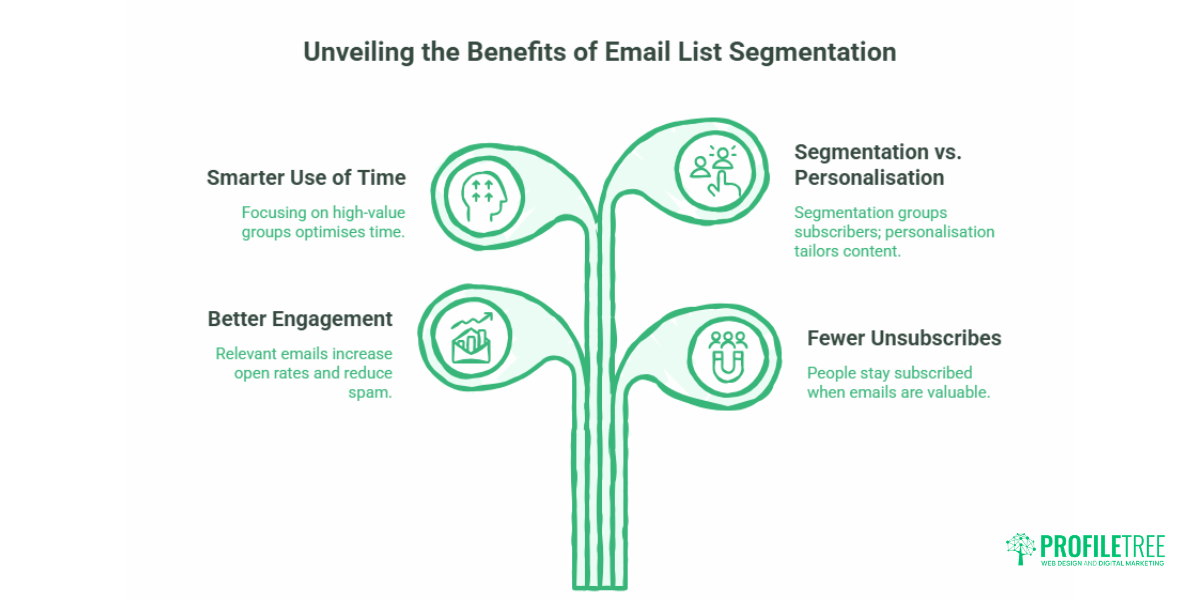
Email list segmentation means dividing your subscribers into smaller groups based on shared traits: what they have bought, where they live, how often they open your emails, or where they sit in their journey with you. Instead of one message to everyone, each group gets content that fits.
The commercial case is well documented. The Data & Marketing Association (DMA) has reported that segmented and targeted emails generate 58% of all email revenue, with much of that concentrated in campaigns sent to specific selections rather than the whole database. For a small business, that does not mean building enterprise-grade segmentation. It means putting your limited sending effort where it pays.
The benefits stack up in a few clear ways:
- Better engagement. Relevant emails get opened. Generic ones get ignored or, worse, marked as spam, which damages your deliverability across the board.
- Fewer unsubscribes. When every email earns its place in the inbox, people stay subscribed.
- Smarter use of your time. Sending to your highest-value group first means your effort goes where the return is.
One caution that the larger guides rarely mention: segmentation is not personalisation. Segmentation sorts your list into groups. Personalisation tailors the content inside an email to the individual, such as a first name or a recommended product. You can segment without personalising, and you can do both. Knowing the difference stops you from over-engineering a small campaign.
The Minimum Viable Segmentation framework
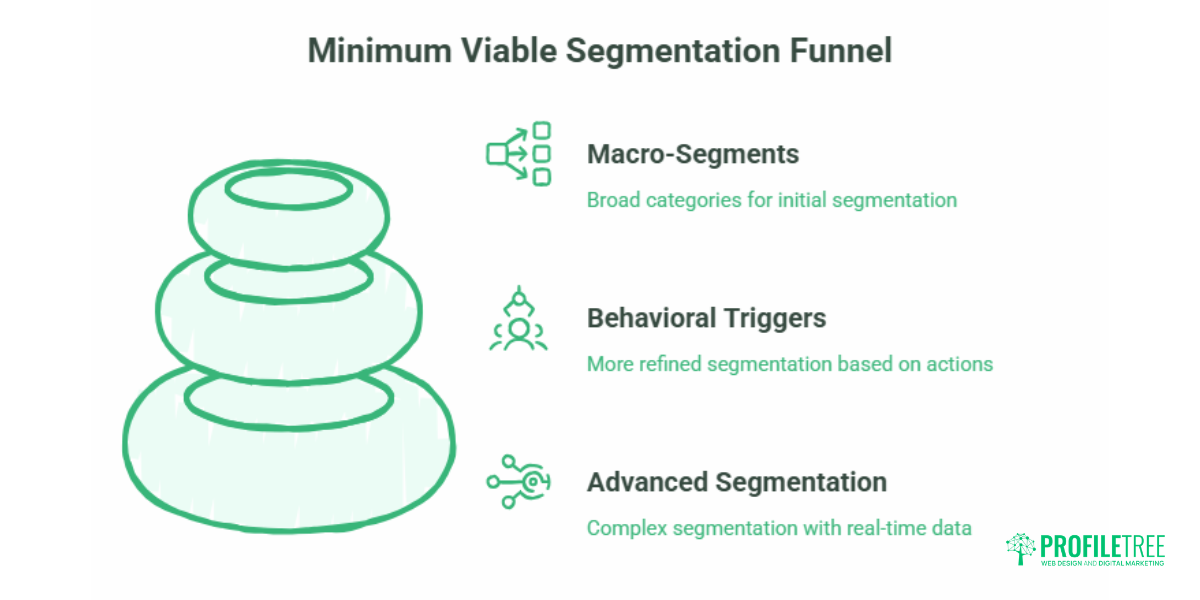
Here is the contrarian bit. For most small businesses, less segmentation is better. We call the starting point Minimum Viable Segmentation: the smallest number of groups that still lets you send more relevant emails than a single broadcast would.
The right number depends on how many people are on your list. Use this as a rule of thumb.
| List size | Recommended segments | Core triggers to use | Suggested frequency |
|---|---|---|---|
| Under 1,000 | 2 to 3 | Buyers vs non-buyers; active vs inactive openers | Every 2 to 4 weeks |
| 1,000 to 5,000 | 4 to 6 | Add purchase frequency, location, lifecycle stage | Weekly to fortnightly |
| 5,000 and above | 6 or more | Add behavioural and real-time signals | Weekly, with automated flows |
For lists under 1,000 subscribers: the power of macro-segments
If your list is small, resist the urge to slice it thinly. Splitting 500 contacts into eight segments leaves you with samples too small to draw any conclusion from, and a campaign calendar you cannot keep up with. Start with two macro-segments instead, for example, buyers and non-buyers, or engaged and dormant. These two groups already justify different messages, and you can build campaigns for both without losing your evening.
Scale up only when the data earns it. When a macro-segment grows large enough that a sub-group inside it behaves clearly differently, that is your cue to split. Until then, simplicity wins.
For lists of 1,000 to 5,000: introducing behavioural triggers
Once your list passes a thousand or so, behavioural triggers start to pay off. You can begin separating people by how recently they bought, which products they looked at, or how engaged they have been over the last 90 days. This is where the more capable email segmentation platforms start to differentiate themselves, and where a clear digital plan helps you decide which behaviours are worth tracking. A short session with a strategist, or our digital marketing strategy team, can save months of trial and error here.
Top email segmentation tools compared
The platforms below all handle segmentation well. They differ in depth, price, and the kind of business they suit. Use the table for a quick comparison, then read the notes for the details.
| Tool | Best for | Segmentation depth | Free tier | Starting price (approx, GBP) |
|---|---|---|---|---|
| Mailchimp | General small business | Tagging, behaviour, lookalike | Yes (limited) | From around £10/month |
| HubSpot | B2B and lead nurture | Auto-updating CRM lists | Yes (limited) | From around £15/month, scales steeply |
| ActiveCampaign | Automation-heavy senders | Tagging, scoring, conditional content | No (trial only) | From around £12/month |
| Klaviyo | E-commerce | Purchase history, predictive | Yes (up to 250 contacts) | From around £16/month |
| Constant Contact | Beginners, non-profits | Custom criteria, event-based | Trial only | From around £10/month |
| Brevo (Sendinblue) | Email plus SMS | Custom attributes, scoring | Yes (daily send limit) | From around £7/month |
| Campaign Monitor | Design-led senders | Geography, activity, custom | Trial only | From around £8/month |
Prices are indicative and depend on list size and currency conversion at the time of purchase. Check each provider’s current pricing before committing.
Mailchimp
Mailchimp remains one of the most widely used email segmentation tools, and for good reason: it balances capability with a gentle learning curve. Its tagging system lets you label subscribers by action or attribute, behaviour-based automation can trigger emails from website activity or purchase history, and its lookalike feature uses AI to find subscribers similar to your best customers. A retail business can build segments such as frequent buyers or cart abandoners and message each differently. For a small team finding its feet, Mailchimp is a sensible default.
HubSpot
HubSpot pairs email marketing with a full CRM, which makes its segmentation unusually powerful for businesses that nurture leads over time. Its lists update automatically as subscriber behaviour changes, and you can combine email data with website analytics and social signals. It suits B2B companies running drip campaigns, a software firm sending research-stage leads tailored resources, for instance. The trade-off is cost: HubSpot scales quickly in price as your contact count and feature needs grow.
ActiveCampaign
ActiveCampaign is built for businesses that lean heavily on automation. Tagging and lead scoring let you rank subscribers by their actions, conditional content blocks change what an email shows depending on the segment, and its workflow builder handles sophisticated sequences. A subscription service might segment by plan type and send targeted upsell or renewal reminders. If automation is central to your plan, it is one of the strongest email segmentation platforms available.
Klaviyo
Klaviyo is the specialist choice for e-commerce. It connects directly with Shopify, WooCommerce, and BigCommerce, and its predictive analytics anticipate buying behaviour so you can act before a customer does. Purchase-history segmentation groups customers by spend, product preference, and buying frequency. An online clothing retailer can use it to recommend items similar to past purchases. If you sell online and segmentation matters, Klaviyo is among the best email segmentation tools for e-commerce specifically.
Constant Contact
Constant Contact is the friendly option for beginners, small charities, and local businesses. Drag-and-drop segmentation, real-time data syncing, and event-based automation cover the essentials without overwhelming you. A local restaurant could send weekly promotions to regular diners and a separate welcome offer to first-timers. It will not satisfy a business wanting deep behavioural targeting, but for getting started, it is hard to fault.
Brevo (formerly Sendinblue)
Brevo combines email segmentation with SMS and basic CRM, which suits businesses wanting both channels in one place. Custom attributes let you define segments precisely, transactional email handles order confirmations, and engagement scoring surfaces your most promising subscribers. A travel agency could segment by destination interest and send tailored itineraries. Its generous free tier makes it a strong starting point for cost-conscious SMEs.
Campaign Monitor
Campaign Monitor pairs polished design tools with solid segmentation. You can segment by geography, purchase history, or email activity, and the visual journey builder makes automated sequences easy to map. A charity could segment donors by giving history and send targeted appeals. If your emails need to look the part and your segmentation needs are moderate, it fits well.
Five essential segmentation strategies for small businesses
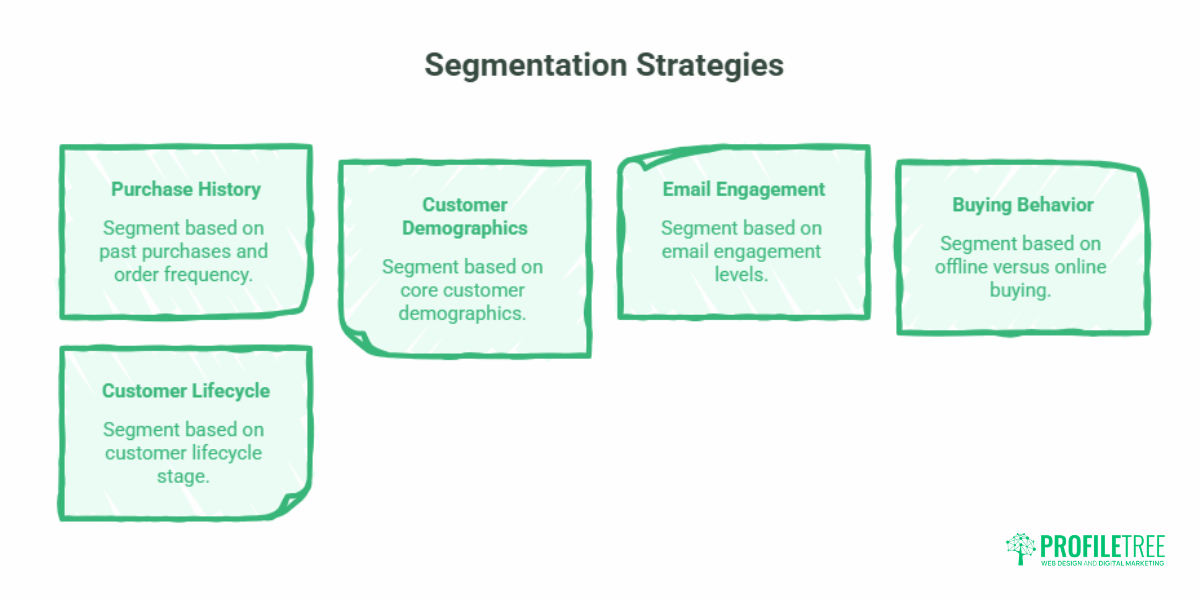
Whichever tool you choose, these five approaches deliver the most for the least effort.
1. Purchase history and order frequency
Group customers by what and how often they buy. First-time buyers, repeat customers, and lapsed customers each warrant a different message. A one-time buyer might get a gentle nudge towards a second purchase; a loyal regular might get early access to new stock.
2. Core customer demographics
Age, location, and the type of customer all shape what is relevant. A business serving both Northern Ireland and the Republic might separate the two to reflect different delivery options, currencies, or local events.
3. Email engagement levels
Separate active openers from those who have gone quiet. Your engaged group can take more frequent emails; your dormant group needs a re-engagement campaign or, eventually, removal to protect deliverability.
4. Offline versus online buying for hybrid high-street retailers
This is the gap most guides ignore. Plenty of UK and Irish small businesses run a physical shop alongside a small online store, yet treat their email list as if every customer bought online. You can bridge the two. A QR code at the till that links to a double opt-in sign-up page lets in-store customers join your list and self-identify as local buyers. From there, you can send them shop-specific offers, opening times, or event invitations that an online-only subscriber would not want. The same QR thinking that powers this works across marketing, as our overview of QR code marketing shows.
5. Customer lifecycle stage
New leads, active customers, and VIP regulars sit at different points in their relationship with you. Lifecycle segmentation maps your messaging to that journey, welcoming newcomers, rewarding loyalty, and re-engaging those drifting away.
Consent-first segmentation under UK GDPR and PECR
This is where UK and Irish businesses must be careful, and where most US-built guides will steer you wrong. Under UK GDPR and the Privacy and Electronic Communications Regulations (PECR), the data you use to build segments has to be collected lawfully. Profiling and behavioural tracking are not banned, but they require transparency and, in most marketing cases, explicit opt-in consent. Quietly tracking behaviour to build hidden profiles is the kind of practice the Information Commissioner’s Office (ICO) takes a dim view of.
The cleanest way to segment compliantly is to let subscribers segment themselves. A preference centre, a simple page where people choose what they want to hear about and how often, satisfies the law and improves relevance at the same time. People tell you exactly what they want, and you have a clear record of consent.
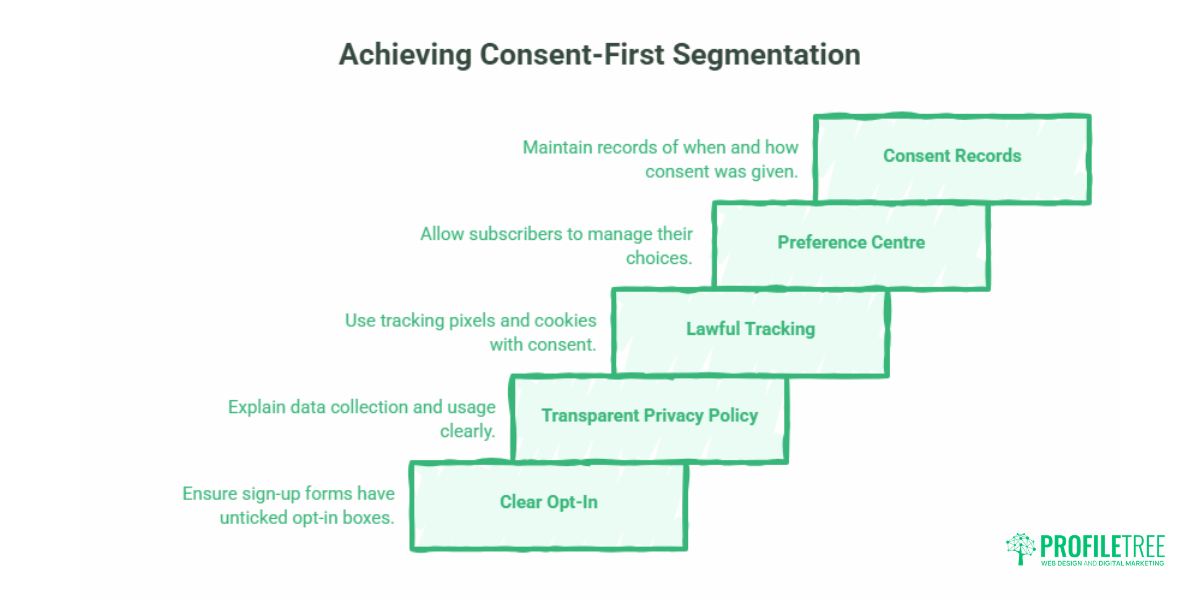
Use this short checklist before you launch:
- Sign-up forms use clear, unticked opt-in boxes with no pre-selected consent.
- Your privacy policy explains what data you collect and how segments are used.
- Tracking pixels and behavioural cookies have a lawful basis and, where required, consent under PECR.
- A preference centre lets subscribers update their choices and unsubscribe easily.
- You keep a record of when and how each subscriber consented.
If your sign-up forms need work, our guide to GDPR-compliant web forms covers the build, and teams that want to get the whole organisation up to speed can look at GDPR training. The wider question of customer data privacy in marketing is worth understanding before you start collecting at scale.
“The small businesses that get email right are not the ones with the most segments. They are the ones who collect data honestly, keep their groups simple, and send something genuinely useful. Get the consent and the relevance right, and the revenue follows.”Ciaran Connolly, Director, ProfileTree
How to implement your segmentation strategy
Start small and build. Choose your platform, import your list, and create your two or three macro-segments first. Send to each, watch what happens, and only add complexity when the data tells you to. A short, structured approach beats a grand plan you never finish.
- Pick a tool that matches your list size and budget.
- Clean your list: remove dead addresses and obvious duplicates.
- Build your macro-segments using the framework above.
- Set up a preference centre so subscribers can refine their own segment.
- Send, measure, and refine over several campaigns.
If setting up tagging rules and automations feels beyond your team’s current confidence, this is exactly the kind of skill our digital training sessions build, so the work stays in-house rather than depending on an agency forever.
Measuring ROI: segmented versus unsegmented campaigns
To know whether segmentation is working, compare it against a control. Hold back a portion of your list as an unsegmented group and send them the standard broadcast. Send your segmented version to the rest. Then compare open rates, click-through rates, and conversions between the two.
A simple worked example: say your segmented campaign converts at 4% and your unsegmented control converts at 2.5%. That is a 60% uplift in conversion attributable to segmentation, on the same list and the same offer. Run this comparison a few times before drawing firm conclusions, since a single send can be skewed by timing or subject line. Pulling these numbers together is far easier when your tracking is set up properly, which is where Google Analytics for marketing earns its keep.
The same data discipline underpins good customer segmentation generally, not just email. If you want to see where email sits among other channels, our look at email statistics by industry gives useful benchmarks, and the broader content marketing trends piece sets the wider context.
Common challenges and how to handle them
Three problems come up again and again.
Inaccurate data. Out-of-date or incomplete records undermine every segment you build. Audit and clean your list on a regular schedule, and let subscribers update their own details through a preference centre.
Too many options. Faced with endless segmentation possibilities, many owners freeze. The fix is the Minimum Viable Segmentation approach: pick the two or three segments that map to your business goals and ignore the rest until you have proven those work.
Disconnected tools. When your shop, till, website, and email platform do not talk to each other, your data fragments. Choose tools that integrate, or get the integrations built properly. This is often a website and systems question as much as a marketing one, which is where website development and content marketing support overlap.
Choosing the right tool for your business
There is no single best email segmentation tool, only the best one for your situation. If you are starting out, Mailchimp, Constant Contact, or Brevo will serve you well. If you sell online, Klaviyo is built for you. If you nurture B2B leads over months, HubSpot or ActiveCampaign reward the investment. Match the tool to your list size, your budget, and the time your team can realistically give it.
Start with a clear goal, build the smallest set of segments that serve it, collect your data lawfully, and refine as you grow. Done that way, a segmented email programme becomes one of the most reliable marketing assets a small business can own.
Frequently asked questions
What is email segmentation in simple terms?
Email segmentation is dividing your subscriber list into smaller groups based on shared traits, such as what they have bought, where they live, or how engaged they are. Each group then receives content that fits them, so subscribers only get emails that are relevant to them.
How small can my list be before I should start segmenting?
If your list is under 500 subscribers, you usually do not need complex segments. Stick to a single list and use simple personalisation fields, such as a first name, until it grows. Between 500 and 1,000, two or three broad macro-segments, for example, buyers versus non-buyers, give you most of the benefit without the workload. Add more groups only when each one is large enough to behave differently and justify its own campaign.
Is email profiling legal under UK GDPR?
Profiling and automated categorisation are legal under UK GDPR, but they require transparency and a lawful basis. In most email marketing cases, that means explicit opt-in consent, a clear privacy policy explaining how data is used, and compliance with PECR where tracking pixels or cookies are involved. The safest route is to let subscribers self-segment through a preference centre, which gives you clear consent and better data at once.
How do I measure the success of my segmented email campaigns?
Run a split test. Hold back part of your list as an unsegmented control group and send them a standard broadcast, then send your segmented version to everyone else. Compare open rates, click-through rates, and conversions between the two. The difference shows the true uplift from segmentation. Repeat the comparison across several campaigns before drawing firm conclusions, since one send can be skewed by timing or subject line.
Can I segment my list using free email marketing tools?
Yes. Most free tiers of popular platforms, including Mailchimp, Brevo, and MailerLite, support basic segmentation using sign-up form data, click activity, and standard subscriber fields. Free plans limit contact numbers or daily sends, but they are enough to build two or three macro-segments and prove the approach before you pay for more.