
Video Production Essentials for High-Performing YouTube
Table of Contents
YouTube rewards consistency, but it starts with craft. The difference between a channel that grows and one that flatlines often comes down to the same fundamentals: sound that doesn’t distract, lighting that keeps viewers engaged, and editing that respects their time.
This guide covers the video production essentials you need to build a high-performing YouTube workflow, from scripting through to export settings, with practical advice tailored to UK and Irish creators.
The Performance-First Production Mindset
Getting the video production essentials right starts with a shift in how you think about the work. Most YouTube production advice treats gear and creativity as separate conversations. In practice, every technical decision you make either helps or hurts viewer retention, and the two are inseparable.
YouTube’s algorithm is blunt: it promotes videos that hold attention and demotes ones that don’t. Average view duration, click-through rate, and re-watch behaviour all feed directly into how widely a video gets distributed. Before you touch a camera, understand that your production choices are performance levers, not stylistic preferences.
The three pillars of a performance-first approach are clarity (can viewers follow what you’re saying?), pacing (does the edit respect their attention span?), and credibility (does the production quality match the expertise you’re claiming?). Get these right across every video, and YouTube algorithm performance tends to follow.
Phase 1: Pre-Production and the Hook Strategy
Pre-production is where the video production essentials for YouTube begin. It’s also where most creators lose the most time and most potential viewers. A poorly planned hook means the audience leaves before they’ve seen what the video offers. Scripting and shot planning before you film is the single most cost-effective improvement you can make to your YouTube output.
Keyword Research vs Topic Interest
Sustainable channel growth comes from balancing what people search for with what your audience genuinely wants. Search-led content gets discovered; interest-led content gets shared. For most UK and Irish SME channels, the practical approach is to lead with a search-viable topic and then bring your specific perspective to it.
Use YouTube’s own search suggestions alongside Google Search Console data to identify which queries your existing content already ranks for. Build new videos around adjacent questions in the same cluster rather than starting from scratch each time. A Northern Ireland accountancy firm, for instance, might find that a short explainer on Making Tax Digital gets five times the impressions of a generic “about us” video, simply because it answers a question people are actively searching for. If your channel covers digital marketing, a video on video production essentials naturally supports your broader topical authority on content strategy.
The First 5 Seconds: Visual Scripting for Retention
The first five seconds of a YouTube video determine whether a viewer stays or leaves. Most creators spend this time with a slow title card, a lengthy intro, or a vague promise of what’s coming. It’s a wasted opportunity. The most effective openers do the opposite: they show the viewer something they didn’t know, ask a question they want answered, or demonstrate the end result of what the video teaches.
Script your hook visually as well as verbally. What is on screen during those first five seconds? A talking head in a plain room is less compelling than a quick cut to the finished result, a striking visual, or a problem the viewer recognises. Write a shot list for your hook the same way you’d write it for any other sequence. This is one of the video production essentials that separates channels that grow from those that stall.
Phase 2: Essential Gear Tiers
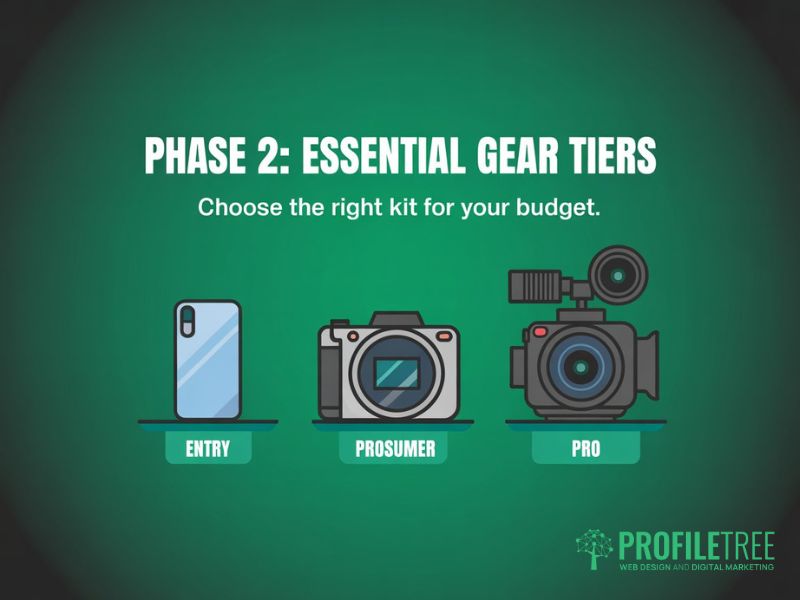
The video production essentials for YouTube gear don’t require the biggest budget. What they do require is the right budget allocation. Camera, audio, and lighting each play a different role in viewer retention, and spending unevenly across the three is one of the most common mistakes UK creators make.
Cameras: From Smartphones to Mirrorless
Resolution matters less than creators think. YouTube compresses all videos on upload, and most viewers watch on phones. What actually matters is image stability, colour accuracy, and the ability to shoot in low light without obvious noise. Getting this right is one of the video production essentials that affects every other decision: a 1080p image that’s sharp and well-lit beats a shaky 4K shot in a dim room every time.
| Category | Entry (under £500) | Prosumer (£500–£2,500) | Professional (£2,500+) |
|---|---|---|---|
| Camera | Smartphone (iPhone 15, Samsung S24) | Sony ZV-E10, Canon EOS M50 Mk II | Sony A7 IV, Blackmagic Pocket 6K |
| Microphone | Rode VideoMicro (£50) | Rode Wireless GO II (£280) | Sennheiser MKH 50 + recorder |
| Lighting | Ring light (£30–£60) | 2-light LED panel kit (£150–£300) | Aputure 300D Mk II + modifiers |
| Best for | Talking head, tutorials, vlogs | Interview, social content, brand video | Commercial, broadcast, high-end brand |
Audio: Why Sound Quality Outranks Resolution
Of all the video production essentials, audio is the one viewers are least forgiving about. Poor audio is the leading cause of drop-off in YouTube productions. A 2023 study by Verbit found that 80% of people are more likely to finish watching a video with accurate audio, and viewer tolerance for visual imperfections is far higher than tolerance for echo, background noise, or inconsistent volume.
The most common audio mistakes UK creators make are filming in rooms with hard surfaces (which create echo), using the camera’s built-in microphone, and not monitoring levels during recording. A lavalier mic clipped close to the speaker costs under £50 and fixes all three problems at once. For voiceovers, a USB condenser microphone in a treated space produces broadcast-quality results at under £100.
Lighting: Three-Point Setup and Natural Light Hacks
Lighting is among the video production essentials that most dramatically change how professional a YouTube channel looks. Three-point lighting (key light, fill light, backlight) is the standard for talking-head and interview content because it separates the subject from the background and removes unflattering shadows. For creators who can’t invest in a full kit immediately, a single large softbox positioned slightly above and to the side of the subject delivers most of the benefit at a fraction of the cost.
For UK and Irish creators, natural light is inconsistent. Overcast skies produce soft, even light that’s actually ideal for filming, but the colour temperature shifts throughout the day (typically 6,000–7,000K under cloud). Set your camera to a fixed white balance rather than auto, so colour doesn’t drift between YouTube shots. North-facing windows give the most consistent light across a full shooting day.
Phase 3: Production Workflow and Technical Settings
Getting your camera settings right before you press record is one of the less glamorous video production essentials, but it saves hours in post-production. The technical choices you make on the day, from frame rate to colour profile, determine how much flexibility you have when editing and how your video looks across different YouTube viewing contexts.
Resolution, Frame Rates, and Shutter Speed for YouTube
For most YouTube video production, 1080p at 25fps (the UK broadcast standard) is the right starting point. Shoot in 4K only if you have the storage, the processing power to edit it, and a genuine reason to do so (such as cropping in post without quality loss). Frame rates above 50fps are useful for slow-motion sequences but look unnatural for standard talking-head footage.
Shutter speed should be double your frame rate. At 25fps, set your shutter to 1/50s. This produces natural motion blur and avoids the stroboscopic effect that appears when shutter speed is too fast. In bright conditions where you need a faster shutter, use ND filters rather than closing down the aperture: keeping control of these settings is one of the video production essentials that makes footage easier to grade in post.
| Setting | 1080p Export | 4K Export |
|---|---|---|
| Codec | H.264 | H.265 (HEVC) |
| Bitrate | 8–15 Mbps | 35–45 Mbps |
| Frame rate | Match source (25 or 30fps) | Match source (25 or 30fps) |
| Container | MP4 | MP4 |
| Audio | AAC, 320kbps | AAC, 320kbps |
On-Camera Presence and Delivery Tips
Delivery sits among the video production essentials that are easy to overlook when you’re focused on gear. Viewers respond to confidence and clarity. Looking directly into the lens (not at your own image on the monitor) creates the impression of eye contact, which increases perceived trustworthiness. Don’t worry if it feels unnatural at first; it’s a habit that builds quickly. Speak slightly faster than feels natural; the edit and background music slow perception of pace.
For presenters who struggle with natural delivery, teleprompter apps work well but require practice to avoid robotic cadence. An alternative is the detailed outline approach: know your key points cold and speak to them conversationally, then tighten the edit. Most professional YouTube video production for UK brands uses a hybrid of scripted key moments and natural transitions between them.
Phase 4: Post-Production for High Retention
Editing is where video production essentials meet YouTube psychology. Raw footage, however well-shot, rarely holds attention without deliberate editing choices. The goal in post-production is not just to remove mistakes but to actively build in reasons for viewers to stay.
The Pattern Interrupt Editing Style
A pattern interrupt is any edit choice that prevents the brain from tuning out. They’re the reason fast-paced YouTube channels hold attention while static talking heads don’t. Zooms, cut-ins, text overlays, sound effects, and b-roll cutaways all serve this function. Mastering the pattern interrupt is one of the video production essentials that YouTube’s own internal data (published via the Creator Academy) backs up: videos using frequent visual cuts in the first two minutes retain far more viewers than static talking-head footage.
The practical implementation is simple: review your audience retention graph in YouTube Studio and identify the frames where viewers drop. These are almost always sections with no visual change for more than 15–20 seconds. Add a zoom, a text callout, or a b-roll cut at each of those points and re-upload. Most creators see measurable retention improvement within one or two iterations.
Integrating AI: Speeding Up B-Roll and Captions
The main editing platforms for YouTube video production break down by level: entry-level options include iMovie and DaVinci Resolve Free; intermediate creators typically use Adobe Premiere Elements or Filmora; and professional workflows run on Adobe Premiere Pro, Final Cut Pro, or DaVinci Resolve Studio. AI tools have changed the post-production workflow for independent creators and small teams in a practical way. They’re not replacing editors, but they’re making the production essentials faster to execute.
Auto-captioning in DaVinci Resolve and Adobe Premiere now produces captions accurate enough to publish with minor corrections, saving several hours per long-form video. Caption accuracy rates vary by accent and background noise; UK regional accents may require more manual correction than standard British or American English.
For b-roll, AI generation tools can create supplementary footage for abstract concepts that are difficult to film, though the results are best used sparingly alongside real footage. The key rule is that AI-assisted production should be invisible to the viewer; if it draws attention to itself, it undermines the video production essentials you’ve worked to get right.
The UK and Ireland Creator’s Toolkit: Local Essentials
Most video production guides are written for US creators and skip over the practical realities of YouTube video production in the UK and Ireland. Treating these video production essentials as a local toolkit, rather than a generic checklist, makes a real difference to what ends up on screen. From overcast lighting conditions to music licensing law, there are a handful of considerations that matter specifically for creators operating in this market.
Dealing with Overcast Light: The Irish and UK Challenge
Grey skies are actually a creative advantage for controlled lighting setups, but they create real problems for outdoor location shoots where the light shifts constantly. The practical solution is to set a fixed Kelvin value (6,200–6,500K works well for typical UK overcast conditions) and monitor your histogram rather than relying on the camera’s auto-exposure. This is a production essential that most US-centric YouTube guides never mention.
Portable LED panels with variable colour temperature (bicolour LEDs) are the most useful tool for UK location work. They let you match ambient conditions precisely, so indoor-outdoor cutaways don’t create jarring colour temperature shifts in the edit. CVP Group and Wex Photo Video are the main UK specialist retailers for the lighting equipment that belongs on any video production essentials list.
Legalities: Music Licensing and UK Filming Permits
Music licensing is the most common legal mistake UK YouTube creators make. Tracks licensed for YouTube use through services such as Epidemic Sound or Artlist are safe for monetised content globally, but popular streaming music is not cleared for YouTube even if you pay for personal streaming. The distinction is between synchronisation rights and performance rights, and platforms enforce this automatically through Content ID.
For filming in public spaces in England and Wales, most photography and filming is permitted under common law, provided it doesn’t cause obstruction. Commercial shoots in public spaces, drone filming, or filming on private property require permission and, in the case of drones, CAA registration and operational authorisation under UK RPAS regulations. In the Republic of Ireland, drone operators are regulated by the IAA under EU Regulation 2019/947. Understanding these rules is one of the video production essentials that UK creators often learn the hard way.
For brands that need professional results without the steep learning curve, ProfileTree’s video production services in Belfast cover full-service YouTube video production, from concept and scripting through to final delivery.
Distribution and Video SEO Essentials
Strong production gets wasted if no one finds the video. The video production essentials on the filming side only pay off when your metadata does its job. YouTube SEO works alongside your production quality rather than independently of it: a well-optimised title and thumbnail get the click, but only the production itself keeps the viewer watching.
- Title: include your primary keyword within the first 40 characters, and make the benefit or outcome clear.
- Thumbnail: high contrast, a clear subject, and text that supports rather than repeats the title. Test at mobile size before publishing.
- Description: Put the most important information in the first two lines (the preview cut-off), then expand with timestamps, links, and keywords.
- Tags: focus on specific phrases rather than generic category terms. Match the language your audience actually uses in YouTube search.
- Chapters: for videos over eight minutes, add timestamps in the description. This improves both navigation and Google indexing of individual sections.
Pair strong production with a solid distribution strategy by reviewing our digital marketing services for Northern Ireland businesses. Video SEO and content strategy work best when they’re planned together from the start.
If you’re building content skills in-house, ProfileTree’s digital training programmes cover video strategy, content planning, and YouTube for business.
For brands ready to build a YouTube presence, ProfileTree’s YouTube marketing services combine channel strategy, production, and distribution into a single managed service.
FAQs
1. Do I need a 4K camera to rank well on YouTube?
No. YouTube compresses all uploaded videos and doesn’t factor resolution into ranking; retention and engagement are driven far more by lighting, audio quality, and editing pacing than by camera choice. Mastering the video production essentials of lighting and audio will do more for your YouTube results than upgrading your camera.
2. What is the best budget microphone for UK creators?
The Rode VideoMicro (around £50) is the most reliable entry-level option for on-camera YouTube video production and is widely available from Wex and Jessops in the UK. For desk-based recording, the Blue Yeti or the Rode NT-USB Mini both produce broadcast-quality audio under £100; for filming subjects who move around, the Rode Wireless GO II (around £280) is the most practical wireless option at the prosumer level. Audio ranks among the video production essentials that reward early investment the most.
3. Do I need a permit to film in public in the UK?
For general filming in public spaces in England and Wales, no permit is required under common law as long as you’re not obstructing or harassing people; commercial shoots on public land, National Trust sites, or Network Rail property require prior permission. Drone filming requires CAA registration for any UK operator, and commercial drone work requires a specific operational authorisation (Scotland has separate access legislation). Understanding these legalities is part of the video production essentials checklist every UK creator should run before an organised outdoor YouTube shoot.
4. How long should a high-performing YouTube video be?
Video length should match search intent rather than a fixed target; for tutorials, the video should be exactly as long as it takes to fully answer the question. The 8–12 minute range is often cited because it’s the minimum that enables mid-roll ad placement, and 6–10 minutes typically satisfies informational intent well. Understanding this is one of the video production essentials that distinguishes growing YouTube channels: use your own retention graph as the guide, not a generic target.
5. Is AI-assisted editing considered low quality by YouTube?
No. YouTube evaluates content based on viewer experience, not production method; AI tools that help with captions, noise reduction, colour correction, or pacing adjustments are treated no differently from any other editing software. Use AI to strengthen the video production essentials you’re already applying, not to replace the craft behind them.