
AI Training for Business: Workshops Across the UK and Ireland
AI training for business isn’t about teaching staff to use a chatbot. It’s about changing how your team thinks, works, and competes. ProfileTree delivers hands-on AI training for businesses across Belfast, Northern Ireland, Ireland, and the UK; practical workshops that translate directly into time saved, costs reduced, and output improved.
Since 2023, we’ve introduced AI tools and workflows to over 1,000 organisations, with clients consistently reporting productivity gains within the first month of implementation. Whether your team is starting from scratch or looking to move beyond basic tool use, our programmes are built around your business, your sector, and the outcomes you actually need.
Three things businesses get from AI training with ProfileTree:
- A clear picture of which AI tools fit their specific workflows (not a generic list)
- Hands-on practice with ChatGPT, Claude, and automation platforms using real work scenarios
- A practical plan they can act on the week after training ends
Why Most AI Training Fails and What to Do Instead
Most businesses that try to learn AI on their own hit the same wall. They pick up a free course, experiment with ChatGPT for a fortnight, produce some passable content, and then revert to their old processes because nothing was ever connected to the way they actually work. Research consistently shows that around 70% of workplace training is forgotten within a week if there’s no reinforcement or real-world application built into the programme.
Generic online courses make this worse. They teach tools in the abstract. They’re built for broad audiences, which means the examples never match your industry, your team’s role, or your actual day-to-day challenges. A marketing manager in a Belfast SME and a warehouse supervisor in Dublin have completely different AI needs; a one-size approach serves neither well.
The businesses that get real results from AI training share a few things in common. They start with a clear picture of where AI fits in their existing operations. They practise on real tasks rather than hypothetical scenarios. And they have support in place for the weeks after training, when the questions actually start.
ProfileTree’s AI training methodology is built around all three. We work with your team using your real content, your real processes, and your real business goals. The result is a capability that sticks.
What AI Training for Business Actually Covers
AI training for business spans a broader range than most people expect when they first enquire. It’s not just content generation, and it’s not just ChatGPT. The most productive AI training programmes cover tools, workflows, and judgement; knowing which AI to use, when to use it, and how to check the output before it leaves your organisation.
Our corporate AI workshops cover the following core areas, adapted to your team’s roles and experience level.
AI Tools for Marketing and Content Teams
Marketing teams typically see the fastest return from AI training because the use cases are immediate and measurable. We cover prompt engineering for content creation, using ChatGPT and Claude for blog posts, email campaigns, social media copy, and product descriptions. Teams learn to maintain brand voice while scaling output and use AI for research, briefing, and first-draft generation without producing the flat, repetitive content that characterises poorly prompted AI writing.
We also cover AI tools for visual content, including Canva AI and image generation workflows, and how to use Perplexity and Gemini for competitor research and trend analysis.
AI for Leaders and Decision-Makers
Executives and business owners need a different kind of AI training. Less hands-on tool use, more strategic clarity. We run dedicated sessions for leadership teams covering AI adoption frameworks, how to evaluate AI investments, how to set realistic expectations for their teams, and how to spot the difference between AI initiatives that will deliver ROI and those that won’t.
AI for Business Automation
Customer-facing teams often underestimate how much of their daily workload AI can take on. We train staff on using AI tools to draft responses, handle common enquiries, maintain consistent tone across communications, and prepare briefings and reports faster. Sessions cover both the tools themselves and the judgment calls around when AI output needs human review before it reaches a client or customer.
This is particularly useful for small teams in Northern Ireland and Ireland, where one or two people are handling the full volume of customer contact alongside other responsibilities. For businesses that want to go further and automate customer interactions entirely, ProfileTree also builds custom AI chatbots as a separate implementation service.
Team Productivity and Collaboration
Individual tool proficiency matters, but the biggest gains come when AI is embedded across team workflows rather than used by a single person. We cover shared prompt libraries, team AI policies, and how to set up governance structures that keep AI use consistent and compliant — including UK GDPR considerations that many training providers skip entirely.
What Your Team Learns at Each Stage
Learning to use AI effectively in a business context isn’t a single event. It’s a progression from awareness to confidence to embedded practice. ProfileTree structures AI training across four phases, each building on the last, with the pace set by your team’s starting point and availability.
The first phase establishes a shared understanding across your team. What AI tools actually do, where they produce reliable output, and where they need human oversight. This phase matters because teams that skip it tend to either over-trust AI output or dismiss it entirely, both of which undermine the investment.
Participants leave Phase 1 knowing which tools are relevant to their roles, how to evaluate AI output critically, and what UK GDPR implications apply to the tools they’ll be using.
Hands-on practice with the tools most relevant to your team’s work. For marketing and content teams this means ChatGPT and Claude for drafting, editing, and research. For leadership teams it means using AI for analysis, briefing and decision support. Sessions use real tasks from your business, not generic examples.
This phase focuses on embedding AI into the way your team already works, rather than treating it as a separate activity. Participants identify the recurring tasks where AI saves the most time, build personal prompt libraries for their most common use cases, and establish quality control habits that keep output standards consistent.
The final phase is about removing the need for ongoing hand-holding. Teams review what’s working, troubleshoot any friction points, and leave with a clear picture of where to go next as tools develop. For organisations that want continued support beyond this point, Future Business Academy provides updated resources and refresher content as AI tools evolve.
Future Business Academy: Dedicated AI Training for UK and Irish SMEs
ProfileTree’s AI training is delivered through Future Business Academy, our dedicated AI and digital skills platform built specifically for SMEs across the UK and Ireland. While ProfileTree handles bespoke corporate workshops and in-person delivery, Future Business Academy provides the structured curriculum, online programmes, and ongoing learning resources that support teams between sessions.
This dual structure means businesses get the best of both: expert-led, customised workshops from a Belfast agency that uses AI daily in live client projects, backed by a dedicated training platform with resources your team can return to at any point.
If you’re exploring AI training for your organisation, Future Business Academy is the starting point for programme overviews, pricing information, and course content — with ProfileTree available for bespoke corporate delivery, sector-specific workshops, and longer-term implementation support.
Our broader digital training services sit alongside the AI programme, covering digital marketing skills, SEO fundamentals, and platform-specific training for teams that need to build capability across multiple areas.
Ready to transform your business with AI? Book your training today!
The ROI of AI Training: Measuring What Changes
The question every business owner asks before committing to training is a fair one: what will we actually get back?
Across our client base, the most consistent return comes from time saved on content production and administrative tasks. A marketing team of three that can produce content at the output of five, without hiring, is a straightforward calculation. A manager who no longer spends four hours a week compiling reports manually has freed four hours for work that requires judgment and relationship-building.
Our Belfast clients typically recover their AI training investment within eight to twelve weeks through efficiency gains alone. Businesses that track productivity metrics before and after training report average improvements of 25 to 40% within three months.
Three metrics worth tracking from day one:
- Time per task: Measure how long specific recurring tasks take before and after AI training. Content drafting, report writing, and email management are the most visible starting points for most SMEs.
- Output volume: Track whether your team is producing more: more content published, more customer queries answered, more proposals sent, without increasing headcount or hours.
- Error and revision rates: AI-assisted work often has lower revision rates when teams are trained on quality control, because the drafting process is more structured from the outset.
How ProfileTree Delivers AI Training: Our Five-Stage Process
Every AI training engagement follows a structured process designed to connect learning directly to business outcomes. This isn’t a case of booking a half-day workshop and hoping for the best.
For location-specific corporate delivery across Northern Ireland, our digital training Belfast page covers what’s available for local teams.
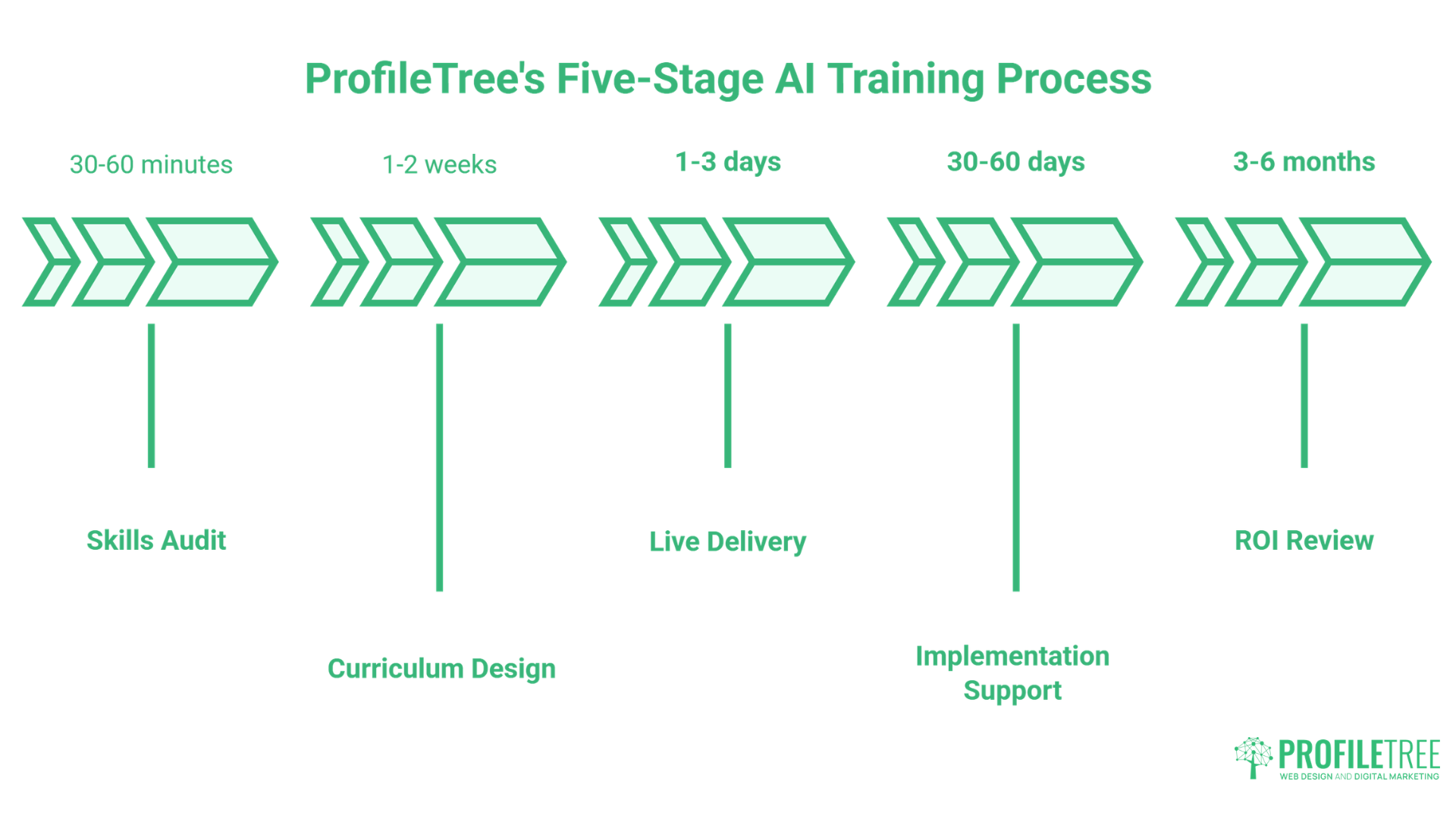
Before any training begins, we assess your team’s current AI knowledge, the tools already in use (or being avoided), and the specific processes where AI could have the most impact. This takes 30 to 60 minutes and informs everything that follows.
We build an AI training programme tailored to your team’s roles, sector, and objectives. A professional services firm has different priorities to a retail business or a manufacturer; the curriculum reflects that.
Sessions are delivered in person or via video call, using real scenarios from your business wherever possible. We don’t use generic examples. Participants practise with their own content, their own data, and the tools they’ll actually use when training ends.
In the 30 to 60 days after AI training, questions always arise. We provide follow-up support to help teams embed what they’ve learned, troubleshoot specific challenges, and refine the workflows they’ve started building.
AI tools change quickly. We update our curriculum monthly and offer quarterly refresh sessions, so your team stays current without paying for repeat courses from scratch.
Why AI Training Matters for NI Businesses Right Now
Northern Ireland occupies an interesting position in the UK’s AI adoption curve. There’s strong Government support for AI upskilling through Invest NI and the wider UK AI Skills Framework, and Enterprise Ireland has equivalent programmes for businesses in the Republic. Businesses that act now are in a position to capture grant funding, build capability ahead of competitors, and avoid the growing productivity gap between AI-enabled organisations and those still operating without it.
McKinsey’s research on AI adoption suggests that early movers in each sector capture a disproportionate share of the value AI creates. The businesses that complete structured AI training this year will be 12 to 18 months ahead of those who wait for the technology to “settle down.” It won’t settle down. The pace of change is the new normal.
ProfileTree has been delivering digital training for businesses across Belfast and Northern Ireland since 2011. We’ve worked with local councils, delivery programmes including Go Succeed, and hundreds of SMEs across every major sector. That local context is something no London agency or online course can replicate.
What Your Team Can Do Immediately After AI Training
One of the most common questions we hear is: “Will people actually use this when they get back to their desks?” It’s a fair concern. Our AI training is structured specifically to avoid the typical post-workshop drop-off.
By the end of a ProfileTree AI training session, participants leave with specific, tested workflows they’ve already practised; not theoretical frameworks to figure out later. A content writer will have a working prompt library for their most common tasks. A marketing manager will have a draft automation for a process that previously took hours. An operations team will have identified three immediate candidates for AI-assisted reporting.
The first week after AI training is where the investment is made or lost. We build that week into the programme design from the start.
Why Choose ProfileTree for AI Training
ProfileTree is a Belfast-based web design and digital marketing agency founded in 2011. In that time, the team has completed over 1,000 projects for businesses across Northern Ireland, Ireland and the UK, and holds a 5-star Google rating from more than 450 verified reviews.
We Use AI in Live Client Work Every Day
The difference between ProfileTree and a generic AI training provider comes down to one thing: we use these tools in live client work every day. Our AI training content is not drawn from textbooks or vendor documentation. It comes from applying ChatGPT, Claude, Copilot, Perplexity, and a range of other tools across real SEO, content, web design, and digital marketing projects, week in, week out.
A training provider that isn’t using these tools in live production work is teaching from a snapshot that’s already out of date.
We Know the Northern Ireland and Ireland Market
Our local presence matters. We understand the specific conditions facing businesses in Northern Ireland and Ireland: the funding picture through Invest NI and Enterprise Ireland, the dual-jurisdiction compliance considerations post-Brexit, and the talent and resource constraints that are different here than in London or Manchester.
Generic providers from outside the region don’t offer this, and it makes a practical difference to the relevance of what’s taught.
Training Backed by a Dedicated Platform
ProfileTree’s AI training is also delivered through Future Business Academy, a dedicated platform built specifically for business AI upskilling. This gives clients access to structured learning resources and updated content beyond the live training hours.
As Ciaran Connolly, ProfileTree’s founder, puts it:
“AI training isn’t about teaching people to use tools; it’s about transforming how they think about problem-solving. When teams understand AI’s true capabilities, they identify opportunities everywhere, creating competitive advantages that competitors cannot match.”
What Our Clients Say About AI and Digital Training
ProfileTree has delivered AI and digital skills training to organisations across Northern Ireland, Ireland, and the UK. The reviews below reflect the kind of outcomes businesses experience when training is practical, personalised, and properly supported.
"Parenting Focus are thrilled to share our positive experience with ProfileTree, who recently provided one-to-one mentoring and training to our Staff on AI as well as expanding current knowledge on other platforms. From the outset, the team at ProfileTree demonstrated expertise, professionalism, and a genuine commitment to our growth and success.
The tailored mentoring sessions were meticulously planned and delivered, ensuring that staff received the opportunity to seek additional information, guidance, and support. The trainers were not only knowledgeable about the latest advancements in AI but also adept at breaking down complex concepts into manageable, easy-to-understand modules. This approach significantly enhanced our team's ability to grasp and apply new technologies effectively."
Parenting Focus
"Just completed 15 hours of social media training with Laura Logan, which included use of Facebook, Instagram, Canva & AI tools to help grow our Yoga & Wellness business.
So informative, invaluable, and completely on point! Laura made our learning experience so enjoyable with her fun approach and incredible patience. Grateful for the insights and practical knowledge shared! Thanks so much Laura!"
Emma and Dianne
"We’ve worked with Ciaran at ProfileTree on multiple fronts, from search engine optimisation (SEO) to AI strategy and even video content production. What makes ProfileTree stand out is their ability to connect the dots between all these services and create a unified strategy that delivers results.
Ciaran is clearly passionate about helping local businesses thrive. He guided us through keyword research, restructured our website’s content, and ensured our blog posts were written with SEO best practices in mind. At the same time, he helped us explore AI-powered analytics and tools that gave us a deeper understanding of our online audience.
Based in Belfast, we really appreciate working with a digital partner who knows the local landscape inside and out. Highly recommend!"
Stewart J. Douds
These experiences reflect an approach ProfileTree has refined across 14 years of digital training delivery. Whether the starting point is AI basics or advanced workflow automation, the goal is always the same: practical capability that makes a measurable difference to how a business operates.
Start Building AI Capability in Your Business Today
ProfileTree has delivered AI and digital training to over 1,000 organisations across Belfast, Northern Ireland, Ireland and the UK since 2011. Whether you’re a small team looking to get started with AI tools or an organisation planning a wider upskilling programme, we’ll build a session around your people, your sector, and your goals.
Contact our Belfast team for an initial conversation about what your business needs. There’s no fixed package to fit into; we start with a skills audit and work from there.
FAQs About Professional AI Training
The right tools depend entirely on your team’s roles and the tasks you want to address. For most SMEs, the starting point is ChatGPT or Claude for content and communications, Microsoft Copilot if you’re already in the Microsoft 365 ecosystem, and one automation platform such as Zapier or Make for workflow tasks. Our training begins with a skills audit precisely to match tool recommendations to your actual business needs rather than defaulting to a generic list.
The most effective approach combines structured sessions with immediate application. Book an AI training programme built around your team’s specific roles and real work scenarios, not a generic course. Follow up the training with a support period where staff can troubleshoot as they implement. The businesses that get the most from AI training are the ones that treat it as the start of a process rather than a one-day event.
A standard AI training programme covers tool selection and setup for your specific use cases, prompt engineering for content and communications, workflow automation to reduce manual tasks, data and privacy guidance including UK GDPR implications, and a practical implementation plan. More advanced programmes add executive strategy sessions, department-specific modules, and post-training support periods.
This varies by team size, existing skill level, and the depth of the programme. A half-day introduction workshop covers core concepts and tool orientation. A full programme covering multiple departments and workflow automation typically runs across two to four days, delivered in sessions over several weeks. We build the timeline around your business rather than a fixed schedule.
Costs depend on team size, programme length, and whether delivery is in person or remote. Introductory workshops for small teams start from a few hundred pounds. Longer, multi-department programmes for larger organisations are scoped and priced individually. It’s worth exploring whether Invest NI or Enterprise Ireland funding applies to your organisation before committing; we can advise on this during an initial conversation.
Yes. Invest NI runs a range of funded digital and AI upskilling programmes for eligible businesses in Northern Ireland, and the UK Government’s AI Skills Framework includes routes for subsidised training. Go Succeed is another avenue for supported digital mentoring across Northern Ireland. We work within several of these programmes and can advise on eligibility.
Online courses teach tools in the abstract using generic examples. ProfileTree’s training uses your actual business, your real content, and your team’s specific roles. You also get live Q&A, follow-up support, and a programme designed around your sector’s compliance requirements. The result is a capability that gets applied immediately, rather than knowledge that sits unused after a certification is issued.

Web Design
We design stunning, user focused websites that present your brand beautifully and convert visitors into customers.

Web Development
We use the latest development tools to build websites that are optimised for peak performance at all times.

Website Hosting
We manage everything from site updates and reports to hosting, allowing you to focus on running your business.

Search Engine Optimisation
Using the latest SEO techniques, we help your brand get found for the right terms and by the right people.

Digital Marketing Strategy
Navigate the digital landscape with a marketing strategy. Our team crafts comprehensive plans that resonate with your target audience, drive engagement, and boost conversions.

Digital Marketing Training
Elevate your digital proficiency. Our in-depth training sessions equip your business with cutting-edge digital marketing techniques to outperform competitors and thrive online.

Social Media Strategy
Captivate and grow your social following. We create tailored social media strategies that ignite engagement, amplify your brand's online presence, and foster lasting connections.

Email Marketing Solutions
Harness the power of your mailing list. Our precision-targeted email marketing campaigns are engineered to nurture relationships and drive tangible business outcomes.

Content Marketing Services
Elevate your brand with our content marketing mastery. From thought-provoking blogs to eye-catching infographics, we craft content that captivates, informs, and converts your ideal audience.

Video Production
Capture your audience with compelling video content. Our production team creates visual stories that engage, inform, and leave a lasting impression.

Brand Storytelling
Bring your brand's story to life with authenticity. We craft compelling narratives that strike a chord with your audience, forging a powerful emotional bond with your brand.

Content Strategy Development
Strategic content that drives action. We develop content strategies that align with your business goals, ensuring every piece of content counts.

AI Training
Empower your business with AI expertise. Our tailored training demystifies AI, equipping your team with the knowledge to leverage its potential for growth and innovation.

AI Chatbots
Transform customer service with AI chatbots. We develop sophisticated chatbots that elevate user experience, streamline interactions, and deliver unparalleled efficiency.

AI Marketing
Transform your reach with AI-driven marketing. Harness data-driven insights for laser-targeted campaigns that captivate, engage, and convert your audience.

AI Tools for Business
Optimise your operations with cutting-edge AI tools. We integrate intelligent solutions that streamline processes, enhance efficiency, and support data-driven decision-making.
Join Our Mailing List
Grow your business with expert web design, AI strategies and digital marketing tips straight to your inbox. Subscribe to our newsletter.