
9 Web Trends: Evaluating and Implementing New Design Innovations
Table of Contents
Web design is the art and science of creating and building websites that are not only visually appealing but also user-friendly, functional, and informative. In today’s rapidly evolving digital landscape, where technology and user expectations are constantly changing, staying ahead of the curve in web design is more crucial than ever for maintaining competitive advantage and meeting user expectations.
Influenced by cultural changes, digital design is rapidly evolving to adjust to new work-life which has become increasingly remote over the past year. With this in mind, digital trends have incorporated unusual colour schemes, 3D product simulations, new typography art, interactive elements, and accessibility features that create realism within digital environments whilst serving all users effectively.
Imagine a website frozen in time, untouched by innovative advancements and evolving user preferences. Its outdated layout, clunky functionality, and lack of visual appeal would likely drive visitors away, hindering its potential for success. By actively monitoring and understanding these trends, we can make informed design decisions that enhance user experience, improve brand perception, and drive success in the ever-competitive digital environment.
With this innovative outlook, here are nine leading web trends that have transformed how we use the internet.
9 Web Trends
Understanding and implementing web trends goes beyond keeping up with aesthetics. Modern web trends directly impact business performance, search rankings, and customer engagement.
Mobile devices now account for 54.24% of all global website traffic, with 88% of global internet users accessing the web via mobile. Page speed matters significantly: 61% of mobile users will abandon a site that takes more than 3 seconds to load. User expectations have never been higher, with 90% expecting websites to be visually appealing and 52% saying website design is the most important factor in their trust of a company.
For businesses in Northern Ireland, Ireland, and across the UK, staying relevant requires embracing innovation and proactively adapting web design to accommodate evolving trends whilst maintaining performance and accessibility standards.
1. Scrolling Transformations
Scrolling transformations occur when users scroll over a particular part of a screen and a responsive action happens. This creates engagement as users participate in the site itself. Receiving visual feedback can range from complex animated transitions to wholesale shifts in layout.
- Parallax Scroll Animations: Parallax scroll effects shift paradigms and engage users effectively. Parallax is an optical illusion that makes near objects appear to move quicker than distant objects. This technique creates immersion, developing a performative experience for users.
- Implementation Considerations: Performance matters. Use CSS transforms rather than JavaScript for better performance. Limit complex parallax to hero sections. Always respect the
prefers-reduced-motionCSS media query for users with vestibular disorders. Consider simplified versions for mobile devices where parallax often works poorly.
“Scrolling transformations should enhance the user journey, not distract from it. When we develop websites for clients, we focus on purposeful animation that guides attention whilst maintaining accessibility and performance standards,” notes Ciaran Connolly, Director at ProfileTree.
2. Dark Mode Design
Dark mode has become increasingly popular with users and companies like Apple have made it easy for users to change screen settings to dark mode. This web trend captures designer attention for both functional and aesthetic reasons.
Not only is it functional, but dark mode also looks good. It highlights elements of design that might be otherwise passed over and it allows parts of the design to pop. On a medical note, it reduces eye strain in low light conditions and can even save on battery power.
3. Horizontal Scrolling
At one point detested, horizontal scrolling has become a popular web trend. Not only is it a trendsetter, but it also helps users receive secondary information in formats particularly effective for image galleries, timelines, and product showcases.
Offer alternative navigation methods such as arrow buttons to alert users to the change in scrolling direction. Be mindful about what benefits from horizontal scrolling. Using it for text that needs reading could cause confusion. Product catalogues, portfolio galleries, and case studies often work well with horizontal scrolling on desktop.
4. 3D Visuals and Physical Products
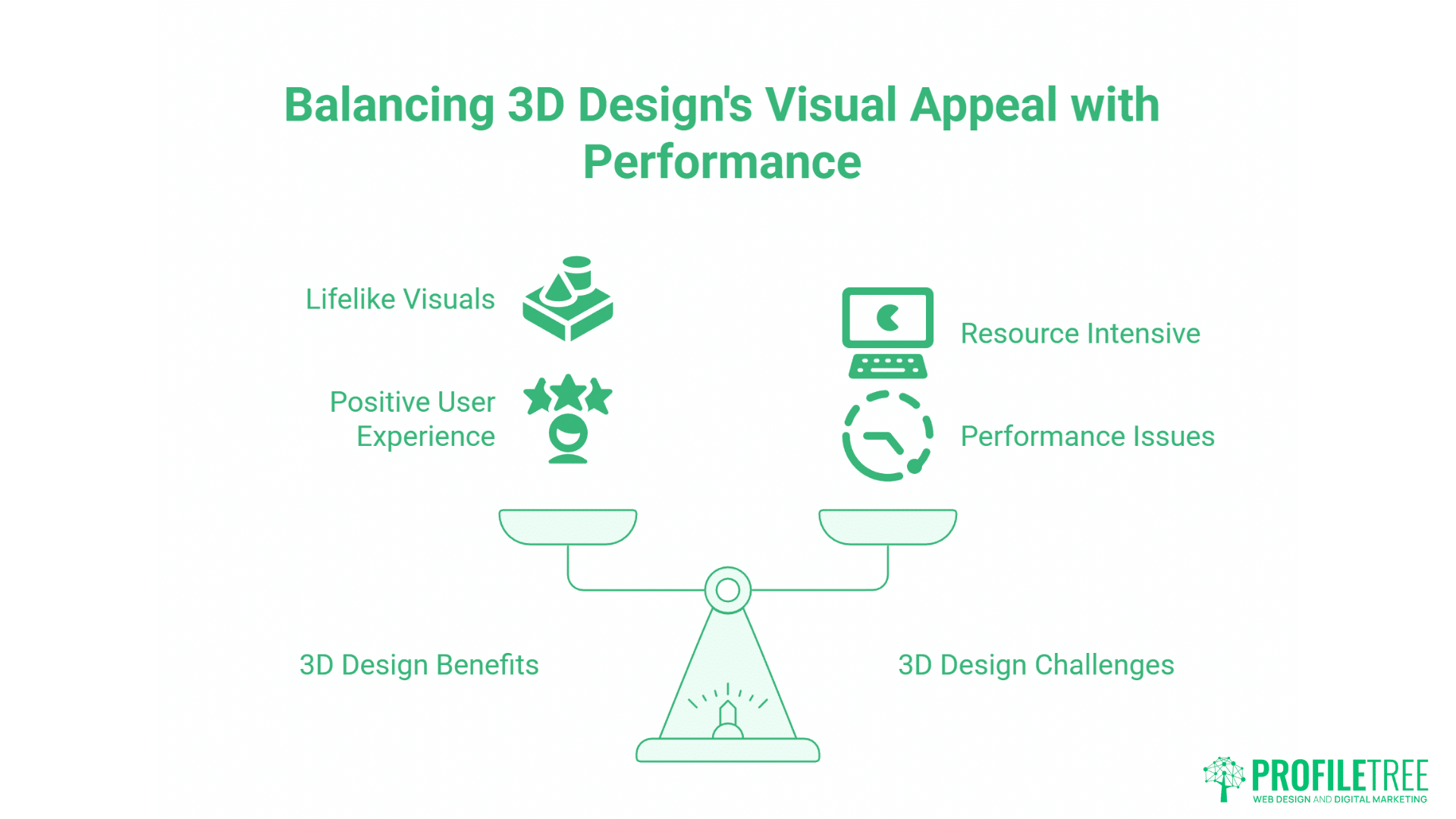
With technology developing, 3D design has become common. Three-dimensional visuals create lifelike feels to web pages. Using minimalist layouts enhances 3D visuals. Drop shadows, gradients, and layered elements bring designs to life.
Designers are blending items like nail polish spilling down a web page to create a visual synergy for the user experience. This creates a positive feeling for users who are experiencing a realistic moment on a website.
Performance Considerations: 3D content is resource-intensive. Implement multiple versions at different complexity levels. Load simpler models initially. Only load 3D when users interact with it. Use modern formats like WebP for better compression. Never force users to wait for large 3D assets before seeing products.
5. Cool Colours and Neutral Palettes
Remote working has become the new normal and web trends are updating to facilitate that. One trend that is becoming ever more popular is using neutral colours that have are not garish and are gentle on the eye for users spending extended periods viewing screens.
Modern colour strategies prioritise functionality over fashion. The trend toward cooler palettes reflects both aesthetic preferences and practical considerations around screen time and eye comfort.
6. Geometric Grids and Structured Layouts
Grids offer simple, effective design that creates bold, clean layouts. They offer engaging navigation and hold attention whilst presenting content in structured ways. Geometric grids offer creativity opportunities. They don’t need uniform arrangement and can enhance product displays.
Bento Grid Layouts: Modern grids create distinct content zones without rigid uniformity. Grid cells adjust to content rather than forcing content into predetermined sizes. Not all cells need equal size. Larger cells draw attention to priority content whilst smaller cells house supporting information.
7. Website Accessibility
Web designers are making websites more accessible and inclusive. Focus on inclusive design means websites are becoming accessible to users with disabilities, including visual, auditory, and cognitive impairments.
Business Benefits: One in five people in the UK lives with a disability. Accessible design removes barriers that exclude this substantial customer segment. Google’s algorithms increasingly favour accessible websites. Semantic HTML structure helps search engines understand content hierarchy.
Implementation Steps: Automated tools like axe DevTools identify many technical violations, but manual testing with assistive technology is essential. Test entire user journeys with keyboard-only navigation. Focus first on issues that completely prevent access: missing alt text on critical images, forms that can’t be completed without a mouse, video content without captions.
8. InteractiveQuestionnaires
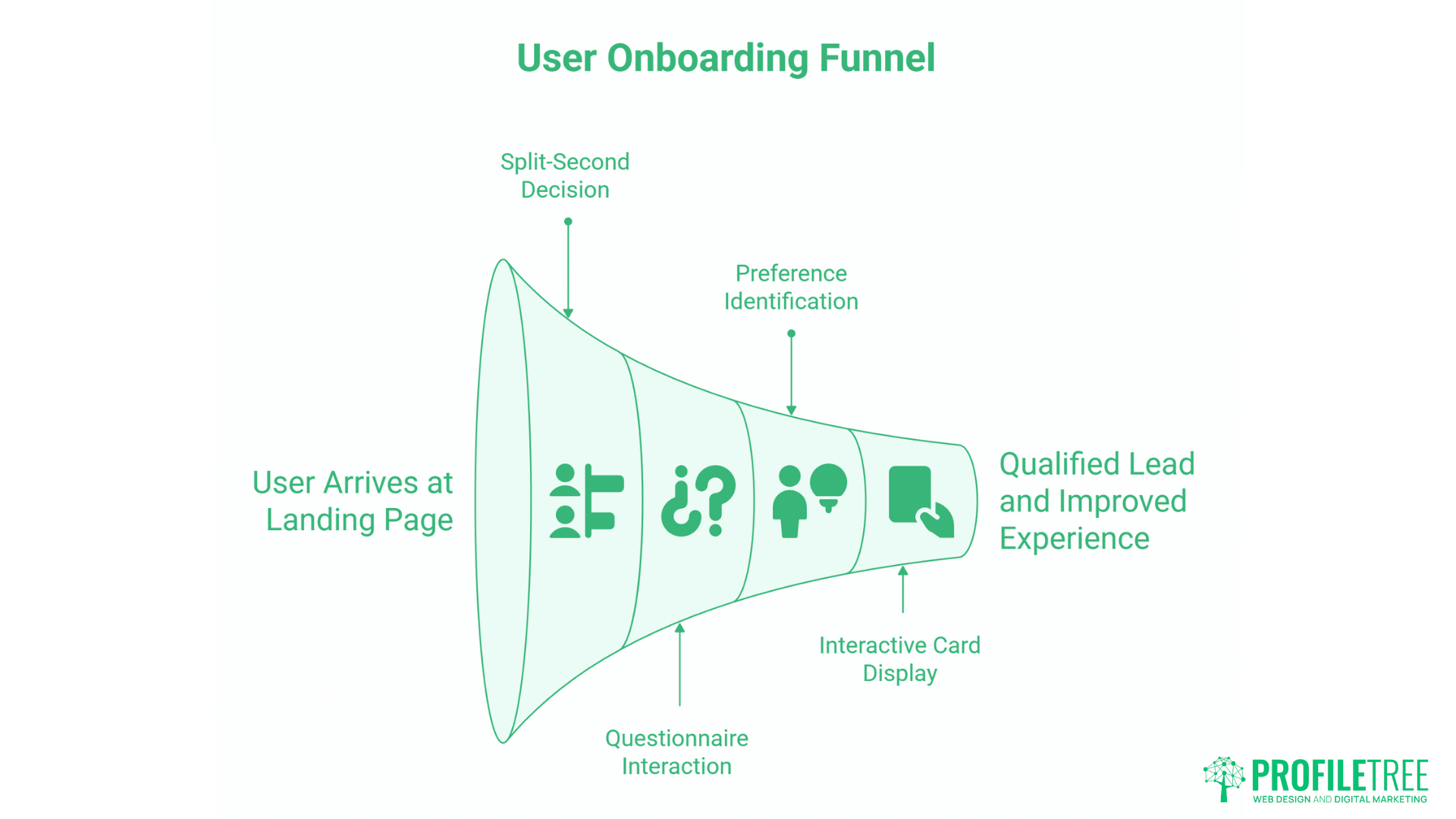
During the onboarding process, users come to the landing page and make split-second decisions about exploring further. One web trend that designers have been incorporating into their sites is using questionnaires.
Using multiple-choice questions, sites focus on visitor preferences where websites immediately cater to their needs. Landing pages transform into interactive cards with animated transitions. For service-based businesses, this qualifies leads whilst improving user experience.
9. Performance-First Architecture
Google’s Core Web Vitals evolution from advisory metrics to ranking factors changed web development priorities. Average page load time remains 4.74 seconds on desktop and 10.3 seconds on mobile. Given that 61% of mobile users abandon sites taking longer than three seconds, this represents substantial commercial loss.
Core Web Vitals: Three metrics define user experience. Largest Contentful Paint (LCP) measures loading performance (target: under 2.5 seconds). Interaction to Next Paint (INP) measures responsiveness (target: under 200 milliseconds). Cumulative Layout Shift (CLS) tracks visual stability (target: under 0.1).
Mobile-First Development: With 54.24% of traffic from mobile devices, mobile performance cannot be an afterthought. Start with core functionality for basic devices with slow connections. Layer enhancements for users with better devices. Images typically represent 50-70% of page weight. Use modern formats like WebP and AVIF for better compression.
Strategic Implementation Guide
Understanding trends is valuable only if you can implement them effectively. This requires structured evaluation processes, realistic planning, and clear success metrics.
Trend Evaluation Framework
Not every trend suits every business. Evaluate trends systematically:
- User Value Assessment: Does this trend solve actual user problems or improve user experience measurably? If implementation is primarily for aesthetic reasons, reconsider. Function must precede form.
- Technical Feasibility: Do you have the technical capability and resources to implement this trend properly? Poor implementation is worse than not implementing at all. Be honest about your team’s capabilities and available budget.
- Performance Impact: Will this trend harm Core Web Vitals scores or create accessibility barriers? Performance and accessibility are non-negotiable. Exciting features that damage these foundations aren’t worth implementing.
- Maintenance Requirements: Can you maintain this implementation long-term? Trends that require ongoing specialised technical knowledge or frequent updates may not be sustainable for smaller teams.
- Competitive Landscape: Are your direct competitors implementing this trend? Are users in your industry expecting these features? Understanding competitive context helps prioritise efforts.
Phased Implementation Approach
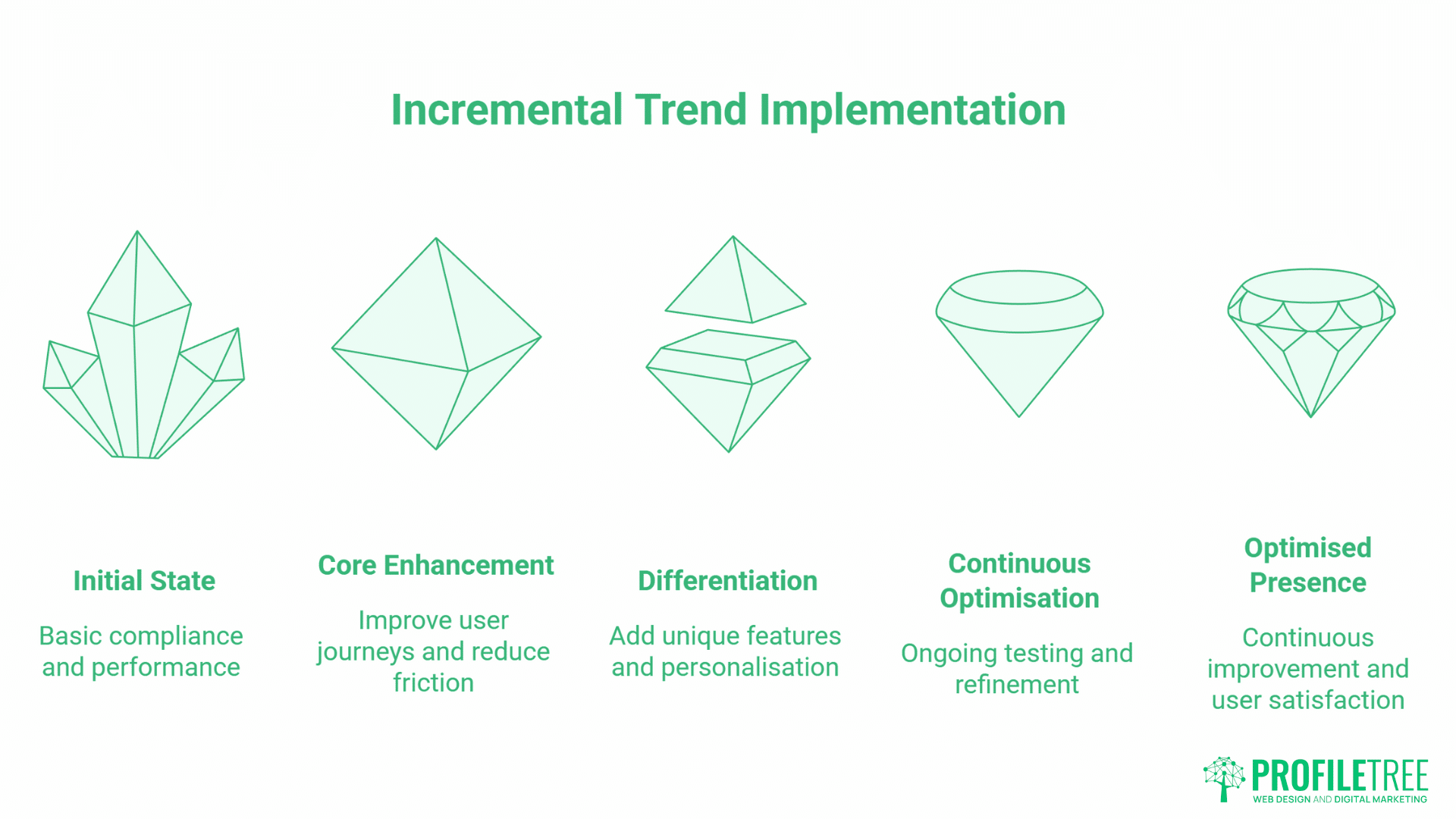
Implement trends incrementally rather than attempting complete redesigns:
- Phase 1: Foundational Requirements: Begin with compliance and performance. Address accessibility issues and optimise Core Web Vitals. These are prerequisites for everything else.
- Phase 2: Core Experience Enhancement: Implement trends that directly improve user journeys. Focus on features that reduce friction, provide clearer information, or make transactions easier.
- Phase 3: Differentiation Features: Add unique implementations that distinguish your digital presence. This might include advanced personalisation, 3D product visualisation, or sophisticated interactive elements.
- Phase 4: Continuous Optimisation: Establish ongoing testing and refinement processes. Monitor performance metrics, gather user feedback, and iterate on implementations.
Testing and Validation
Measure the impact of trend implementations rigorously:
- A/B Testing: Test new features against current implementations with real users. Measure concrete metrics like conversion rate, engagement time, or task completion rates. Statistical significance matters, small sample sizes produce unreliable results.
- User Testing: Observe real users interacting with new features. Identify confusion points, accessibility issues, or unexpected usage patterns. User testing reveals problems that analytics alone cannot detect.
- Performance Monitoring: Track Core Web Vitals continuously. Many features that seem fast in development environments perform poorly under real-world network conditions. Test on actual mobile devices with throttled connections.
- Analytics Review: Monitor standard metrics after implementation: bounce rate, page depth, conversion rate, average session duration. Look for both positive impacts and unexpected negative consequences.
Getting Internal Buy-In
Implementing trends requires organisational support. Build effective cases for investment:
- Business Case Development: Quantify expected benefits in business terms. Improved conversion rates, reduced support costs, expanded market reach, frame benefits in language that resonates with decision makers.
- Pilot Projects: Propose limited implementations that demonstrate value before requesting full-scale investment. Pilot projects reduce perceived risk and provide concrete data for broader rollout decisions.
- Competitive Intelligence: Show what successful competitors are implementing and the reported business results. Demonstrating that competitors are gaining advantages through these implementations creates urgency.
- Risk Mitigation: Acknowledge potential problems and explain how you’ll address them. Decision makers appreciate realistic assessments over overly optimistic projections.
5 Key Web Trends Predicted for 2026
Looking ahead, several web trends are positioned to become increasingly important:
Advanced Accessibility Implementation
Focus on inclusive design continues expanding. Websites will become increasingly accessible to users with disabilities. Compliance with WCAG 2.2 guidelines and integration of assistive technologies will move from optional enhancement to standard practice.
AI-Native Experiences
AI-enabled websites add chatbots to existing architectures. AI-native websites are built around artificial intelligence mediating user interactions from the ground up. Users will expect websites to understand natural language queries, anticipate needs based on context, and adapt interfaces dynamically to individual preferences.
Augmented Reality Integration
AR technology is maturing beyond novelty to practical business application. Websites will incorporate AR elements to showcase products in immersive ways. Users will see how products look in their own environment through AR simulations, reducing purchase hesitancy whilst decreasing returns.
Enhanced Sustainability Practices
Environmental considerations in web design will continue gaining importance. Businesses will choose green hosting providers and utilise data centres with energy-efficient practices as sustainability reporting becomes standard. Digital carbon footprints will be measured and reported alongside other sustainability metrics.
AI-Native Interface Design
The distinction between AI-enabled and AI-native represents more than semantic quibbling. AI-enabled websites add chatbots or recommendation engines to existing architectures. AI-native websites are built around the assumption that artificial intelligence mediates user interactions from the ground up.
We’re observing the early stages of this transition now. Within 18 months, the difference will become stark. Users will expect websites to understand natural language queries, anticipate needs based on context, and adapt interfaces dynamically to individual preferences and abilities.
From Chatbots to Agentic Interfaces
Current chatbot implementations follow scripted conversation trees. Users type queries, the system matches keywords to pre-written responses, and the interaction follows predetermined paths. This approach breaks down quickly when users deviate from expected patterns or ask nuanced questions.
Agentic AI interfaces operate differently. They understand context, maintain conversation state, and can take actions on behalf of users. Rather than simply answering “What are your business hours?”, an agentic system might recognise that you’re asking because you want to visit, check current traffic conditions, compare your schedule against available appointment slots, and suggest optimal visit times, all in a single interaction.
Practical Applications for UK Businesses
- E-commerce: Instead of category browsing and keyword search, customers describe what they need in natural language. The system understands context like “I need professional clothing for a job interview next week but my budget is tight” and surfaces appropriate products while considering size, style preferences from previous purchases, and current promotions.
- Service Booking: Rather than clicking through calendar interfaces, users state their scheduling constraints and preferences. The system negotiates available slots, sends confirmations, and handles rescheduling requests through conversational interaction.
- Content Discovery: Website search evolves from keyword matching to understanding intent. A query like “resources for improving our social media presence” might surface blog posts, case studies, video tutorials, and relevant service pages based on the user’s industry and previous engagement history.
Hyper-Personalisation Within GDPR Constraints
Personalisation has always promised better user experiences. Early attempts were crude: “Welcome back, [Name]!” messages and basic product recommendations based on browsing history. Modern AI systems enable far more sophisticated personalisation, but UK businesses must navigate this capability within GDPR requirements.
The UK’s post-Brexit data sovereignty framework maintains alignment with GDPR’s core principles while establishing separate regulatory oversight. This creates specific considerations for personalisation systems:
- Consent Requirements: Personalisation based on behavioural data requires explicit consent. This means clear explanations of what data you collect, how you use it, and allowing users to opt out without degrading basic functionality.
- Data Minimisation: Collect only the data necessary for your stated purposes. AI systems trained on extensive personal data may violate GDPR’s data minimisation principle even if that data improves recommendations.
- Right to Explanation: When AI systems make decisions that significantly affect users, GDPR grants users the right to understand how those decisions were reached. Your personalisation logic must be explainable, not a black box algorithm.
- Data Residency: For users in the UK and EU, personal data must be processed within these jurisdictions unless specific safeguards are implemented. Cloud AI services hosted in the US or other regions may create compliance complications.
Effective personalisation within these constraints focuses on first-party data, transparent value exchange, and privacy-preserving techniques. Netflix’s recommendation engine succeeds not because it tracks users across the web but because it delivers clear value in exchange for watching history, a fair, understood transaction.
Voice Interface Optimisation
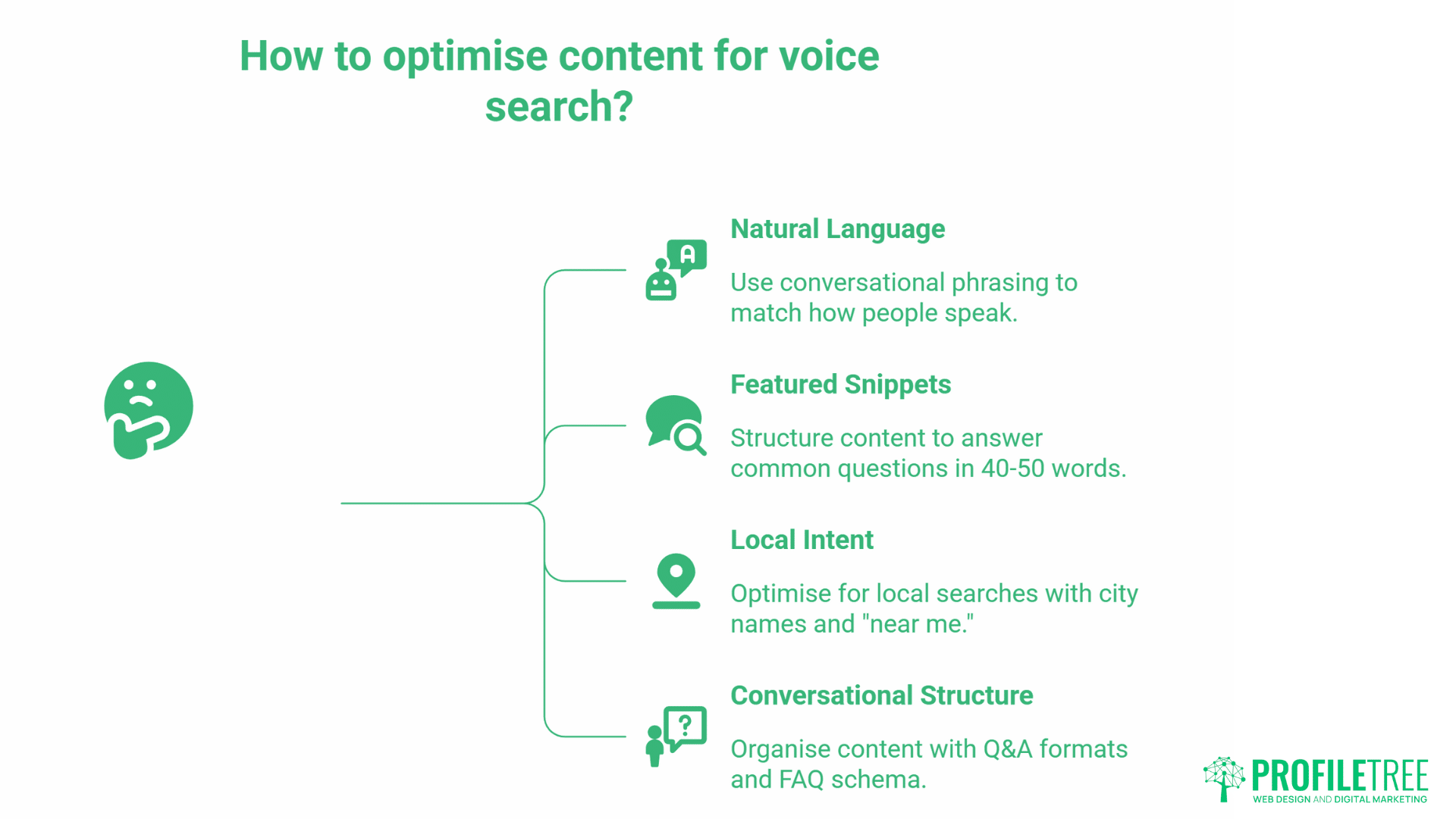
Voice search and voice-controlled interfaces are becoming standard interaction methods. Optimising for voice requires different content strategies than traditional text-based search:
- Natural Language Content: Write in conversational patterns that match how people actually speak. Instead of “Web design services Belfast,” optimise for “Who provides web design services in Belfast?” This means longer, more natural phrasing throughout your content.
- Featured Snippet Targeting: Voice assistants predominantly read featured snippets for answers. Structure content to directly answer common questions in 40-50 words, formatted for easy extraction by search engines.
- Local Intent Recognition: Voice searches often have local intent. Phrases like “near me” or city names appear frequently. Optimise your local SEO foundations, Google Business Profile, local citations, location-specific content, to capture these queries.
- Conversational Page Structure: Organise content around question-and-answer formats. Use FAQ schema markup to help search engines identify these patterns. Think about the questions users ask at each stage of their journey and address them explicitly.
Conclusion
web trends shaping 2025 and 2026 represent a fundamental shift from aesthetic experimentation to strategic necessity. These nine trends demonstrate how modern web design balances visual appeal with performance, accessibility, and business outcomes. From scrolling transformations that engage users to dark mode implementations that reduce eye strain, from 3D visuals that bridge physical and digital retail to performance-first architecture that satisfies both users and search engines, each trend serves a clear purpose beyond simple decoration.
For businesses across Northern Ireland, Ireland, and the UK, implementing these trends strategically creates competitive advantages that translate directly into improved search rankings, increased conversions, and expanded market reach. The key is not chasing every trend but carefully evaluating which developments align with your business objectives, user needs, and technical capabilities. Start with foundations like accessibility and performance, then build towards differentiation through personalisation, immersive content, and innovative interactions. The websites that succeed are those that serve users effectively whilst driving measurable business growth.
FAQs
What web trends should UK businesses prioritise in 2025?
Focus on accessibility compliance first. The European Accessibility Act deadline of 28th June 2025 makes this legally imperative for businesses serving EU customers. Second, address Core Web Vitals performance. Google’s ranking algorithm penalises slow sites directly. Third, consider AI-native features that improve user experience, particularly conversational interfaces and intelligent personalisation within GDPR constraints.
How much does implementing modern web trends cost?
Costs vary dramatically based on current state and desired end state. Basic accessibility remediation for a small business website might cost £2,000-5,000. Comprehensive accessibility overhaul for a complex site can exceed £50,000. Performance optimisation projects typically range from £3,000-15,000 depending on technical complexity. AI implementation costs vary from £5,000 for basic chatbot integration to £100,000+ for sophisticated agentic systems. The key is prioritising based on business impact and legal requirements rather than aesthetic preferences.
Can I implement these trends on existing WordPress sites?
Most trends can be implemented on WordPress, though some require significant technical work. Accessibility improvements work on any WordPress site with appropriate theme and plugin updates. Performance optimisation may require theme changes or moving to headless architecture. AI features integrate through plugins or custom development. The platform doesn’t limit possibility, but implementation complexity varies based on your current setup.
How do I measure the success of web trend implementations?
Define clear metrics before implementation. Accessibility success shows in reduced bounce rates, increased time on site, and expanded audience reach. Performance improvements correlate with improved search rankings, reduced bounce rates, and increased conversion rates. AI feature success depends on the specific implementation, measure chatbot resolution rates, personalisation’s impact on engagement, or voice search traffic increases. Always establish baseline metrics before changes to measure actual impact.
Should I redesign my entire website or implement trends incrementally?
Incremental implementation is typically more effective than complete redesigns. Full redesigns are expensive, risky, and time-consuming. They also provide no value until launch, while incremental improvements deliver ongoing benefits. Start with foundational requirements like accessibility and performance. Add enhanced features progressively. This approach spreads costs over time, allows testing and validation of each change, and provides continuous improvement rather than periodic overhauls.
How do I balance trendy design with timeless usability?
Prioritise usability fundamentals, clear navigation, fast loading, accessible content, mobile responsiveness, over aesthetic trends. These foundations remain valuable regardless of design fashion. Layer current visual trends on top of strong fundamentals. When aesthetic trends evolve, updating surface design is straightforward. Rebuilding fundamental usability is expensive. Think of trends as accent colours in a room: change them easily without restructuring the entire space.
ProfileTree is a digital marketing and creative media agency based in Belfast, serving clients across Northern Ireland, Ireland, and the UK. We specialise in web design and development, SEO, video production, content marketing, AI implementation and training, and digital strategy. Our approach focuses on building websites that don’t just look contemporary but drive real business results through improved user experience and search visibility. Whether you need a complete website redesign, performance optimisation, accessibility improvements, or strategic guidance on implementing modern web trends, our team brings the expertise to help your business grow. Contact us to discuss how we can support your digital objectives.