
Live Streaming for Business: A Practical Guide for UK SMEs
Table of Contents
Live streaming for business has moved well beyond the early days of shaky webcam product demos. Across the UK and Ireland, SMEs are now using live video to run product launches, host client Q&As, deliver training sessions, and build audience relationships that pre-recorded video cannot replicate. The format rewards preparation and punishes carelessness, meaning businesses that plan it properly get results, while those that treat it as an afterthought usually produce content they never use again.
This guide covers the practical foundations: how to choose the right platform for your audience, what technical setup actually matters, how to build a promotion plan that drives attendance, and how to repurpose what you record into content that keeps working after the stream ends. UK-specific considerations, including Ofcom requirements, GDPR obligations, and upload speed guidance for common ISP packages, are addressed throughout.
Whether you are running your first live stream or looking to bring more consistency to an existing programme, the sections below give you a framework to work from.
Why Live Streaming Fits Your Video Marketing Strategy
Live streaming for business is not a separate channel from your wider video marketing activity. It is one format within a broader content system, and understanding where it fits prevents the mistake most businesses make: treating every live stream as a standalone event with no connection to anything that came before or after it.
The format offers distinct advantages that recorded video does not. Audiences can ask questions in real time. Platforms send notifications to followers when you go live, giving you a reach spike that scheduled posts rarely achieve. And the unscripted quality of live content, when handled professionally, builds a credibility that highly produced corporate videos sometimes lack. A well-run Q&A with a founder or subject matter expert can do more to establish trust with a prospect than a polished brand film.
Real-Time Engagement Changes the Conversation
The comment section during a live stream is not a distraction; it is data. The questions your audience asks in real time tell you what they do not understand about your product or service, what objections they have, and what language they use to describe their problems. That intelligence feeds directly into your video content strategies across every other format.
Businesses that take this seriously use their post-stream transcript as a brief for follow-up content. A product demo that generates fifteen chat questions about pricing and integration becomes the outline for five separate pieces of content. The live stream is the research as much as the output.
Organic Reach and Platform Prioritisation
LinkedIn and Facebook both surface live content more prominently than scheduled posts during the broadcast itself. This is not a permanent feature of their algorithms and has varied over time, but for now, it gives businesses with smaller followings a genuine mechanism to reach new audiences without paid promotion. YouTube Live content is indexed as a permanent video with full search potential, a significant advantage for businesses investing in YouTube SEO.
The reach advantage is not automatic. It depends on promotion in the days before the stream, the quality of the content itself, and whether your existing audience shares or engages during the broadcast. Passive live streaming, where you simply go live and hope people find you, rarely produces results.
Live Streaming as a Content Multiplier
One sixty-minute live stream, handled correctly, produces considerably more than a single piece of content. The recording becomes a YouTube video. Key moments become short-form video content for Instagram Reels and TikTok. The Q&A section becomes an FAQ article. The introduction and closing remarks, with light editing, become email newsletter content. This repurposing logic is central to any content marketing programme that needs to produce volume without proportionally increasing production costs.
As Ciaran Connolly, founder of ProfileTree, puts it: “Most SMEs treat live streaming as a one-off experiment rather than a planned content channel. The businesses that get the most from it are the ones that approach it the way they would any other video production: with a brief, a run-of-show, and a clear idea of what they want the audience to do afterwards.”
That framing (live streaming as a production discipline rather than an informal broadcast) applies to every decision that follows, from platform selection to technical setup to post-stream distribution.
Choosing the Right Platform: A Comparison for UK Businesses
The right live-streaming platform for business depends on three things: where your audience actually is, what type of content you are producing, and what you plan to do with the recording afterwards. The comparison below covers the six platforms most relevant to UK and Irish SMEs, with a focus on practical fit rather than feature lists.
| Platform | Primary Audience | Best Content Types | Max Resolution | Recording Stays Live? | Best For |
|---|---|---|---|---|---|
| YouTube Live | Broad (B2C and B2B) | Webinars, tutorials, demos | 4K | Yes (permanent) | Long-term content value, SEO |
| LinkedIn Live | Business professionals | Panel discussions, announcements | 1080p | Yes (as a post) | B2B audiences, thought leadership |
| Facebook Live | Broad consumer | Product launches, Q&As | 1080p | Yes (as a video post) | Community engagement, consumer brands |
| Instagram Live | 18–34 demographic | Behind-the-scenes, collabs | 720p | Limited (Reels, 30 days) | Brand personality, younger audiences |
| Twitch | 18–34, gaming-adjacent | Demos, casual Q&As | 1080p | Yes (VOD, 60 days) | Tech and creative brands |
| Zoom / Teams | Internal or invited audiences | Training, webinars, presentations | 1080p | Yes (local or cloud) | Gated events, client sessions |
YouTube Live: The Strongest Long-Term Case
For most UK businesses investing in live streaming as part of a content strategy, YouTube Live offers the strongest long-term return. The recording does not disappear after 24 hours; it becomes a permanent video asset that can be optimised for search, embedded on your website, and included in email campaigns months after the stream ends. For businesses already building a YouTube channel, going live also triggers notifications to subscribers, boosting reach that organic posts rarely match.
The trade-off is audience size. If your YouTube channel is relatively new, a live stream will draw a smaller initial audience than the same broadcast on a platform where you already have an active following. The answer to that is promotion in advance, not platform switching.
LinkedIn Live: The B2B Option
LinkedIn Live is the clearest choice for businesses whose primary audience is other businesses. Panel discussions, thought leadership conversations, product announcements, and industry commentary all perform well here. The platform’s event invitation system lets you notify your connections directly, consistently outperforming organic post reach for live content. The audience skews towards decision-makers and professionals, making it the most commercially focused environment of the main live streaming platforms.
LinkedIn requires approval to access LinkedIn Live through third-party streaming tools. First-time users should allow at least a week for the application process before scheduling their first broadcast.
Instagram Live: Personality and Reach, Not Production
Instagram Live is best treated as a relationship channel rather than a content production channel. The 720p resolution cap, the short shelf life of recordings, and the predominantly younger demographic make it suitable for informal engagement rather than corporate announcements. For brands with an active Instagram presence, the Instagram Live Rooms feature allows up to 4 participants in a single stream, opening up interview and panel formats without requiring dedicated streaming software. Recordings from Instagram Live can be repurposed directly into Reels, extending the content’s life beyond the broadcast window.
Zoom and Microsoft Teams: The Case for Private Events
Not every business live stream needs to be public. Training sessions, client briefings, shareholder updates, and educational webinars often benefit from a controlled environment where you manage who attends and can host breakout discussions. Zoom and Microsoft Teams are the standard tools for this format in the UK market. Both record locally or to cloud storage, support screen sharing and presenter slides, and integrate with calendar and registration systems that public social platforms do not.
The limitation is discoverability. A Zoom webinar does not appear in a platform feed or build an organic audience. It requires its own registration and promotion system, which adds planning overhead that businesses should account for when choosing this route.
Planning and Technical Setup
The gap between a live stream that builds credibility and one that damages it is almost always technical and logistical rather than content-related. Poor audio, unstable connections, and unplanned stream structure are the most common failure points, and all three are preventable with modest preparation.
Upload Speed Requirements for UK Businesses
The single most important technical requirement for live streaming is upload speed, and it is the one that most businesses underestimate. Unlike download speeds, which most UK broadband packages optimise for, upload speeds vary significantly between providers and package types. The following are minimum recommended upload speeds for stable streaming at common resolutions:
- 720p at 30fps: 3–5 Mbps upload
- 1080p at 30fps: 5–10 Mbps upload
- 1080p at 60fps: 10–15 Mbps upload
- 4K: 25 Mbps or above (requires dedicated streaming hardware)
Many standard ADSL and entry-level FTTC packages from UK providers offer upload speeds of 2–5 Mbps, which is insufficient for reliable 1080p streaming. Businesses on Virgin Media, BT Ultrafast, or Openreach FTTP packages generally have adequate upload headroom, but you should test your actual upload speed on the day you intend to stream rather than relying on your ISP’s advertised maximum. A wired Ethernet connection to your router is non-negotiable for anything above 720p; wi-fi introduces latency and packet loss that manifests as dropped frames and buffering on the viewer’s side.
Camera, Audio, and Lighting: Where to Focus Your Budget
Camera quality matters, but audio quality matters more. Viewers will tolerate average visuals; they will switch off within minutes of poor sound. A dedicated USB condenser microphone positioned 15–30cm from the speaker, or a clip-on lavalier microphone connected to an audio interface, will produce results that the built-in microphone on any laptop or webcam cannot match. This is the single hardware investment that delivers the greatest immediate improvement in live-stream quality for most SMEs.
For camera options, the gap between a modern smartphone on a tripod (adequate for basic streaming) and a dedicated mirrorless or DSLR camera connected via a capture card (noticeably superior) is real, but the starting point does not need to be expensive. A detailed breakdown of camera options relevant to video and live content production is covered in the guide to the best camera for YouTube, where the same hardware considerations apply.
Lighting is the third variable. A ring light, positioned behind the camera and angled towards the presenter, removes shadows and produces a consistent, professional appearance that flat overhead office lighting cannot. For businesses investing in regular live streaming as part of a wider content programme, a basic two-point softbox lighting setup is worth considering alongside the camera and audio investment.
Content Structure: The Run-of-Show
A run-of-show is a timed plan that covers every segment of your live stream from the opening holding slide to the closing call to action. It does not script every word, but it defines the structure: when the host introduces themselves, when the main content begins, when the Q&A opens, and when the broadcast ends. Without this, live streams almost always run long, lose pace in the middle, and close without a clear next step for the audience.
A practical format for most business live streams under 60 minutes: two to three minutes of opening remarks and housekeeping, 30–40 minutes of main content, 10–15 minutes of live Q&A, and two to three minutes of closing summary and call to action. The Q&A window is where most engagement happens and where the most useful audience intelligence surfaces. Build it into the structure rather than treating it as an optional extra if time allows.
Promotion: The Week Before Matters More Than the Day
Live stream attendance is built in the days before the event, not the hour before. A promotion sequence that works for most business live streams:
- Seven days out: Announce the stream date, topic, and platform across all relevant digital marketing channels. Include a registration link if the platform supports it.
- Three days out: Share a specific piece of value from the planned content, such as a question you will answer or a topic you will cover, to give undecided followers a reason to attend.
- Day before: Final reminder, with the exact time in both GMT and BST if your audience spans time zones within the UK and Ireland.
- Two hours before: A brief “going live soon” reminder on your most active channel.
Email marketing consistently outperforms social promotion for live event attendance. If you have a subscriber list, even a small one, use it. The open rate for event reminder emails is typically higher than the standard newsletter rate, and the conversion to attendance is meaningfully higher than for cold social promotion.
UK Regulatory Considerations
Most business live streams on social platforms fall outside the scope of regulated broadcast under Ofcom’s Broadcasting Code, which applies to licensed television and radio services. Two areas require attention regardless of the platform.
The first is UK GDPR. If your live stream captures footage of identifiable individuals who are not employees, you need either explicit consent or a legitimate interest basis that you can document. For streams filmed in public spaces or at events where non-consenting individuals may appear in the background, signage stating that filming is taking place is a minimum precaution. Follow ICO guidance on filming and data protection rather than relying on platform terms of service.
The second is advertising standards. If your live stream includes product claims, pricing information, or promotional comparisons, the ASA/CAP Code applies. Unsubstantiated claims made during a live broadcast carry the same risk as those in any other marketing format.
When to Bring in Professional Support
In-house live streaming is entirely viable for regular content, such as weekly Q&As, team updates, and informal product walkthroughs. For high-stakes events, a product launch with significant commercial implications, a public-facing broadcast with invited press, or an annual general meeting, the cost of professional production is justified by the risk of technical failure or poor presentation quality.
Professional live stream production covers multi-camera switching, graphics overlays, lower thirds (name and title captions), professional audio mixing, and backup connectivity. It also covers the pre-production work that in-house teams rarely prioritise: briefing speakers, running technical rehearsals, and preparing contingency plans for connection failure. For businesses that rely on video storytelling as a core part of their brand communication, the production standards of a flagship live event should match those of their other video output.
Animated explainer segments can be incorporated into live stream productions to illustrate technical points or product features that are difficult to convey through live footage alone. This is one area where animated video production and live streaming intersect in practice, particularly for software, SaaS, and professional services businesses presenting complex propositions to a live audience.
Building Team Confidence Through Digital Training
Many SMEs avoid live streaming not because they lack the equipment but because the team lacks confidence in front of a camera. Presentation skills, handling live questions without losing composure, and managing technical issues mid-stream are all learnable. Digital training that covers video and live content production provides in-house teams with a practical foundation without requiring every member of staff to complete a full media training programme. For businesses in Northern Ireland and across the UK and Ireland, building this capability internally reduces the long-term cost of content production and makes live streaming a sustainable part of the marketing calendar rather than an occasional exercise.
Measuring What Matters
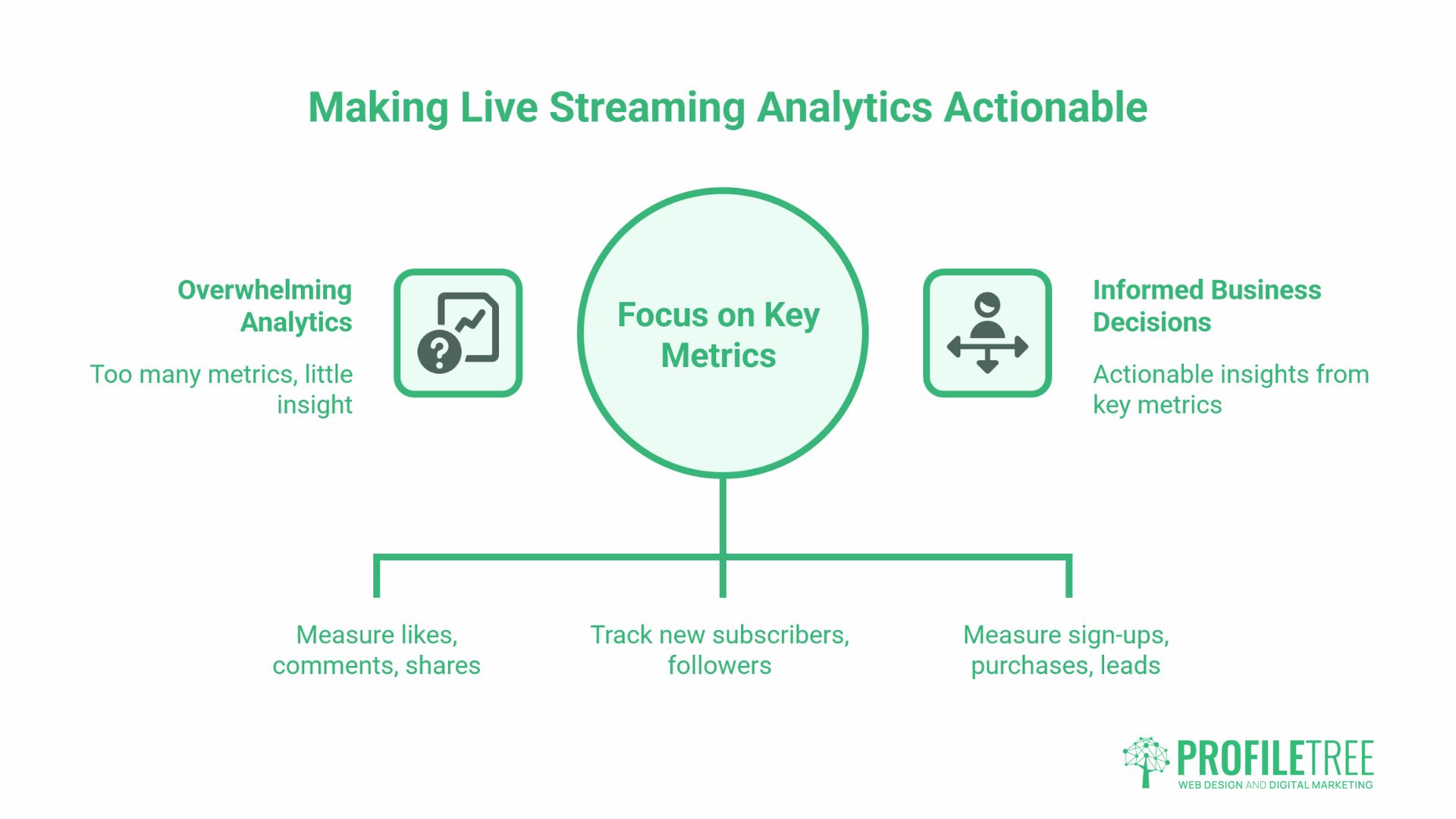
Platform analytics for live streaming measure different things, and not all of them are equally useful for business decision-making. The metrics worth tracking and what each actually tells you:
- Peak concurrent viewers: The highest number of people watching simultaneously. This tells you when your content was most engaging and helps you time future streams. It does not tell you about total reach.
- Average watch time: The average duration a viewer stayed in the stream. A strong indicator of content quality. If average watch time drops sharply at a specific point, something in the content caused disengagement, which is worth investigating in the recording.
- Total view count: Includes both live viewers and those who watched the recording afterwards. For YouTube Live in particular, post-stream views often significantly exceed live viewers.
- Engagement rate: Comments, reactions, and shares as a proportion of viewers. Higher engagement indicates the content prompted a response, which is useful for comparing content types and topics across streams.
- Chat activity by timestamp: LinkedIn and YouTube both let you review chat activity along the recording timeline. Spikes in chat volume identify the moments that generated the most audience response.
None of these metrics is meaningful in isolation from your business objective. A training webinar with 40 engaged attendees who convert at a high rate is more valuable than a product announcement with 400 passive viewers who take no action. Define what success looks like for each stream before you go live, and measure against that definition rather than chasing raw view counts.
For businesses running live streaming as part of a broader social media marketing programme, monthly comparison across streams reveals trends that single-stream data cannot: which topics draw larger audiences, which formats retain viewers longest, and which platforms produce the most post-stream engagement from the recording.
Conclusion
Live streaming for business works best when it is treated as a planned content channel rather than a one-off broadcast. Choose the platform that matches your audience, prepare the technical basics before you go live, promote in advance, and build a repurposing workflow so the recording keeps delivering after the stream ends. The businesses seeing the strongest results from live video are not necessarily the ones with the most sophisticated setups; they are the ones that show up consistently and learn from each broadcast. Start with one format, measure what matters, and build from there.
FAQs
Do I need a licence to live stream commercially in the UK?
For most business live streams on social platforms, no licence is required. Ofcom’s Broadcasting Code covers licensed television and radio services, not content published on YouTube, LinkedIn, or Facebook. If your stream includes licensed music or retransmitted broadcast content, separate rights clearance is required.
What upload speed do I need for a professional-quality stream?
A minimum of 5–10 Mbps upload on a wired Ethernet connection for stable 1080p. Many standard UK broadband packages offer 2–5 Mbps upload, which is marginal. Test your actual speed on the day rather than relying on your ISP’s advertised maximum.
Which platform is best for B2B live streaming?
LinkedIn Live for professional audiences and thought leadership content. YouTube Live for long-term content value, since recordings are permanent and searchable. The right choice depends on where your specific audience is already active.
How far in advance should I promote a business live stream?
Begin at least seven days out, two weeks for a significant event. Lead with email, follow with social, and send a final reminder on the day. Promotion, directing people to the recording after the stream ends, is worth including and often overlooked.