
Content Calendar Publishing: A Step-by-Step Guide
Table of Contents
Content calendar publishing is the process of planning, scheduling, and delivering content across every channel your business uses. Done well, it turns reactive, inconsistent output into a system that builds authority and drives traffic. Done poorly, it leaves content scattered with no clear strategy holding it together.
Most guides on this subject focus on the spreadsheet. This one focuses on the publishing system behind it: how to build a workflow that actually holds up under pressure, how to manage a multi-channel content calendar without it becoming a full-time job in itself, and how to plan content around the UK commercial calendar rather than a generic template designed for a different market.
ProfileTree works with SMEs and marketing teams across Northern Ireland, Ireland, and the UK on content planning and publishing. The same structural problems come up repeatedly, and this guide addresses them directly.
What Is Content Calendar Publishing?
Content calendar publishing refers to the end-to-end process of planning what content to create, scheduling when and where it’ll be published, and managing the workflow that gets it from brief to live. It goes beyond a basic posting schedule by connecting each piece of content to a goal, an audience, a channel, and an approval process.
The distinction matters because many businesses have a content calendar but don’t have a content calendar publishing system. They know what they want to create, but the process of getting it reviewed, formatted, scheduled, and measured breaks down between the idea and the live URL. A publishing system closes that gap.
Editorial Calendar vs. Content Calendar: What is the Difference?
An editorial calendar operates at the strategic level: it maps campaign themes, content pillars, and publishing priorities across a quarter or a year. A content calendar is tactical: it lists individual pieces, assigned owners, deadlines, channel-specific details, and publish dates.
For most SMEs, a single integrated document handles both functions well. Larger organisations with multiple product lines may need the two layers sitting separately, with the editorial calendar feeding the content calendar. Start with one document and add layers only when the team size or output volume genuinely requires it. The goal is a system people will actually use, not an elaborate structure that gets abandoned after six weeks.
Why Content Calendar Publishing Matters for Multi-Platform Delivery
Multi-platform content delivery without a calendar behind it produces inconsistent output and missed opportunities. Content gets posted when someone has a spare moment, rather than when the audience is most active. Brand voice drifts between platforms because there’s no agreed framework. Analytics become meaningless because there’s no baseline of consistent activity to measure against.
A structured approach to content calendar publishing solves all three problems. It creates a predictable publishing rhythm audiences come to rely on, a shared framework that keeps brand voice consistent across channels, and a record of what was published and when that makes performance analysis meaningful. For businesses managing multi-platform content delivery across five or more channels, the publishing calendar is the single source of truth that the whole team works from.
The Core Elements of Effective Content Calendar Management
Content calendar management works when the structure is simple enough to maintain and detailed enough to be useful. Too few fields, and it’s a rough ideas list. Too many, and it turns into a reporting burden nobody keeps current.
Essential Fields for Every Content Calendar
These are the fields that every content calendar publishing system needs, regardless of team size or channel mix:
- Content title and format (blog post, email, LinkedIn post, video, reel)
- Target keyword or campaign theme
- Author or content owner
- Draft deadline and publish date
- Channel and account
- Status: idea, in progress, in review, scheduled, or live
- Link to the live URL or asset once published
Fields That Improve Multi-Channel Content Calendar Performance
Beyond the basics, the most effective multi-channel content calendar setups also include the target audience segment for each piece, the goal it supports (organic traffic, lead generation, engagement, or email click-through) and the internal links planned before writing starts. Without clear goals per piece, you can’t meaningfully measure whether your content calendar publishing effort is actually delivering results.
Adding a repurposing column is worth two minutes per entry for most teams. A 1,500-word blog post can become a LinkedIn article, three short social posts, an email newsletter section, and a video script. Mapping that in the calendar at the planning stage means the asset gets full value across every channel, rather than sitting underused while the social queue runs dry.
| Channel | Content Format | UK Optimal Frequency | Primary Audience | Publishing Goal |
|---|---|---|---|---|
| Blog | Long-form article | 1–2x per week | Search audiences, SMEs | Organic traffic |
| Short video/reel | 3–4x per week | B2B decision makers | Brand authority | |
| Email newsletter | Curated digest | Fortnightly | Warm leads, existing clients | Nurture and retention |
| Instagram / TikTok | Short video / reel | 4–5x per week | B2C, younger demographics | Reach and engagement |
| YouTube | Tutorial/case study video | 1–2x per month | Research-phase buyers | Trust and depth |
Building Your Multi-Platform Publishing Workflow Step by Step
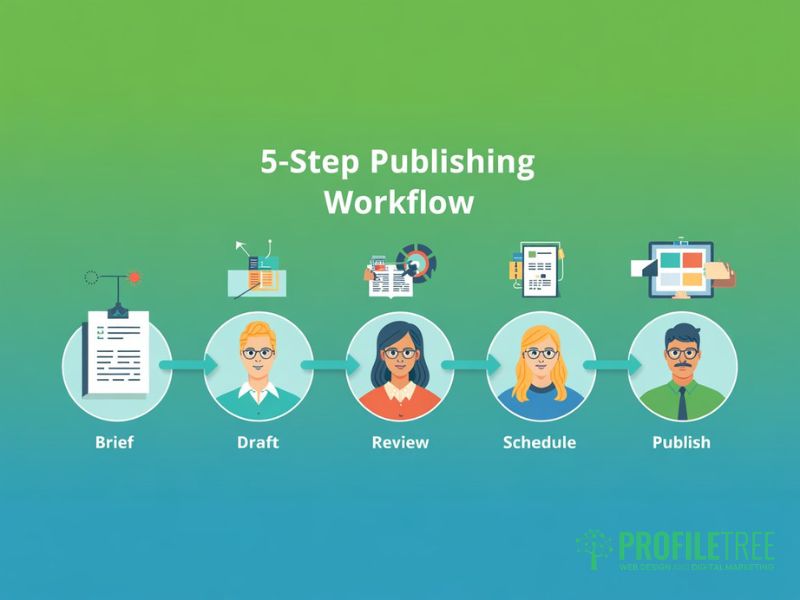
The publishing workflow is what separates a content calendar that drives consistent output from one that sits ignored. Without a defined process for getting content from brief to live, the calendar becomes aspirational rather than operational. These steps create a repeatable system for content calendar publishing that holds up under the pressure of a busy team.
Step 1: Audit Your Channels and Realistic Capacity
Before building your publishing schedule, establish what you’re actually publishing on and how much your team can produce consistently at quality. An ambitious content calendar publishing plan that produces rushed output does more damage than a modest one delivered well. List every channel, the content format it needs, the current posting frequency, and who owns it.
This audit usually surfaces two things: channels that aren’t getting the attention they need, and effort being spent on platforms that aren’t driving results. Your analytics will tell you which channels are earning traffic, engagement, and leads. Use that data to prioritise your publishing schedule rather than trying to maintain a full presence everywhere at the same level.
Step 2: Set a Planning Horizon and Sprint Structure
A three-month strategic view combined with two-week tactical sprints works well for most teams managing a multi-channel content calendar. The quarterly view aligns with business cycles and campaign planning. The fortnightly sprint keeps the team focused without locking in content so far in advance that it loses relevance by the time it’s published.
For UK businesses, it’s worth aligning quarterly planning with the April-to-March fiscal year rather than the calendar year. This makes it easier to connect content investment to budget cycles and to plan ahead for financial year-end content, which reaches a genuinely high-intent B2B audience in late February and March.
Step 3: Define the Approval Chain Before It Is Needed
The approval chain is where multi-platform content delivery breaks down most often. Content sits in review while the publish date passes, or goes live without sign-off because a deadline was pressing. Map the chain before you start creating. For each content type, identify who drafts, who reviews for accuracy, who approves for brand, and who schedules the post.
Build review time into the calendar itself. If a blog post needs two days of review, the draft deadline is two days before the publish date. This sounds obvious, but it’s ignored in most publishing schedules until the first missed deadline makes it unavoidable.
Step 4: Assign Named Owners for Every Piece
Every piece of content in your multi-channel content calendar needs a named owner from ideation to go-live. Without clear ownership, tasks fall through when schedules get busy. A weekly five-minute standup or a shared Monday morning status update catches blockers before they become missed deadlines. The calendar is only useful if its status fields are accurate, and accurate status requires someone accountable for each entry.
Step 5: Use Staging and a Ready-to-Publish Checklist
Publishing directly from draft to live is a risk most teams underestimate. CMS staging lets you check formatting, test internal links, verify metadata, and preview the page before it’s indexed. For social channels, scheduling tools let you prepare posts during quiet periods and publish at peak engagement windows without manual intervention.
Build a five-point ready-to-publish checklist into your content calendar publishing workflow. Before any piece goes live: confirm the SEO title and meta description are filled in, verify at least one internal link is in place, check image alt text is added, apply a UTM tracking tag where relevant, and preview on mobile. These checks take 2 minutes per piece and prevent small errors that accumulate under a high-volume publishing schedule.
Content Planning and Publishing Around the UK Calendar
One of the most consistent gaps in content planning and publishing guides is the absence of UK-specific context. Most templates and tools are built for the US market, which means UK and Irish marketing teams are adapting a calendar designed around different holidays, a different fiscal calendar, and different cultural reference points. A cross-platform content calendar built for UK audiences needs to account for several things that generic templates ignore.
UK Bank Holidays and Their Effect on Your Publishing Schedule
UK bank holidays affect both content performance and team capacity in ways that make content calendar management genuinely different here. England, Scotland, Northern Ireland, and the Republic of Ireland each have different bank holiday dates. A Northern Ireland business publishing around the July fortnight needs a completely different plan to a London agency treating that as a normal working period.
For B2B content, plan around reduced engagement in the week before and after bank holidays. For B2C, many of those dates are peak commercial moments that demand campaign content prepared well in advance. Build a UK and island-specific bank holiday map into your publishing schedule at the start of each year. For Northern Ireland businesses, that means accounting for both NI and ROI public holidays if you’re serving clients across the island.
Aligning Content Calendar Publishing with the UK Fiscal Year
The UK financial year runs from April to March. For B2B content targeting procurement managers, finance directors, and business owners, this calendar matters more than the calendar year when it comes to content planning and publishing. Budget sign-off typically happens in January and February, with new spending available from April. Content addressing new financial year planning, published in late February and March, reaches a high-intent audience at exactly the right moment.
Align your content calendar management cycle with the fiscal year rather than the calendar year. This puts strategic planning in January rather than December, when most teams aren’t available, and creates a natural rhythm for quarterly content reviews that connects directly to business performance.
UK-Specific Dates Your Publishing Schedule Needs
Several dates matter to UK and Irish content performance that rarely appear in generic multi-channel content calendar templates. Mother’s Day falls in March in the UK and Ireland, not May as in the US. The academic year runs from September to July, which shapes search behaviour differently from a US-structured calendar. Budget announcements, elections, and sector-specific regulatory changes create content opportunities that need reserved space in the publishing schedule for reactive work.
Build a rolling reactive buffer of 10 to 15 per cent of your publishing slots. These are held open for news-led content, fast-turn commentary, and responses to industry developments. A fixed publishing schedule with no buffer forces a choice between missing a timely opportunity or publishing something that wasn’t ready. Neither outcome serves the audience.
Agile Publishing: Keeping the Calendar Flexible
A content calendar is a plan, not a contract. The teams that get the most value from their content calendar publishing systems treat the calendar as a living document rather than a fixed schedule. Agility is built in by design, not added when something goes wrong.
The 70/20/10 Publishing Framework
A practical model for managing a multi-platform content calendar is to divide your publishing schedule into three categories. Seventy per cent is planned content: the pieces you know about weeks in advance, mapped to campaigns, SEO goals, and editorial themes. Twenty per cent is updated or repurposed content: existing pieces being refreshed, adapted for a new channel, or extended based on performance data. Ten per cent is reactive: space held for news-led posts, trend responses, and commentary on sector developments.
This framework prevents the two failure modes that hit most content calendar management setups. The first is rigid over-planning, where the publishing schedule is so full there’s no room to respond to something genuinely interesting happening in your industry. The second is reactive chaos, where the plan gets abandoned every time something comes up, and the consistency that builds audiences disappears.
When to Pivot the Publishing Schedule
When a news event or industry development breaks, the decision to change the calendar needs to happen quickly against clear criteria. Three questions: Is this genuinely relevant to our audience? Can we add real perspective rather than just reacting for the sake of it? Do we have the capacity to produce something worth reading in time? If the answer to all three is yes, move a lower-priority piece and publish the reactive content. If any answer is no, hold the schedule and note the topic for a considered piece later.
A two-paragraph social post that adds a real insight is worth more to your content calendar publishing record than a 1,500-word article that says nothing new. Speed without substance doesn’t build authority.
Maintaining Quality and Brand Voice Across Every Platform
Managing content quality across a multi-channel content calendar is harder than it sounds. Each platform has its own tone conventions, audience expectations, and format requirements. What performs on LinkedIn reads poorly on Instagram. A long-form blog post needs fundamentally different treatment than a 60-second video script. Consistency of quality doesn’t mean identical content everywhere; it means the same standards, values, and level of care applied to every format.
A shared style reference covering brand voice, tone ranges by channel, and examples of what good looks like for each format does more practical work than an exhaustive brand guidelines document.
Cross-Platform Content Adaptation Without Losing Brand Coherence
When managing cross-platform content calendar delivery, the practical risk is that content adapted for different channels starts to diverge in voice and positioning. A LinkedIn post repurposed as a tweet, then adapted into an email intro, then turned into a caption, can drift meaningfully from the original intent if there’s no framework holding the adaptation process together.
Build platform-specific tone notes into your content calendar management system. A single line per channel (‘LinkedIn: formal and evidence-led’, ‘Instagram: direct and visual’, ‘Email: conversational and action-oriented’) is enough to guide the person adapting content without requiring a full brief for every derivative piece. Review brand voice alignment as part of your quarterly content calendar publishing audit rather than treating it as a one-off exercise.
Quality Checks Built Into the Publishing Workflow
Quality consistency comes from structural habits in the publishing workflow, rather than relying on each content creator to follow the guidelines from memory. A brief template for every piece of content, even short social posts, aligns the creator and the reviewer from the start. Three lines covering the goal, the audience, and the key message are enough for most formats.
For blog content, a post-draft checklist covering focus keyword placement, internal links, metadata, and image alt text catches the technical errors that undermine content calendar publishing performance. Running this check before scheduling rather than after publishing avoids the situation where a piece has been live for two weeks before someone notices the meta description is empty.
Content Calendar Tools: Choosing What Fits Your Team
The right tool for content calendar management is the one your team will actually use. A well-maintained spreadsheet outperforms an underused enterprise platform every time. That said, the right tool does reduce friction, and for UK teams, there are specific considerations around data residency and GDPR compliance worth checking before committing to a platform.
Starting with Google Sheets or Notion
For teams of one to five managing a multi-channel content calendar, Google Sheets is the most practical starting point. It’s free, collaborative in real time, and flexible enough to handle most content calendar publishing requirements. Build a master tab with all content pieces, then add filtered views by channel, by owner, and by status. A separate tab works well as your UK editorial calendar, mapping bank holidays, campaign themes, and quarterly goals against the publishing schedule.
Notion works well for teams that want to combine content calendar management with asset storage and briefs. Its database views let you switch between a calendar view for scheduling and a table view for status tracking without duplicating data. Both Google and Notion store data on their own servers; check whether your organisation’s data policies require UK or EU data residency before choosing.
| Tool | Best For | GDPR / Data Residency | Approx. Cost (GBP) |
|---|---|---|---|
| Google Sheets | Small teams, free setup | EU hosting available via Workspace | Free / from £4.60/user/month |
| Notion | Teams combining planning and asset storage | US servers by default; check Enterprise plan | Free / from £8/user/month |
| CoSchedule | Marketing teams with social scheduling needs | US-based; GDPR compliance via DPA | From approx. £25/user/month |
| Hootsuite | High-volume social publishing schedules | GDPR-compliant; EU data hosting available | From approx. £80/month (team plan) |
When to Move to a Specialist Platform
Once a team is managing more than five channels simultaneously, the manual overhead of a spreadsheet-based multi-platform content calendar becomes a genuine drag on output. Specialist platforms earn their cost through automated scheduling, approval workflow features, and analytics dashboards that pull performance data across channels into one view. Before committing, check CMS integration, UK pricing in GBP, and data hosting location.
ProfileTree’s approach to content planning and publishing for SME clients uses a modular system: a master editorial calendar for strategy, channel-specific scheduling tools for execution, and a shared folder for review and approval. The same outcome is achievable with free tools, provided the process discipline is in place. If your team needs support building a content calendar management system that works for your size and channel mix, our digital marketing training programmes cover this in practical detail.
Measuring Content Calendar Publishing Performance
A content calendar publishing system only improves over time if you’re measuring what’s working and feeding that back into planning. Post-publishing analysis closes the loop between content strategy and content output, and it’s the step most teams skip.
The Metrics That Matter by Channel
Trying to track every available metric across a multi-channel content calendar creates noise rather than insight. Choose two or three metrics per channel that connect directly to your goals. For blog content, organic search impressions, ranking positions for target keywords, and time on page tell you whether content is being found and whether it’s relevant. For social content, reach and engagement rate indicate whether the content resonates with the audience. For email, open rate and click-through rate are the primary signals worth tracking week to week.
Google Search Console is particularly useful for identifying queries a page is starting to rank for that weren’t in the original brief. That’s often a signal the topic has more depth worth covering in an extended section or a follow-up piece, and it’s one of the more useful inputs into your cross-platform content calendar planning cycle.
The Quarterly Content Calendar Review
Every quarter, review your content calendar publishing record against the goals you set during planning. Which pieces drove organic traffic? Which social formats generated the most engagement? Which email subject lines produced the highest open rates? Use those answers to inform next quarter’s planning rather than just replicating what worked without understanding why.
For UK businesses, the quarterly review cycle naturally aligns with the fiscal calendar. A review in late March covers the full financial year and feeds directly into new-year content investment and Q1 strategic priorities. Build this as a fixed calendar event. A content team that reviews consistently improves year on year. One that plans to review eventually stays at the same level indefinitely.
Getting Your Content Calendar Publishing System Right
Effective content calendar publishing is less about the tool you choose and more about the discipline behind it. The spreadsheet is just the visible layer. The real work is in the workflow: the approval chain, the quality checks, the quarterly review, and the agility to adapt the publishing schedule when circumstances change.
Start with a structure your team will actually maintain. Add complexity only where it reduces friction, not where it adds it. Review the calendar format every quarter alongside the performance data and adjust based on what’s working. A cross-platform content calendar that improves with each cycle builds compounding value over time in a way that a perfect-looking system nobody maintains never will.
If you’re building out a content strategy for your business and need support with both the planning structure and the content itself, ProfileTree’s content marketing services cover everything from content calendar management through to full production and multi-platform publishing. We work with SMEs across Northern Ireland, Ireland, and the UK, and the starting point is always the same: understanding what you’re trying to achieve before deciding what to publish.
FAQs
1. What should be included in a multi-platform content calendar?
At minimum, a multi-platform content calendar needs the content title and format, the target channel, the assigned owner, the draft deadline, the publish date, and a status field. For more structured content calendar management, you’ll want to add the target keyword or campaign theme, the goal for each piece, planned internal links, and a repurposing column to map how each piece will be adapted across other channels. The most useful fields are those that prevent decisions from having to be remade at the point of publishing.
2. How far in advance should a publishing schedule be planned?
A three-month strategic view combined with two-week tactical sprints is the model that works best for most teams managing a cross-platform content calendar. Plan themes and campaign priorities quarterly, then populate specific pieces fortnightly. This keeps content relevant without locking in topics so far in advance that they’ve lost their timeliness. For seasonal campaigns tied to UK-specific dates, including financial year-end and bank holidays, plan six to eight weeks ahead to allow for production, review, and scheduling.
3. How do I manage a content calendar for a small team?
Focus on low-friction tools and a single source of truth. Google Sheets handles content calendar management well for teams of one to five. Keep the structure simple: one row per piece, a status column updated regularly, and a weekly five-minute review to check the next fortnight’s publishing schedule. The biggest risk for small teams is an over-ambitious content planning and publishing commitment followed by calendar abandonment. A modest, consistently maintained calendar delivers more value than an elaborate system that collapses after six weeks.
4. Do I need separate calendars for each social media platform?
Not necessarily. One integrated master multi-channel content calendar is usually more manageable and does a better job of maintaining brand voice consistency. Use separate columns or filtered views for each platform rather than separate documents. The exception is very high-volume social publishing. If you’re producing more than 20 social posts per week, a dedicated social scheduling tool with its own calendar view is worth adding as a layer on top of the master content calendar.
5. How do I handle UK bank holidays in my content planning and publishing?
Map all UK and ROI bank holidays at the start of each year and mark them in your publishing schedule. For B2B content, treat the days immediately before and after bank holidays as lower-engagement periods and avoid major launches or campaign activity in those windows. For B2C content, many bank holidays are peak commercial moments that need campaign content ready two to three weeks in advance. For Northern Ireland businesses, the content calendar management process needs to account for both NI and ROI public holidays if you’re serving clients across the island of Ireland.