
AI Website Design: Builders, Workflows and Professional Strategy
Table of Contents
AI website design has moved well beyond novelty. Platforms that once required a developer and weeks of work can now produce a functional, visually coherent website in hours. For small and medium-sized businesses across the UK and Ireland, that shift is significant. But there’s a real gap between what an AI website builder produces and what a high-performing site actually requires, and most guides online skip straight past it.
This article looks at how artificial intelligence website design tools are changing the build process, which platforms are worth evaluating if you operate in the UK or Ireland, and what a professional AI web design workflow looks like when AI tools are part of the team rather than a replacement for it. A sound grasp of artificial intelligence website design separates businesses that use these tools well from those that publish underperforming sites and wonder why. It also addresses the compliance and technical gaps that trip up businesses that rely too heavily on generated output.
What AI Website Design Actually Means
AI website design covers the use of artificial intelligence tools to assist, automate, or generate elements of the website creation process. The range is wide: all-in-one AI website builders that produce full layouts based on a few questions, content generation tools, image creation tools, and code assistants that speed up a developer’s workflow.
The distinction worth drawing early is between AI as a builder and AI as a collaborator. Platforms such as Wix ADI act as a complete AI website builder, handling design decisions on the user’s behalf. Design-assist tools such as Framer or Relume use AI tools to accelerate a designer’s work without replacing their judgment. Knowing which category a platform sits in helps set realistic expectations before committing.
Why AI Website Design Matters for UK SMEs
For smaller businesses with limited budgets, AI website design makes professional-quality web design more accessible than it has ever been. A sole trader in Belfast who could not previously afford a bespoke build now has real options. The relevant question isn’t whether these AI tools are useful (they are), but how to use them without accumulating technical debt that costs more to fix later than a professional build would have cost in the first place.
AI website design tools add genuine value in three areas: speed of iteration, producing multiple website design layout concepts in minutes; content scaffolding, generating draft copy that a human then refines; and SEO structure, with some platforms now suggesting heading hierarchies and meta structures based on your topic. None of these replaces strategic thinking, but they reduce the time between brief and working prototype considerably.
Where Artificial Intelligence Website Design Falls Short
Artificial intelligence website design tools learn from patterns in existing sites and reproduce them. That is useful, but it means they tend toward conformity. If your brand has a genuinely distinctive identity, AI website builders will often pull the web design toward the average. They also lack the contextual understanding that makes a website actually convert: knowing which call to action belongs above the fold for a specific audience, or how to structure a service page for a Belfast accountancy firm rather than a generic business.
The other consistent gap is technical quality. AI-generated code can be bloated, poorly structured for Core Web Vitals performance, and inconsistent in accessibility. A site that looks polished in a preview but loads slowly on a mobile connection is a problem that good aesthetics alone will not fix. Applying AI tools without a professional review process at the end is one of the most common mistakes we see.
Top AI Website Builders for UK Businesses
The market for AI website builders has expanded quickly, and the options vary considerably in what they actually deliver. The table below compares the platforms most relevant to UK and Irish businesses, with specific attention to GDPR readiness and UK hosting options. Most competitor reviews omit both of these, which isn’t particularly helpful if you’re trading from a UK or Irish address and need your AI website design to be fully compliant.
| Platform | Best For | GDPR Ready? | UK Hosting? | Ease of Use (1–10) | Monthly Cost |
|---|---|---|---|---|---|
| Wix ADI | Quick launch, SMEs | Partial | No (US-based) | 9 | From £8/mo |
| Webflow | Design control + AI | Yes (EU servers) | Yes | 6 | From £14/mo |
| Framer | Prototyping, portfolios | Partial | No | 7 | From £15/mo |
| 10Web | WordPress AI builds | Yes | EU available | 7 | From £10/mo |
| Jimdo | Micro-businesses | Yes (DE-based) | Yes (EU) | 9 | From £9/mo |
| TeleportHQ | Developers, code export | Partial | No | 5 | Free + paid tiers |
Wix ADI: Best for Quick Launches
Wix’s Artificial Design Intelligence approach is one of the most widely used AI website builders for small businesses. It asks users a series of questions and automatically generates a complete website design. For non-technical users who need an online presence quickly, it is the most intuitive entry point into AI website design, and its built-in AI tools cover layout, copy suggestions, and basic SEO.
The limitation for UK businesses is data residency. Wix stores data on US servers by default, which creates complications for GDPR compliance when collecting user data, email addresses, or processing payments. For a Northern Ireland retailer needing a basic web design with no complex data collection, Wix ADI can do the job. For anything involving customer accounts or financial transactions, the hosting situation needs to be reviewed carefully before launch.
Webflow: Best for Design Control
Webflow occupies a middle ground between a fully automated AI website builder and a professional web design development platform. Its AI tools assist with layout suggestions and copy generation, but the platform gives designers far more control over the final website design than Wix ADI. Webflow offers EU server options, which is a meaningful advantage for businesses that take GDPR compliance seriously.
The trade-off is a steeper learning curve. Webflow isn’t designed for non-technical users working independently; it’s designed for designers who want to reduce repetitive tasks while retaining creative control. If you’re working with a web design agency, Webflow is a strong platform choice because it enables genuinely bespoke website design alongside AI-assisted speed.
10Web: Best for WordPress Builds
10Web uses AI tools to generate WordPress websites automatically, which matters because WordPress remains the most SEO-friendly and extensible CMS for most businesses. For companies that want the long-term advantages of WordPress (plugin support, SEO control, content flexibility) but need the speed of an AI website builder, 10Web bridges that gap effectively.
That said, the generated sites still require SEO configuration, image optimisation, and an accessibility review before they perform at a competitive level. What you get from 10Web is a solid AI website design starting point, not a finished product ready to rank. Treating the AI output as a first draft rather than a final deliverable is the right way to approach it.
The Professional AI Web Design Workflow
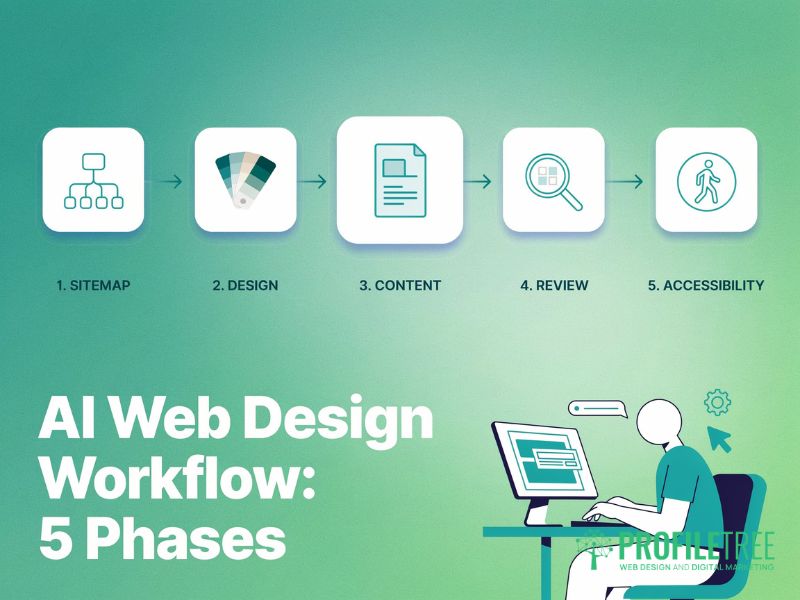
The biggest mistake businesses make with AI website design is treating it as a single step: generate the site, publish the site. AI website builders are genuinely strong at certain stages of the process and weak at others. A professional AI web design workflow uses AI tools to deliver speed and applies human expertise where it changes outcomes.
Phase 1: Structure and Sitemap
Before opening any AI website builder, use AI tools to work through your information architecture. Tools such as ChatGPT are effective at generating sitemap suggestions, identifying the pages a site of a given type typically requires, and proposing heading hierarchies for key service pages. This phase is low-risk and high-value: you’re using AI tools to accelerate thinking, not to make final decisions about your web design.
For a Belfast professional services firm, this might mean prompting an AI tool to suggest the structure of a website for a ten-person accountancy practice serving SMEs, then refining the output against your actual service offering and the questions your clients really ask. It’s faster than starting from a blank document, and you’ll catch structural gaps in your web design that you might otherwise miss.
Phase 2: Visual Design and Layout
This is where AI website builders and design-assist platforms come in. Run the structure from Phase 1 through your chosen AI website design tool and generate initial layout options. Treat these as drafts, not final decisions. Review them against your brand guidelines and, most importantly, against what your ideal customer needs to see to take action.
The common failure at this stage is accepting the AI website builder’s default choices because they look polished. Polished isn’t the same as effective. A homepage web design that leads with your company history rather than a customer-focused value proposition won’t convert, regardless of how well the AI tools have styled it.
Phase 3: Content Generation and Refinement
AI tools produce serviceable first drafts for service pages, about sections, and blog posts. They reduce the time spent on the blank-page problem considerably. The output needs human refinement before publication: checking accuracy, removing generic phrasing, adding specific examples and local context, and ensuring the writing reflects your actual voice rather than the averaged-out style that AI website design platforms default to.
For businesses in Northern Ireland, this means adding the specific context that makes content genuinely useful to a local audience. An AI website builder writing content about web design for businesses in Belfast won’t know that your target clients are more likely to be manufacturing SMEs than tech start-ups unless you tell it explicitly. The AI tools are only as targeted as the input you give them.
Phase 4: SEO and Technical Audit
Once your AI website design structure and content are in place, an SEO and technical audit is essential before launch. AI website builders regularly produce sites with page loading issues due to unoptimised images and bloated code, missing or duplicate meta tags, inadequate alt text, and heading hierarchies that look correct visually but aren’t properly structured for search.
Core Web Vitals scores are consistently weaker on AI-generated sites than on professionally built ones. Checking your Largest Contentful Paint, Cumulative Layout Shift, and Interaction to Next Paint scores before launch isn’t optional if you want the site to rank.
Our team at ProfileTree regularly works with businesses that have used an AI website builder to get started and then need help addressing the SEO and performance gaps the generated web design introduced. You can learn more about how our search engine optimisation services handle these technical audits for SMEs across the UK and Ireland.
Phase 5: Accessibility Review
UK businesses are subject to the Public Sector Bodies Accessibility Regulations 2018, and private sector businesses face growing pressure from WCAG 2.2 standards. AI website design platforms frequently produce sites that fail basic accessibility checks: insufficient colour contrast ratios, missing ARIA labels, keyboard navigation issues, and images without meaningful alt text.
Running your AI website design output through an automated accessibility checker such as Axe or WAVE before launch will identify the most obvious problems. More complex issues around screen reader compatibility require human review that automated AI tools alone can’t provide. This step is short but essential before any web design goes live.
Compliance and Technical Considerations for UK and Irish Businesses
Most AI website design guides are written for a US audience and skip the regulatory context that matters for businesses operating under UK GDPR and EU GDPR. If you’re using an AI website builder to create a business site in Northern Ireland or the Republic, these considerations are not optional extras; they are part of a compliant web design process.
Data Residency and UK GDPR
When you use a US-based AI website builder, the data you enter, and potentially the data your site visitors generate, may be stored on servers outside the UK or EEA. Under UK GDPR, transferring personal data to countries without an adequacy decision requires specific safeguards. Many smaller businesses aren’t aware of this requirement until a data subject access request or complaint surfaces the issue.
Before committing to any AI website design platform, confirm where user data will be stored, whether the platform offers UK or EU server options, and whether its data processing agreement covers your obligations as a data controller. Platforms with EU or UK hosting (Jimdo and Webflow’s EU configurations, for example) simplify your compliance position for AI website design work considerably.
Cookie Consent and Privacy Policy
AI website builders generally include a privacy policy template and a cookie consent mechanism as part of the web design package. Neither is usually sufficient without review. Privacy policy templates are generic; they don’t reflect your specific data processing activities. Cookie consent banners need to meet the ICO’s requirements: genuine informed consent before non-essential cookies are set, with a clear mechanism to withdraw that consent.
A web design that uses Google Analytics without a properly configured consent mechanism is non-compliant regardless of how polished the AI website design looks. AI tools can produce the visual structure of a consent banner, but the legal configuration requires human review. This is a straightforward fix, but you need to know the requirement exists.
AI-Generated Imagery and Copyright
Using AI tools to generate images for your web design creates an unsettled copyright position in the UK. The Intellectual Property Office’s consultation on AI and intellectual property did not produce final legislation, and the legal position on ownership of AI-generated works remains contested. If you use AI-generated images commercially and ownership is later disputed, you may have limited legal recourse.
The safer approach to AI website design is to use AI-generated images for decorative, non-distinctive purposes and to rely on licensed photography or original images for core brand assets. If you do use AI tools for imagery, keep records of the platform used and the prompts applied.
Will AI Replace Web Designers?
The most common question that surfaces around artificial intelligence website design is whether it makes professional designers redundant. The straightforward answer is that AI web design tools have already changed what designers spend their time on, and they will continue to do so. They haven’t made human expertise unnecessary; they’ve redirected where that expertise is applied.
What AI website builders have done is automate the parts of web design that were repetitive and time-consuming: generating initial layout options, producing first-draft copy, resizing and formatting images, and writing basic CSS. A designer who previously spent two days producing a website design mockup can now produce three in the same time. That is a genuine productivity gain, not a threat to the profession.
What AI website design tools can’t do is understand your business well enough to make strategic decisions on your behalf. They don’t know that your Belfast manufacturing clients need to see sector-specific case studies before they’ll trust you, or that a particular web design call to action outperforms another because of how your specific audience makes purchasing decisions. Those judgements require experience, contextual knowledge, and the kind of iterative relationship that develops between a business and a design team over time.
The businesses that benefit most from AI website design are those that treat AI tools as part of a professional process, not a shortcut around one. If you’d like to understand how a Belfast-based team integrates AI into a professional build workflow, our web design services page covers how we approach this for SME clients across the UK and Ireland.
FAQs
1. What is the best AI website builder for UK businesses?
The best AI website builder depends on your goals and technical confidence. For all-in-one simplicity, Wix ADI and Jimdo are the most accessible options; for web design control and technical quality, Webflow or 10Web are stronger choices. None of these platforms produces publish-ready sites without professional review: they produce AI web design starting points that need refinement before going live.
2. Is AI website design good for SEO?
AI website design produces consistent SEO challenges: bloated code that harms Core Web Vitals scores, generic meta tags that miss actual search intent, and heading structures that look correct visually but fail search engine requirements. AI website design platforms include basic SEO tools, but none replace manual configuration through a plugin such as Rank Math or Yoast. Without a post-generation SEO audit, an AI website builder output will typically underperform against a professionally optimised competitor.
3. Can I use ChatGPT as an AI web design tool?
ChatGPT isn’t a visual AI website design tool, but it’s genuinely useful for the structural stages: generating sitemaps, drafting service page copy, writing basic HTML and CSS, and working through information architecture before you open an AI website builder. For visual web design, you will need a dedicated platform such as Webflow or Framer. Use ChatGPT for thinking and content, then hand off to a visual AI web design tool or a developer.
4. Who owns the copyright of an AI-designed website?
UK copyright law currently attributes authorship of computer-generated works to the person who made the arrangements for the work, meaning the person using the AI website builder or AI tools. This position is contested, and ongoing legal cases may change it. For core brand assets, using AI website design output as the basis creates real risk; for lower-stakes web design elements, the practical exposure is lower, but legal clarity is still absent.
5. Do I still need a web designer if I use an AI website builder?
For a basic online presence with no conversion goals and no SEO requirements, an AI website builder alone can be sufficient. For most business websites, professional web design input adds meaningful value in at least three areas: strategic structure (which pages and calls to action will actually serve your customers), technical performance (Core Web Vitals, accessibility, structured data), and ongoing SEO. The pattern we see at ProfileTree is businesses that use an AI website builder to get started quickly, then engage professional web design support once they have growth goals that the AI website design alone cannot reach without significant rework.