
Creating Images, Videos and Graphics for Social Media Success
Table of Contents
Visual content isn’t just complementary to your social media strategy—it’s the primary driver of engagement, with businesses using AI-generated visuals seeing dramatic improvements in reach and conversion.
The gap between businesses that thrive on social media and those that struggle often comes down to visual content quality and consistency. Northern Ireland SMEs face a particular challenge: competing against larger companies with dedicated design teams whilst managing limited resources and time. AI visual generation tools have democratised professional-quality content creation, but knowing how to prompt these tools effectively separates amateur results from stunning, brand-aligned visuals that stop scrollers in their tracks.
Visual content generates 94% more views than text-only posts, yet most businesses approach AI image generation with the same casual attitude they’d use for a Google search. The reality is that crafting effective prompts for visual AI requires understanding composition, colour theory, brand consistency, and platform-specific requirements. When ProfileTree works with Belfast businesses on their visual content strategies, we consistently see that prompt engineering makes the difference between AI-generated images that look obviously artificial and those that rival professional photography and design.
Understanding AI Visual Content Prompts: Beyond Basic Text-to-Image
Modern AI visual tools offer capabilities far beyond simple illustration, but accessing their full potential requires understanding how different models interpret prompts and generate imagery.
Each AI visual platform processes prompts differently. Midjourney excels at artistic, stylised imagery with exceptional lighting and composition. DALL-E 3 provides superior text integration and follows complex prompts more literally. Stable Diffusion offers unmatched customisation through fine-tuning and controlnets. Adobe Firefly integrates seamlessly with professional workflows whilst maintaining commercial safety. Understanding these differences fundamentally shapes how you structure your prompts.
The technical foundations matter because they influence prompt strategy. Diffusion models build images from noise, meaning they respond better to prompts describing overall composition and mood. Traditional GANs work by competing networks, making them excellent for photorealistic outputs when prompted with specific technical parameters. Newer architectures like CLIP-guided generation understand conceptual relationships, allowing more abstract and creative prompting approaches.
Your prompt structure should reflect your chosen tool’s strengths. For Midjourney, emphasise artistic style, lighting, and emotional tone: “Professional headshot of a Belfast entrepreneur, soft window lighting, confident expression, modern office background, shot on Hasselblad camera, subtle film grain, –ar 2:3 –style raw –v 6”. For DALL-E 3, focus on specific details and relationships: “Create a social media graphic showing a small business owner confidently using AI tools on a laptop, with holographic data visualisations floating above the screen, warm office environment, photorealistic style with purple and blue colour scheme matching ProfileTree branding.
Token limits and prompt weighting significantly impact results. Most platforms process prompts sequentially, giving more weight to earlier elements. Structure your prompts with critical elements first: subject, action, style, then supporting details. Understanding token economics prevents wasted generation credits on poorly structured prompts that bury important elements deep in the description.
Brand Consistency Through Strategic Visual Prompting
Maintaining visual brand identity across AI-generated content requires systematic prompt templates that encode your brand’s visual language into reusable frameworks.
Brand consistency starts with colour palette integration. Rather than hoping AI randomly selects appropriate colours, explicitly define them in your prompts: “Corporate headshot using ProfileTree brand colours: primary #0066CC blue, secondary #FF6B35 orange accents, neutral #F5F5F5 backgrounds, ensuring colour accessibility with WCAG AA contrast ratios”. This specificity ensures every generated image aligns with established brand guidelines.
Style consistency requires developing a visual vocabulary unique to your brand. Document specific descriptors that produce your desired aesthetic: “ProfileTree visual style: clean minimalist compositions, authentic natural lighting, Northern Ireland business environments, professional but approachable subjects, subtle depth of field, modern tech-forward elements integrated naturally”. These become building blocks for consistent prompt construction.
Create prompt templates for recurring content types. Product showcases might follow: “[Product] photographed on clean white surface, soft shadowless lighting, ProfileTree blue accent elements, minimal composition with generous negative space, professional product photography style, high resolution detail –ar 16:9”. Service illustrations might use: “Abstract representation of [service], geometric shapes in ProfileTree brand colours, modern flat design with subtle gradients, technology-themed icons, suitable for social media header –ar 3:1.
Develop negative prompts that explicitly exclude off-brand elements. These prove particularly valuable: “NOT: stock photo aesthetic, aggressive sales imagery, outdated technology, cluttered compositions, oversaturated colours, generic business people, American corporate settings”. Negative prompting helps AI avoid common pitfalls that dilute brand identity.
Platform-Optimised Visual Specifications

Each social platform has specific visual requirements and audience expectations that your AI prompts must address to maximise engagement and avoid cropping issues.
Instagram’s various formats demand precise aspect ratio specifications. Feed posts require “–ar 1:1” for square or “–ar 4:5” for portrait orientation. Stories need “–ar 9:16” with important elements centred to avoid interface overlay. Reels perform best with vertical video prompts: “Vertical video frame of Belfast cityscape, smartphone filming perspective, dynamic movement, suitable for 9:16 Instagram Reel with clear space at bottom for captions”. Include specific carousel considerations: “First slide of 10-slide carousel about web design trends, consistent visual theme throughout, numbered corner element, swipeable narrative flow.
LinkedIn’s professional audience expects different visual standards. Prompts should emphasise credibility and expertise: “Professional infographic about AI implementation statistics, corporate blue colour scheme, clean data visualisation, suitable for LinkedIn article header 1200x627px, readable at mobile size. LinkedIn native video performs exceptionally well: “Professional talking head video frame, modern office background with subtle depth, confident presenter positioning, broadcast quality lighting, space for LinkedIn caption overlay”.
TikTok’s vertical video dominance requires specific prompt considerations: “Energetic vertical video thumbnail, eye-catching moment capture, bold text overlay space, trending visual style, suitable for TikTok discovery page, movement implied in still frame –ar 9:16”. Understanding TikTok’s aesthetic helps: “Gen-Z appealing visual style, authentic rather than polished, bright engaging colours, dynamic composition suggesting movement, trending effect integration”.
Facebook’s varied formats need adaptable prompts. For Facebook ads: “Scroll-stopping product image, clear value proposition space, minimal text for 20% rule compliance, emotional connection with viewer, suitable for Facebook feed ad 1200x628px. For organic posts: “Shareable infographic about local business statistics, community-focused imagery, Northern Ireland landmarks subtly included, warm approachable colour scheme, clear branding without being promotional”.
Creating Coherent Visual Series and Campaigns
Successful visual content strategies require series of related images that maintain consistency whilst avoiding repetition, demanding sophisticated prompt variation techniques.
Series prompting starts with establishing a visual framework. Define core elements that remain constant: “Campaign constants: ProfileTree brand colours, modern minimalist style, Belfast business context, consistent lighting direction from upper left, subtle tech elements integrated”. Then specify variables: “Variable elements: different business owner demographics, varying industry settings, unique AI implementation scenarios, diverse emotional expressions from confidence to curiosity”.
Batch generation strategies maximise efficiency whilst maintaining quality. Structure prompts for systematic variation: “Create 5 social media graphics for AI training series: 1) Entrepreneur discovering AI possibilities, expression of excitement 2) Team collaborating with AI tools, productive atmosphere 3) Data visualisation showing business growth, upward trends 4) Customer service enhanced by AI, satisfaction visible 5) Future-forward business powered by AI, innovative environment. Maintain consistent: ProfileTree colour scheme, clean modern design, Northern Ireland business setting throughout all variations”.
Storyboarding for video content requires sequential prompt planning. Map out visual narratives: “Frame 1: Establishing shot of Belfast business district, morning light Frame 2: Close-up of hands typing on laptop, AI interface visible Frame 3: Medium shot of business owner reviewing AI-generated insights Frame 4: Wide shot of team implementing AI recommendations Frame 5: Success metrics displayed on screen, celebration atmosphere”. Each frame prompt must consider transition and continuity.
Template systems for recurring content accelerate production whilst maintaining quality. Develop modular prompt components: Base: “[Content type] for ProfileTree social media” + Subject: “[Specific topic or service]” + Style: “Modern minimalist design language” + Colours: “Brand palette with [specific emphasis]” + Context: “[Platform] optimised at [dimensions]”. This modular approach enables rapid generation whilst ensuring consistency.
Advanced Prompt Engineering for Photorealistic Results
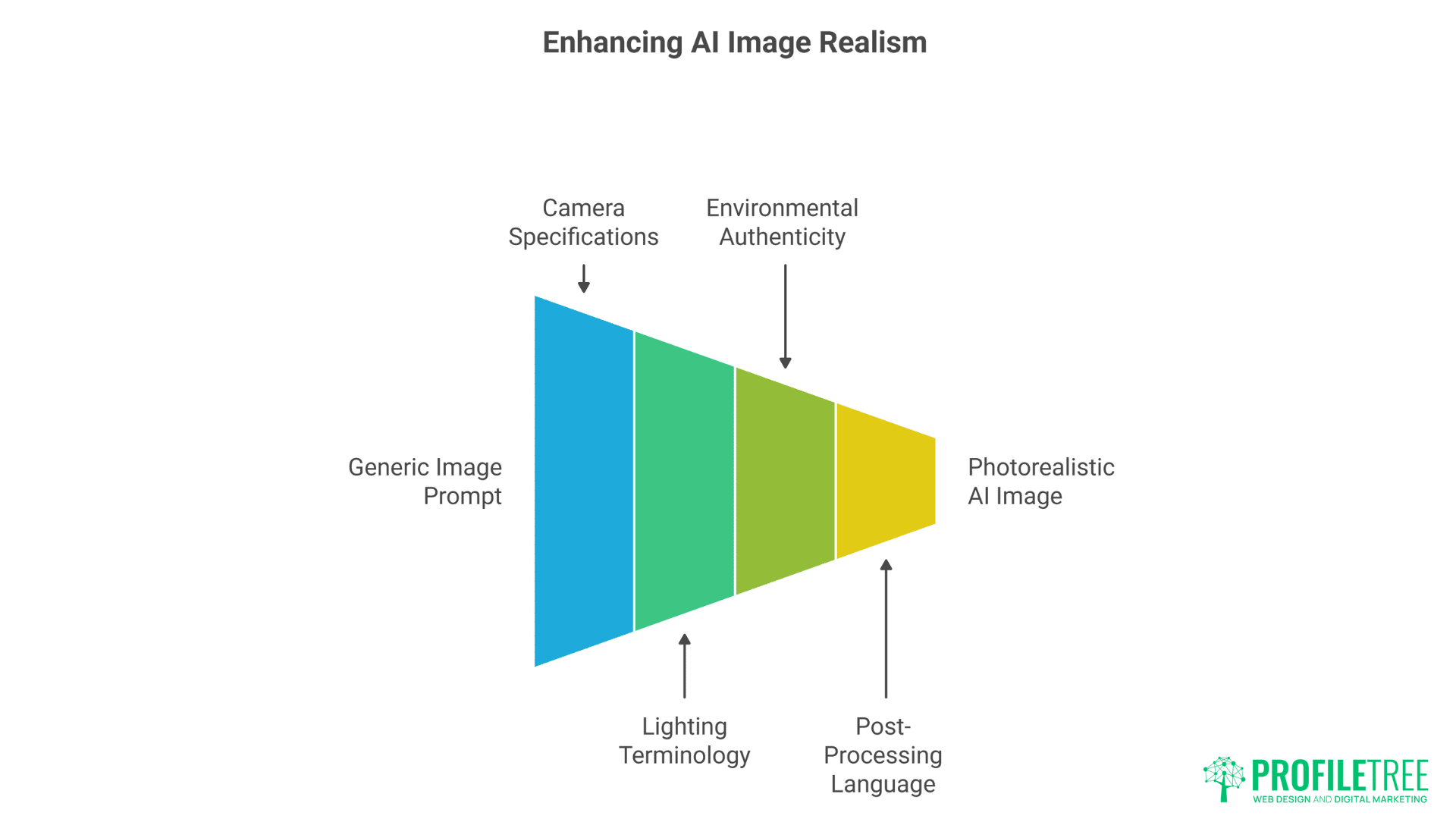
Achieving photorealistic AI-generated images that pass as genuine photography requires understanding camera technical specifications and lighting terminology.
Camera specification prompts dramatically improve realism. Instead of generic “professional photo,” specify: “Shot on Canon EOS R5, 85mm lens, f/2.8 aperture, shallow depth of field, natural skin tones, professional portrait lighting setup with key light at 45 degrees, fill light for shadow detail, rim lighting for separation, captured in RAW format”. These technical details guide AI toward photographic rather than illustrated aesthetics.
Lighting terminology transforms image quality. Master lighting patterns: “Rembrandt lighting with distinctive triangle on subject’s cheek, soft window light from north-facing window, golden hour warmth with long shadows, studio strobe with beauty dish modifier, practical lighting from visible sources in frame”. Each lighting style creates different moods and professional appearances.
Environmental authenticity requires specific location prompting. For Northern Ireland businesses: “Modern Belfast office space, Titanic Quarter visible through windows, contemporary Irish architecture, local business award plaques visible, subtle Ulster references without clichés, authentic UK power outlets and signage, weather-appropriate for Northern Ireland climate”. These details create believable local context.
Post-processing language adds final polish: “Colour graded for Instagram, subtle orange and teal colour grade, lifted blacks for modern feel, slight film grain for organic texture, professional retouching maintaining natural skin texture, calibrated for sRGB colour space, export quality for social media compression”. Understanding post-processing terminology helps achieve platform-ready results.
Motion and Animation Prompting Strategies
Static images no longer suffice for social media success—understanding how to prompt for motion graphics and animated content unlocks higher engagement potential.
Animation style prompts require specific movement descriptions. Rather than “animated logo,” specify: “ProfileTree logo animation: letters assembling from geometric particles, smooth ease-in-out timing, 3-second duration, suitable for video intro, modern tech aesthetic with subtle glow effects, loopable for Instagram Stories, exported at 60fps for smooth playback”. Movement descriptions guide AI animation tools effectively.
Cinemagraph prompts create striking hybrid content: “Professional portrait with subtle animated elements: hair gently moving in breeze, coffee steam rising continuously, computer screen content subtly changing, everything else frozen, perfect 3-second loop, exported as high-quality GIF or MP4 for social media autoplay”. These living photos significantly outperform static images.
Transition prompts for video content ensure smooth flow: “Morph transition from bar chart to pie chart, smooth 1.5-second transformation, data points maintaining position relationships, ProfileTree blue particles connecting elements, suitable for data visualisation video, broadcast-quality motion graphics”. Specific transition descriptions prevent jarring cuts.
Motion graphics templates streamline video creation: “Lower third animation template: name and title sliding in from left, subtle blur and opacity animation, ProfileTree brand colours, clean modern typography, 0.5-second entrance, 3-second hold, 0.3-second exit, suitable for interview videos”. Template prompts ensure consistent video branding.
Text Integration and Typography in Visual AI
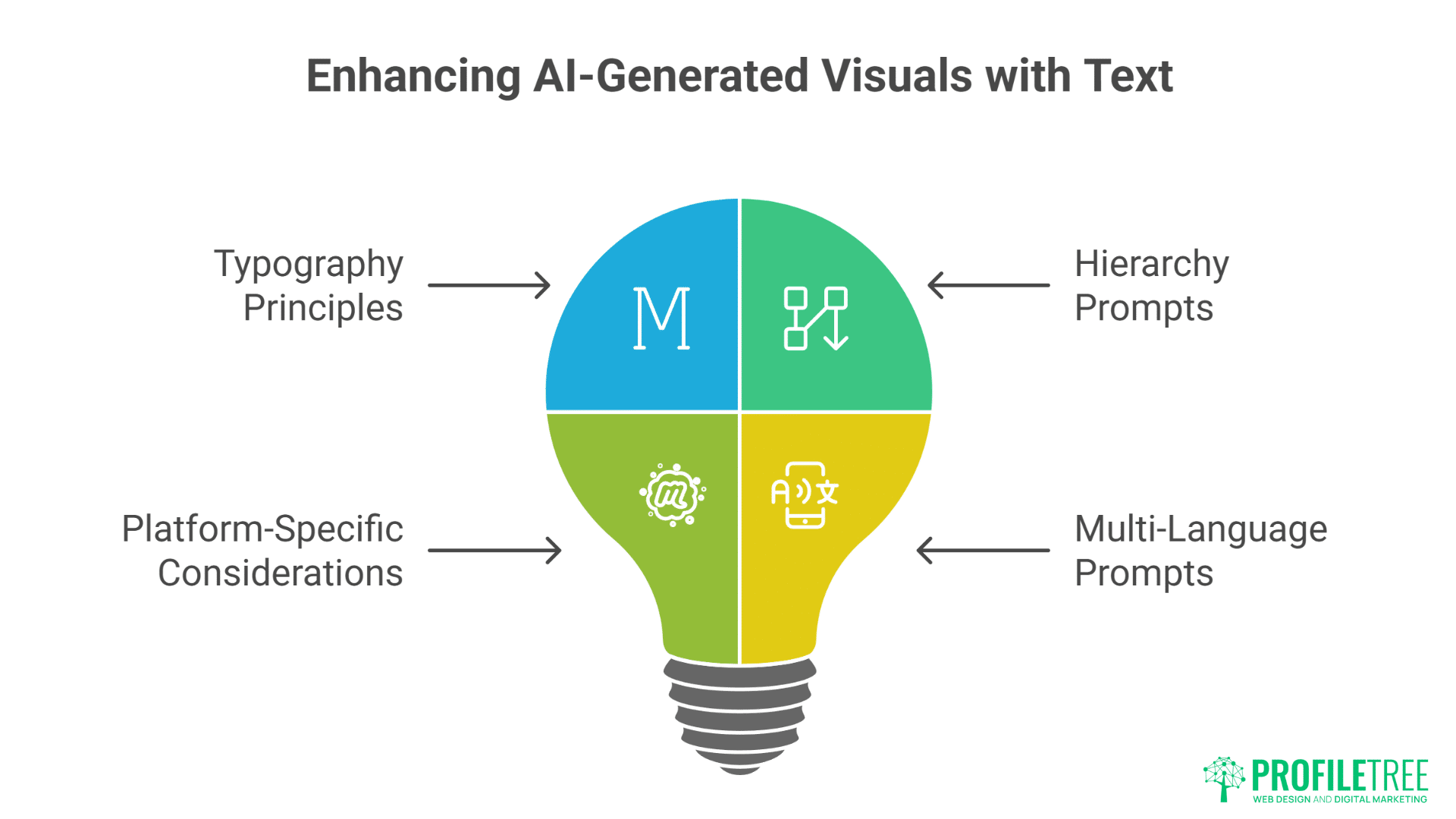
Incorporating text effectively in AI-generated visuals requires understanding typography principles and platform-specific legibility requirements.
Typography prompts must specify more than just words. Include font characteristics: “Bold sans-serif headline ‘AI TRANSFORMS BUSINESS’, modern geometric typeface similar to Montserrat, proper kerning and leading, high contrast against background, readable at thumbnail size, positioned using rule of thirds, subtle drop shadow for depth”. Specific typography instructions prevent AI’s often-poor text rendering.
Hierarchy prompts structure information effectively: “Social media carousel with three text levels: Primary headline 48pt bold, secondary subheading 24pt medium, body text 16pt regular, consistent left alignment, generous white space between sections, ProfileTree blue for headlines, dark grey for body text, ensuring mobile readability”. Clear hierarchy guides viewer attention.
Platform-specific text considerations vary significantly. For Instagram: “Quote graphic with text occupying maximum 40% of image area, centred composition with breathing room, readable without zooming on mobile, Instagram-safe fonts that display correctly across devices”. For LinkedIn: “Infographic with data labels clearly legible at feed preview size, professional typography avoiding decorative fonts, sufficient contrast for office environment viewing”.
Multi-language prompts require special attention: “Bilingual social graphic with English and Irish text, equal visual weight for both languages, culturally appropriate typography choices, proper special character support for Irish fadas, clear visual separation without hierarchy implying preference”. Belfast businesses serving diverse communities benefit from multilingual visual capabilities.
Ethical Considerations and Legal Compliance in AI Visuals
Creating AI-generated visual content responsibly requires understanding copyright, model releases, and ethical representation to protect your business from legal issues.
Copyright-safe prompting avoids legal complications. Never prompt for: “Image in the style of [specific photographer]” or “Recreate [copyrighted character/logo]”. Instead, use: “Professional business photography with clean commercial aesthetic, original composition avoiding any copyrighted elements, generic technology props without visible brands, model-released business people representations”. Understanding copyright boundaries protects your business.
Diversity and representation require thoughtful prompting: “Diverse group of Northern Ireland business owners including various ethnicities representative of Belfast demographics, range of ages from young entrepreneurs to experienced leaders, visible disabilities represented naturally, avoiding stereotypes whilst maintaining authenticity”. Inclusive visual content reflects modern business values.
Model release considerations affect people imagery: “Photorealistic business person composite that doesn’t resemble any specific individual, amalgamated features preventing identification, professional context without implying endorsement, suitable for commercial use without model release requirements”. Understanding when model releases apply prevents legal issues.
Disclosure requirements for AI-generated content evolve constantly. Include metadata prompts: “Generate with embedded metadata indicating AI creation, suitable for platforms requiring AI content disclosure, maintaining transparency whilst preserving professional appearance”. Stay informed about platform-specific AI content labelling requirements.
Optimisation and File Management for AI Visuals

Generating images is only half the battle—understanding how to optimise, organise, and repurpose AI visual content determines long-term success.
File format prompts optimise for intended use. Specify: “Export as PNG with transparent background for logo overlays, maximum quality preservation” or “JPEG optimised for web at 85% quality, progressive encoding for faster perceived loading, embedded colour profile for consistency across devices”. Format specifications prevent quality loss and compatibility issues.
Batch processing prompts streamline workflows: “Generate 10 variations maintaining core composition, varying: colour temperature slightly, crop for different aspect ratios, alternative text placements, seasonal background variations, different times of day. Export all at consistent quality settings with sequential naming convention”. Efficient batch generation maximises prompt investment.
Version control through prompt documentation proves essential. Maintain prompt libraries: “v1: Original product shot prompt [full prompt]. v2: Added ProfileTree branding elements. v3: Adjusted lighting for better social media visibility. v4: Platform-specific variations for Instagram/LinkedIn/Facebook”. Documented iterations enable consistent regeneration and improvement.
Asset organisation systems require naming convention prompts: “Generate with descriptive filename: ProfileTree_AITraining_SocialGraphic_LinkedIn_2025Q1_v1, include generation parameters in metadata, suitable for DAM system import, maintaining brand taxonomy structure”. Systematic organisation prevents lost assets and duplicated effort.
Measuring Visual Content Performance
Understanding which AI-generated visuals succeed requires systematic testing and measurement, informing future prompt refinement.
A/B testing prompts create controlled variations: “Generate two versions of same concept: Version A with warm colour temperature and smiling subjects, Version B with cool professional tones and serious expressions. Maintain identical composition, text, and branding. Track engagement metrics separately”. Systematic testing identifies winning visual formulas.
Performance indicators guide prompt evolution. Track: engagement rate by visual style, click-through rates on different colour schemes, save rates for educational versus inspirational content, share rates for localised versus generic imagery. These metrics directly inform prompt refinements: “Previous testing shows 40% higher engagement with Belfast landmarks visible, incorporate subtle local elements in all business imagery”.
Heatmap analysis reveals optimal composition. If analytics show attention clustering in specific areas, adjust prompts: “Position key visual elements in upper-left quadrant where eye tracking shows initial focus, secondary information in natural reading pattern flow, call-to-action in high-attention bottom-right corner based on platform heatmap data”.
Sentiment analysis of comments provides qualitative feedback. If users consistently mention certain visual elements positively: “Emphasise authentic, candid business moments that testing shows resonates with Northern Ireland audience, avoid overly polished corporate aesthetic that receives negative feedback, include relatable imperfections that humanise brand”.
Advanced AI Visual Techniques and Emerging Technologies

Cutting-edge AI visual capabilities continue evolving rapidly, with new techniques offering unprecedented creative possibilities for businesses willing to experiment.
Controlnet prompting enables precise visual control: “Use depth map controlnet to maintain exact composition whilst changing style: convert professional photo to illustration maintaining spatial relationships, preserve ProfileTree team positioning whilst transforming to anime style for youth campaign, maintain architectural accuracy of Belfast offices whilst applying watercolour treatment”. These advanced techniques unlock creative flexibility.
Style transfer prompts blend references intelligently: “Combine the composition of [uploaded reference image] with ProfileTree brand colour palette, maintaining photographic realism whilst applying subtle artistic treatment inspired by Irish contemporary art, suitable for culture-focused marketing campaign”. Multi-reference prompting creates unique branded aesthetics.
3D asset generation expands possibilities: “Three-dimensional ProfileTree logo suitable for AR filter, optimised polygon count for mobile rendering, PBR materials with realistic metal and glass properties, exportable to USDZ for iOS and GLB for Android, including animation rig for rotating display. 3D content performs exceptionally on modern social platforms.
Real-time generation integration streamlines workflows: “Develop prompt templates for API integration: automatic social media visual generation based on blog post content, extracting key concepts for visual representation, maintaining brand consistency whilst allowing topical variation, suitable for automated content pipeline”. API-driven generation scales visual content production.
Building Visual Prompt Libraries for Team Use
Scaling AI visual content creation across teams requires systematic prompt documentation and training to ensure consistent quality.
Prompt template hierarchies organise resources effectively. Structure libraries: Master templates (unchangeable brand elements), Department templates (team-specific variations), Campaign templates (temporary project needs), Experimental templates (testing new approaches). This hierarchy maintains consistency whilst enabling creativity.
Documentation standards ensure prompt usability: “Prompt title: LinkedIn Thought Leadership Graphic. Purpose: Generate professional infographics for expert articles. Base prompt: [full prompt text]. Variables: [topic], [statistics], [colour emphasis]. Example outputs: [links to successful generations]. Notes: Performs best with technical topics, less effective for abstract concepts”. Comprehensive documentation prevents knowledge silos.
Training materials accelerate team adoption. Create guides showing: prompt structure anatomy, before/after examples demonstrating impact of specific changes, common mistakes and solutions, platform-specific requirements summary. Video tutorials showing live prompt refinement prove particularly effective for visual learners.
Quality assurance processes maintain standards. Implement review stages: initial prompt testing by creator, peer review for brand compliance, management approval for client-facing content, performance review after publication. This workflow ensures consistently high-quality visual output whilst enabling rapid production.
FAQs
How can small Belfast businesses compete with larger companies’ visual content using AI tools?
Small businesses actually have advantages in AI visual content creation. You can move faster, experiment more freely, and maintain more authentic local connections. Focus prompts on showcasing genuine Northern Ireland business stories, local landmarks, and community connections that larger corporations cannot replicate authentically. Your agility in testing and refining prompts enables rapid improvement.
What’s the minimum budget for professional-quality AI visual content creation?
Professional results are achievable from £30-50 monthly. Midjourney’s basic plan (£8/month) or DALL-E 3 through ChatGPT Plus (£20/month) provides sufficient generation credits for regular social media content. Adobe Firefly includes generous credits with Creative Cloud subscriptions. Focus on quality over quantity—one excellent prompt refined carefully outperforms dozens of casual attempts.
How do you maintain brand consistency when different team members create AI visuals?
Develop comprehensive prompt style guides documenting exact colour values, approved style descriptors, composition preferences, and negative prompts to avoid off-brand elements. Create shared prompt libraries with proven templates for common content types. Implement approval workflows for new prompt variations. Regular team training ensures everyone understands brand visual language.
Should businesses disclose when using AI-generated images on social media?
Transparency builds trust whilst requirements vary by platform and jurisdiction. Current best practice suggests disclosure for photorealistic content that might mislead (like fake testimonials or product photos) whilst artistic illustrations generally don’t require labels. Include subtle watermarks or captions indicating AI assistance when appropriate. Monitor evolving platform policies and legal requirements.
How often should visual content prompts be updated and refined?
Review prompt performance monthly, analysing engagement metrics by visual style. Major prompt library updates quarterly accommodate platform changes and trending aesthetics. Campaign-specific prompts need weekly refinement during active periods. Document all iterations to track improvement patterns. Successful prompts become templates whilst underperforming ones get archived with lessons learnt.
What resolution and file sizes work best for AI-generated social media visuals?
Generate at maximum quality then optimise for platforms. Instagram performs best with 1080x1080px to 1080x1350px at 72-96 DPI. LinkedIn prefers 1200x627px for posts, 1920x1080px for native video. TikTok needs 1080x1920px vertical format. Always generate larger than needed—downsizing preserves quality whilst upscaling degrades it. Keep web-optimised versions under 1MB when possible.
ProfileTree’s experience helping Northern Ireland businesses master AI visual content generation demonstrates that success comes from systematic prompt development rather than random experimentation. As AI visual capabilities continue advancing rapidly, businesses that develop strong prompt engineering skills today position themselves for sustained competitive advantage in tomorrow’s increasingly visual digital landscape.