
Video Captions and In-Video Text: Optimising for Platform Algorithms
Table of Contents
Every video you upload is read twice. A person watches it, and an algorithm reads the in-video text attached to it: your video captions, the auto-generated transcript, and any words that appear on screen. That second reader decides who sees the video at all. For a business in Belfast, Dublin or anywhere across the UK, the words wrapped around your video often matter as much as the footage itself.
This guide explains how platform algorithms turn video text into ranking signals, what the law in Northern Ireland, Britain and Ireland actually asks of you, and how to build captioning into production rather than bolting it on afterwards. ProfileTree, a Belfast-based video production and digital marketing agency, works with SMEs across Northern Ireland, Ireland and the UK on exactly this problem, and the practical steps below come from that day-to-day work.
How social and search algorithms read your video
Platforms cannot watch a video the way you do. They rely on text to categorise it, and they gather that text from several places: the caption or subtitle file you upload, the transcript the platform generates from the audio, the title and description, and any words visible in the frame. Each source gives the algorithm a clue about topic, context and audience.
On-screen words are read through optical character recognition, or OCR. The platform scans video frames, detects lettering, and converts it to machine-readable text. A recipe video with the ingredients listed on screen hands the algorithm a set of food-related signals it would otherwise have to guess at. The same principle applies to a product demo that shows a model number, or a tutorial that numbers its steps on screen.
Google adds another layer. Its search results can surface specific moments inside a video, and text that appears in the frame helps it understand what each moment contains. So the question “can Google read text inside my video?” has a short answer: yes, increasingly, through a mix of transcript indexing and frame analysis. That makes your on-screen wording part of your search footprint, not just a design choice.
This is why short-form video rewards planning. If you produce vertical clips for social feeds, the text you burn into the first few seconds shapes how the platform files the whole video. ProfileTree’s guidance on short-form video covers the wider format shift, captioning sits inside the fuller video production process, and the mechanics of captions and subtitles are worth reading alongside this piece.
“Social feeds have quietly become search engines. When someone types a query into TikTok or YouTube, the platform matches it against the text in your video, so in-video text is doing the job a meta description used to do on a web page. Businesses that write that text on purpose get found; the ones that leave it to auto-captions get overlooked.”
Ciaran Connolly, founder of ProfileTree
Video captions, subtitles and in-video text: the differences that matter
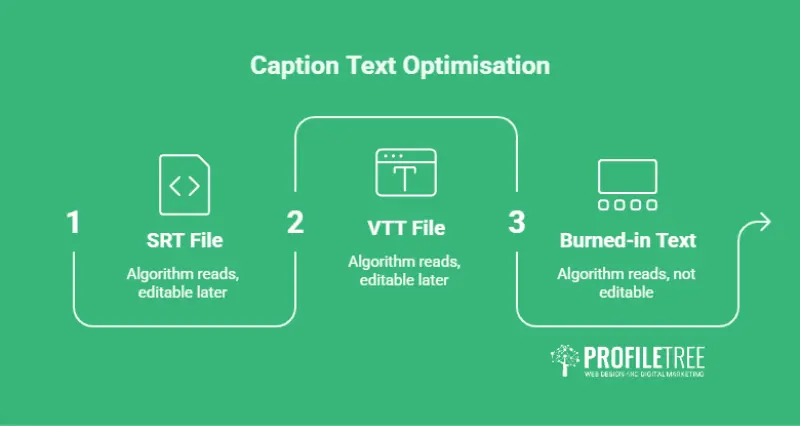
The three main ways of putting text on a video are not interchangeable, and each behaves differently for search. The table below sets out how they compare.
| Text type | How the algorithm reads it | Editable later? | Best use |
|---|---|---|---|
| SRT file (SubRip) | Read as a full, timestamped transcript. The most widely supported caption format and the easiest for platforms to index word for word. | Yes, it is a separate file. | YouTube, LinkedIn and any long-form video where searchable accuracy matters. |
| VTT file (WebVTT) | Also read as a transcript, with added support for styling and positioning. Whether platforms weight formatted text more heavily is not publicly confirmed. | Yes, a separate file. | When you need captions positioned away from on-screen graphics. |
| Burned-in text (hardcoded / on-screen) | Read only through OCR from the video frames, so clarity and duration decide whether it registers. | No, it is baked into the footage. | Hook text, titles, key numbers and short vertical clips. |
The practical takeaway: upload a caption file for anything you want indexed reliably, and treat burned-in text as a second, reinforcing signal rather than the only one. Open captions (always visible) and closed captions (toggled by the viewer) differ for the viewer, but for search what counts is whether a clean transcript exists for the platform to read.
Accessibility and the law across Northern Ireland, Britain and Ireland
Most captioning guides are written for a US audience and skip the rules that apply here. The position is not uniform across these islands, and a Belfast business should know which framework governs it.
In Northern Ireland, the Disability Discrimination Act 1995 still applies, with its own local amendments. The Equality Act 2010, which people often assume covers the whole UK, does not extend to Northern Ireland; it applies in England, Scotland and Wales.
Both frameworks place a duty on service providers to make reasonable adjustments so that disabled people are not put at a disadvantage. Neither names a specific technical standard, and neither spells out “you must caption videos” in those words. In practice, regulators and courts treat the Web Content Accessibility Guidelines (WCAG) 2.1 at Level AA as the benchmark for a reasonable adjustment, and WCAG success criterion 1.2.2 asks for synchronised captions on pre-recorded audio and video.
Public bodies face a firmer rule. The Public Sector Bodies (Websites and Mobile Applications) Accessibility Regulations 2018 require public sector websites and apps to meet WCAG 2.1 AA, and since 2020 pre-recorded video has had to be captioned (live streaming is excluded). Any SME that supplies councils, universities, health trusts or other public bodies will find caption requirements written into the work.
In the Republic of Ireland and the wider EU, the position moved recently. The European Accessibility Act (Directive 2019/882) began applying to a range of private-sector digital products and services from 28 June 2025. A UK business selling digital services to consumers in the EU can fall within its scope, so an agency in Belfast serving clients in Dublin or Cork needs it on the radar.
A fair caveat: these duties bite most clearly on video you host on your own website or app, and on public-sector content. Captioning your social-platform posts is best practice that follows the same principle rather than a blanket statutory requirement for every clip. The commercial point stands either way. The caption you add for a deaf viewer is the same caption the algorithm reads, so accessibility and reach are the same task done once. ProfileTree’s guide to accessible video content goes deeper on the practical steps.
Platform-by-platform rules
Each platform reads text through its own system, so the tactics shift depending on where the video lives.
YouTube
YouTube treats captions as searchable text on a par with page content, so it rewards a clean uploaded transcript. Upload an SRT or VTT file rather than relying on the automatic version, add chapter markers with descriptive labels so different segments can surface for different searches, and keep the wording in your thumbnail, title and opening captions consistent. Mixed signals confuse the categorisation; matched signals reinforce it. For the wider picture of how captions fit channel growth, see ProfileTree’s guide to ranking YouTube videos.
TikTok and Reels
Short vertical platforms lean heavily on OCR, so on-screen text carries real weight. Two rules matter most. First, keep text inside the safe zone: the platform’s own buttons and captions sit along the right edge and across the bottom, so text placed there gets covered and, for the viewer, effectively disappears. Keep important wording clear of those edges. Second, put your topic in the first three seconds. That opening hook text shapes how the platform files the whole clip, and it is the single most underused lever most businesses have. Use the platform’s native caption tools, which integrate better than pre-rendered text, and correct the auto-captions before posting.
LinkedIn favours professional, industry-specific language and distributes business content accordingly. Upload a corrected caption file for anything containing acronyms, product names or technical terms, and spell out an acronym in full at least once so the system can connect it to the concept. A clip on GDPR, for example, benefits from “General Data Protection Regulation” appearing somewhere in the captions.
The script-to-caption workflow
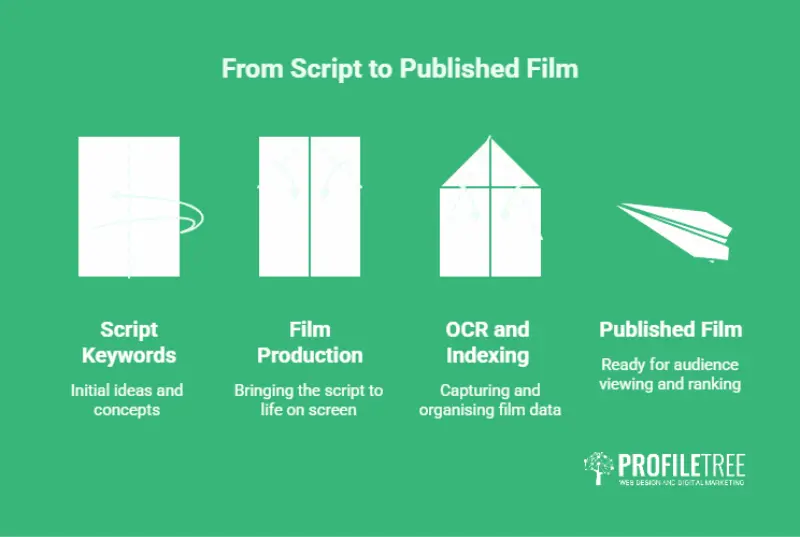
The mistake most businesses make is treating captions as a post-production chore. By then the words are fixed by whatever was said on the day. The better approach starts at the script.
Write the terms you want to rank for into the spoken script, near the start, in plain sentences. If a video is about email automation, the presenter should say “email automation” in the opening lines rather than circling it for two minutes. Those words then flow naturally into the caption file, which the algorithm reads, without any keyword stuffing. Repeat the core idea a few times across a longer video using natural variations (“email automation”, “automated campaigns”, “triggered emails”) so the platform picks up related searches too.
This is where a production process earns its keep. Planning captions before filming, rather than retrofitting them, is one of the practical differences between a video that gets found and one that gets forty views. It is also the stage where local signals go in: a Belfast retailer can work “Northern Ireland” and a specific area into the script where it fits, so the clip surfaces for both broad and local searches. For the sequence of it, picture four steps: script the keywords, film, caption for OCR and indexing, then publish and rank.
Common captioning mistakes that cut your reach
These are the errors that show up most often when auditing business video, and each is straightforward to fix.
- Leaning on auto-captions. Automatic speech recognition is decent for clear speech but stumbles on Irish and Northern Irish accents, proper nouns and jargon. “ProfileTree” can come out as “profile tree”, which blocks brand searches. Download the auto-captions, correct them, re-upload; it takes minutes and it pays back.
- Keyword stuffing. Repeating a phrase unnaturally reads badly to viewers and is treated as a weak signal by platforms. If a caption sounds robotic read aloud, rewrite it.
- Poor timing. Captions should track the audio within about half a second and stay on screen long enough to read comfortably, roughly three to seven seconds per line. Text that flashes past hurts both accessibility and retention.
- Low-contrast on-screen text. Light text on a busy background fails viewers and OCR alike. A quick test: convert a frame to greyscale, and if the text vanishes it is providing a weak signal. Add a drop shadow or a solid backing box.
- Text that moves too fast. Keywords that fly across the screen in under a second rarely register through OCR. Hold on-screen wording static for a few seconds at full size before any transition.
Using AI tools without losing brand accuracy
Speech-recognition accuracy has climbed steadily, and for clear English speech it now sits at a level that makes AI transcription a sensible starting point rather than a finished product. The sensible position for a business is to let AI tools do the first pass and keep a human review step for anything carrying the brand name, a client name or a technical claim. That review is where the value is, because a single mis-transcribed product name can quietly remove a video from the searches that matter.
The sensible position for a business is to let AI tools do the first pass and keep a human review step for anything carrying the brand name, a client name or a technical claim. That review is where the value sits, because a single mis-transcribed product name can quietly remove a video from the searches that matter. Sensible AI adoption here means faster captioning with a check in place, not automation with no oversight. Where a team wants to own this in-house, ProfileTree runs digital training to build that capability rather than leave a business dependent on an outside supplier for routine work.
Measuring caption performance
Optimisation without measurement is guesswork, and the platforms hand you the data to check whether your captions are doing their job. Three readings tell you most of what you need.
Search traffic. YouTube Studio lists the search terms that led people to a video, under the YouTube Search traffic source. Compare those terms against the keywords in your captions. If the two line up, the caption strategy is working; if the video is turning up for unrelated queries, the captions and the content have drifted apart. TikTok shows a similar picture, letting you see whether views come from search or from the feed.
Retention. Accurate captions tend to hold viewers longer, because people who find a video through a matching search get what they expected. YouTube’s audience retention graph shows where viewers stay and where they drop off, and the first thirty seconds is the stretch to watch: a sharp early fall often means the title and captions promised something the video did not deliver.
Click-through from search. Captions sometimes appear as preview text in search results, so clear, relevant caption wording can lift the rate at which an impression becomes a view. Track impressions against views over time to see whether appearing in search is actually converting.
None of this needs paid software. The point is to close the loop: caption, publish, read the data, then adjust the next video rather than repeating the same guess. A wider SEO checker can sit alongside this for the on-page side of your video hosting.
Tools for captioning and optimisation
The right tool depends on how much video you produce and how much the accuracy matters commercially. A short list covers most business needs.
- Subtitle Edit is a free, open-source caption editor that handles frame-accurate timing and exports to SRT, VTT and platform-specific formats. It suits businesses that want control without a subscription.
- Descript edits video by editing its transcript, which keeps captions and footage in step as you cut. It fits teams producing regular content who want captioning built into the edit rather than added afterwards.
- Human transcription services offer manually produced captions for business-critical content, handling accents and technical terms that automated systems miss. The trade-off is cost and turnaround against accuracy, so they earn their place on the videos that carry the most weight.
- YouTube Studio has a built-in editor for downloading the auto-generated captions, correcting them and republishing without leaving the platform. For many businesses this is the fastest route to fixing the errors that block brand searches.
Tool names above are references, not endorsements. Whichever you choose, the workflow is the same: generate a first draft, correct it against the script, and upload a clean file.
Caption and on-screen text optimisation is one of the few improvements to organic reach that costs nothing but attention. The steps are unglamorous: upload corrected caption files, put your topic in the first three seconds, keep on-screen text high-contrast and readable, and match your wording across title, thumbnail and captions. Done consistently, they widen the audience for content you have already paid to produce.
The direction of travel is worth watching. Platforms are getting better at understanding video directly from the imagery, so text will become one signal among several rather than the whole story. That shift makes the planning stage more valuable, not less: the businesses that script for discoverability, caption accurately and check their work will keep the edge as the tools improve. The next practical step is to look at your last handful of videos and check one thing first, whether the captions are accurate, because everything else builds on that.
Frequently asked questions
Do captions actually help the TikTok algorithm?
Yes. TikTok reads on-screen text through OCR and indexes caption text for search, so accurate, topic-led captions improve how the platform categorises and distributes your video.
What is the difference between open and closed captions for SEO?
For search it makes little difference, as long as a clean transcript exists for the platform to read. The open-versus-closed choice is about the viewer’s control over whether captions show.
Can Google Search see text overlays in my videos?
Increasingly, yes. Google uses transcript indexing and frame analysis to understand video content, so on-screen text can help specific moments surface in results.
Do captions on my videos meet UK or Irish accessibility requirements?
They help, but the rules differ: Northern Ireland follows the Disability Discrimination Act 1995, Great Britain the Equality Act 2010, and the EU the European Accessibility Act since June 2025. Take specific compliance advice for your sector and where your audience is.
Is it better to use auto-generated captions or upload an SRT file?
An uploaded SRT is better for both accuracy and search, because auto-captions frequently mis-transcribe accents, brand names and technical terms.
Does where I place text on screen affect reach?
Yes. Text hidden behind a platform’s own buttons is missed by viewers and provides a weaker signal, so keep important wording inside the safe zone.