
AI Website Builder for UK Small Businesses: Implementation Guide
Table of Contents
Most AI website builder guides stop at launch. They walk you through signing up, picking a template, and going live, then leave you wondering why the site has barely moved on Google three months later. This guide takes a different approach. Drawing on implementation work across small businesses in Northern Ireland, Ireland, and the UK, it covers the full picture: platform selection, a four-stage build process, UK compliance, local SEO, and the post-launch signals that actually matter. Whether you’re evaluating a website builder UK businesses already use or exploring newer AI-first platforms, the same principles apply.
Why UK Small Businesses Are Choosing AI Website Builders

The case for using an AI website builder has become genuinely compelling for UK SMEs. Costs have dropped, output quality has improved, and the time from brief to live site has compressed from weeks to days. For a business owner who needs a professional online presence without a five-figure budget, an AI website builder isn’t a compromise.
The typical UK small business arrives at this decision from one of several starting points. Some have a website built years ago that hasn’t been updated since. Some have a basic HTML page with no content management capability. Others have no site at all, or an e-commerce set-up that was never properly connected to their Google Business Profile. An AI website builder addresses the speed and cost barrier in all of these cases. It doesn’t automatically address the strategy, content, or technical configuration that determines whether a site generates enquiries.
“An AI website builder gives you the structure, but structure alone doesn’t rank,” says Ciaran Connolly, founder of ProfileTree, the Belfast-based web design and digital marketing agency. “The businesses we see getting real results from these platforms are the ones treating the output as a draft, then putting proper time into the content, the local signals, and the technical setup that follows.”
What a well-implemented AI website builder can realistically deliver for a UK small business is worth stating plainly. You can expect a mobile-responsive, SSL-secured site with a reasonable page structure, launched in one to three weeks rather than the eight to twelve weeks typical of a custom agency build, and at a fraction of the cost. What you shouldn’t expect is a site that ranks without SEO work, converts without genuine copywriting, or stays compliant with UK data regulations without manual configuration.
What Makes a Small Business Website Work
Before selecting an AI website builder, it’s worth being clear on what a working small business website actually needs. The platform generates the scaffolding. Everything else, the content quality, the local relevance, the conversion pathway, and the technical performance, comes from decisions a human makes after the AI has done its initial work.
A small business website that earns enquiries and ranks consistently loads quickly on mobile, contains useful content written in the language customers use, and has consistent contact information across every platform. An AI website builder can scaffold all of this. Getting it right requires the four-stage process covered later in this guide.
Choosing the Right AI Website Builder
Platform selection is the first real decision, and it deserves more time than most businesses give it. The right AI website builder depends on your business type, your technical confidence, and where you’ll be in two years. In the UK website builder market, three platforms account for the majority of small-business implementations: Wix ADI, 10Web, and Framer. Each has a distinct strength, so the right choice depends on what your business actually needs.
The table below compares three AI website builder platforms commonly used by UK small businesses across the criteria that matter most at the implementation stage.
| Criteria | Wix ADI | 10Web (WordPress AI) | Framer AI |
|---|---|---|---|
| Best for | Retail, hospitality, local services | Professional services, growing SMEs | Portfolios, creative businesses |
| AI generation quality | Strong, polished output | Good, WordPress foundation | Excellent, design-led output |
| E-commerce | Fully built-in suite | Via WooCommerce | Limited |
| UK GDPR tools | Built-in cookie consent | Plugin-dependent | Manual setup required |
| Local SEO control | Good, editable meta and schema | Excellent, full control | Limited without add-ons |
| Monthly cost (approx.) | £17 to £35 | £14 to £40 | £14 to £30 |
| Time to launch | 1 to 2 weeks | 2 to 3 weeks | 1 to 2 weeks |
| Vendor lock-in | High, proprietary platform | Low, portable CMS | Medium |
Cost Comparison: AI Builder vs Traditional Web Design
Web design for small businesses has historically meant either a large agency fee or a DIY WordPress installation that demands ongoing technical upkeep. An AI website builder sits between those two options in a way that did not exist five years ago.
| Cost factor | Traditional agency build | AI builder (self-managed) | AI builder (with consultant) |
|---|---|---|---|
| Initial design and build | £3,000 to £7,000 | £0 (subscription covers this) | £500 to £1,500 |
| E-commerce setup | £1,500 to £3,000 | Included in plan | £200 to £500 |
| Time to launch | 8 to 12 weeks | 1 to 3 weeks | 2 to 4 weeks |
| Monthly ongoing | £75 to £200 | £15 to £50 | £15 to £50 + ad-hoc |
| SEO configuration | Usually included | DIY | Included in setup |
| GDPR compliance | Usually included | DIY | Included in setup |
The cost savings are real and substantial. Where businesses lose it is by launching without proper configuration and paying for fixes later, or by choosing a platform that cannot support growth and rebuilding within eighteen months. A conversation with a digital specialist at the selection stage costs far less than correcting a poor platform choice a year down the line.
ProfileTree’s web design services include platform selection support for businesses that want an informed recommendation before committing to a build.
The Four-Stage Implementation Blueprint
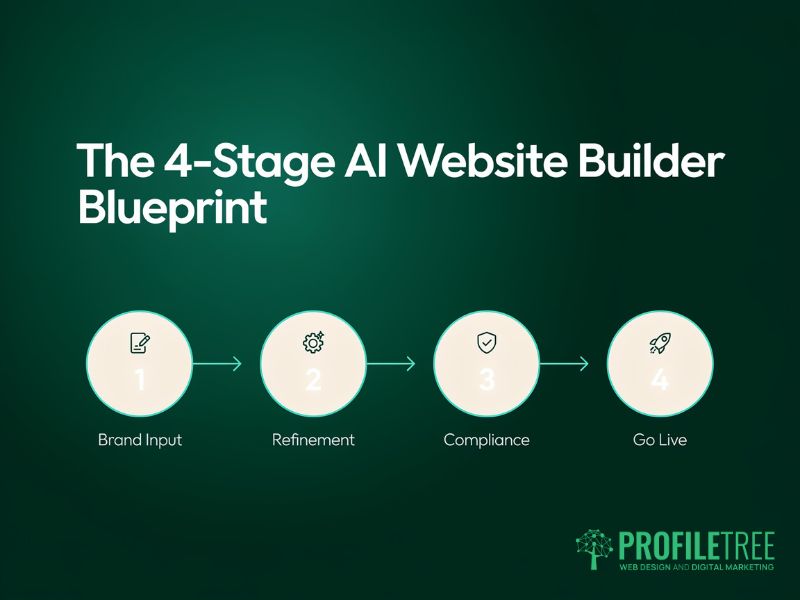
The businesses that get the best results from an AI website builder follow a consistent process. They use the AI generation as a foundation, then apply human judgment across four distinct phases. Skipping any phase produces a site that looks acceptable but underperforms commercially.
Phase 1: Brand Input and Prompt Engineering
The quality of any AI website builder output depends almost entirely on the quality of the input. Most businesses rush this stage and spend weeks correcting a site that was never given the right foundation.
Before running the AI generator, prepare the following: your exact business name, physical address, and service area; a one-sentence description of what you do and who you do it for; your brand colours in hex codes and your logo in SVG or high-resolution PNG; three to five photographs of your actual premises, products, or team rather than stock images; the specific services or products you want featured with brief descriptions; and the primary action you want visitors to take.
Feed this in systematically rather than accepting the generic prompts the platform offers. A Belfast kitchen fitter who inputs actual service areas and real photographs will get a far more useful output than one who accepts the defaults. The more specific your inputs, you’ll spend less time overriding AI-generated content that bears no relation to your business.
Phase 2: Structural Refinement and Human Review
Once the AI website builder has generated the initial structure, treat it as a brief rather than a finished product. The job now is refinement across every page, applying human judgment to what the AI cannot know about your specific business.
On the homepage, replace every piece of placeholder copy with content that reflects your actual value proposition. Rewrite the headline to speak to the specific problem your customers bring to you, not a generic category description. Replace stock imagery with genuine business photographs. Your about section should introduce real people, not a corporate-sounding description that could belong to any business in the sector.
Service or product pages need detailed, accurate descriptions written in the language your customers use. If you offer web design for small business clients in a specific area, your service page copy should reflect the questions those clients ask and the reassurances they need, not generic copy about digital services. This is the stage where a skilled copywriter or digital consultant adds the most value to an AI-generated build. When you want to build a website that converts rather than merely exists, this phase is where the outcome is decided.
For businesses that need more capability and control than an AI website builder can offer, professional website development provides a fully bespoke foundation built to your exact requirements.
Phase 3: UK Compliance and Local SEO
This phase is where most generic AI website builder guides fail UK businesses completely. GDPR compliance, cookie consent, and local content configuration are not optional extras. They’re the difference between a site that operates legally and one that exposes you to regulatory risk.
For GDPR compliance on any small business website, you need a properly configured cookie consent banner that blocks analytics and marketing scripts until consent is given, a privacy policy that accurately describes how your site collects and processes data, and a process for handling data subject requests. Most AI website builder platforms include a consent tool, but it needs manual configuration. If you’re unsure what to configure, a brief audit costs far less than a GDPR complaint. The default settings on several major platforms allow tracking before consent is obtained, which doesn’t meet UK GDPR requirements.
For local SEO, every page targeting a specific geographic area needs location signals beyond simply including a town name. Title tags and meta descriptions should include the location naturally. Your contact page needs a consistent Name, Address, and Phone number format that exactly matches your Google Business Profile. For businesses serving multiple areas, separate location pages with genuinely different content perform far better than a single service page with a list of town names appended at the bottom.
ProfileTree’s search engine optimisation services cover the full technical and content work that follows an AI website builder launch, from local citation building to Core Web Vitals improvement.
Phase 4: Technical Setup and Analytics
The technical configuration phase is where the gap between an AI-built site and a professionally configured one becomes most visible. AI website builder platforms generate clean, serviceable code, but they don’t automatically optimise Core Web Vitals, set up measurement tools, or connect all the integrations needed to track commercial performance.
The priority tasks at this stage are: connecting Google Search Console so you can monitor indexing from day one; installing Google Analytics 4 with conversion tracking; compressing images to WebP format, since most AI website builder platforms default to unoptimised JPEG uploads; ensuring your Google Business Profile URL matches your live domain; and configuring structured data relevant to your business type.
If you’re migrating from an existing site, map all old URLs to their equivalents on the new build and implement 301 redirects before launching. Losing existing organic traffic because of broken URLs is one of the most common and entirely avoidable post-launch problems. Any time you build a website on a new platform while migrating from an established domain, this step isn’t optional.
Post-Launch Performance: What to Track
The first 90 days after launch are the period when configuration decisions show up in data. Knowing which metrics to watch lets you make targeted improvements rather than guessing.
Organic Search Visibility
Google Search Console will begin showing data within a few weeks of launch. For any small business website, the key signals in the first 90 days are indexing coverage, average position for target keywords, and impressions for branded search queries, which indicate growing brand recognition. Any Core Web Vitals issues flagged in the Experience report should be addressed promptly, as they affect ranking across all pages on the domain.
For local businesses, Google Business Profile data provides a parallel view of how you are appearing in map and local search results. Track profile views, website clicks from the profile, direction requests, and call clicks. A mismatch between strong profile performance and weak organic performance usually means the website content needs attention, not the technical setup.
Conversion Metrics and User Behaviour
Traffic without conversion is noise. The metrics that tell you whether a small business website is working commercially are contact form completions, phone calls, e-commerce transactions, and the pages users visit before converting. Google Analytics 4 tracks all of these with proper configuration.
One pattern worth watching: AI web design layouts often produce high scroll depth on homepages but low click-through to service pages. This is one of the most consistent findings across AI web design implementations for small businesses. If you see this in your data, the homepage navigation needs attention rather than more content. Visitors are reading but not being guided to the next step. It’s a content and structure problem, not a traffic problem.
Common Post-Launch Pitfalls
Several problems appear consistently across AI website builder implementations in the first few months. Knowing them in advance makes them straightforward to avoid.
- Generic visual identity: AI website builder designs share template patterns that experienced users spot immediately. Custom photography, genuine brand typography, and a distinct colour palette are the minimum investment needed to differentiate your site from thousands of others built on the same platform.
- Thin service pages: AI web design tools often generate multiple pages with similar, low-depth content. This is one of the most persistent quality issues in AI web design output and one that Google penalises over time. Audit for pages that cover the same ground and either consolidate them or add genuinely distinct content to each.
- GDPR configuration drift: When you add new tools after launch, such as a chat widget or a booking system, they’ll need to be added to your consent configuration. Many businesses configure compliance correctly at launch and break it within three months by adding new scripts without updating the consent tool.
- Unmonitored site speed: Image uploads, third-party script additions, and plugin installations after launch degrade performance gradually. Run a Core Web Vitals check every quarter to catch regressions before they affect rankings.
For businesses that want expert analysis of post-launch data and ongoing improvement, ProfileTree’s digital strategy services cover measurement framework setup, conversion rate optimisation, and long-term growth planning.
Is an AI Website Builder Right for Your Business?
An AI website builder is a genuine option for UK small businesses, not a shortcut that produces inferior results by default. The results depend almost entirely on what happens after the AI generates its initial output. Businesses that invest in content development, local SEO, and compliance get sites that compete with far more expensive custom builds.
Those who publish the AI output without refinement and treat launch as the finish line typically revisit the decision within a year.
When you’re ready to build a website that performs commercially and not just looks the part, expert support makes a measurable difference. ProfileTree’s digital marketing services and web design team work with businesses across Northern Ireland, Ireland, and the UK. We can advise on the right website builder UK approach before you commit to a platform or a build.
As the UK website-builder market develops, AI speed combined with human expertise remains the most reliable route to a site that works commercially. ProfileTree has delivered web design for small business clients across Northern Ireland and the UK since 2011, and the lesson hasn’t changed: the tool matters far less than the thinking behind it
FAQs
1. Does an AI website builder rank well on Google?
An AI website builder produces technically clean code that Google can crawl without difficulty. Whether the resulting small business website ranks depends on content quality, local SEO configuration, and the authority signals built after launch. A site with well-written content and proper technical configuration will rank; one with placeholder copy and no ongoing SEO work won’t.
2. How much does an AI website builder cost for a UK small business?
Platform subscriptions typically run between £15 and £50 per month; a domain costs around £10 to £15 per year. If you use a consultant for setup, local SEO, and GDPR compliance, expect a one-off fee of £500 to £1,500. This is substantially lower than the £4,500 to £10,000 range typical of a custom web design for a small business project, making the AI website builder route the most practical starting point for most UK SMEs.
3. Is an AI-built small business website GDPR compliant?
Not by default. Most AI website builder platforms provide the tools for compliance, but they require manual configuration: you need a cookie consent mechanism that blocks non-essential scripts, an accurate privacy policy, and a process for data subject requests. Any third-party tools added after launch must be covered by your consent configuration and disclosed in your privacy policy.
4. Can I move my site to a different host after using an AI website builder?
It depends on the platform. Wix and Squarespace are proprietary, so your site can’t be directly exported, and rebuilding elsewhere means starting again. 10Web, built on WordPress, is fully portable, so a WordPress-based AI website builder gives you far more long-term flexibility than a proprietary platform.
5. How long does a proper AI website builder implementation take?
The AI generation takes minutes, but a properly configured small business website takes two to four weeks: platform setup and brand input in week one; content development and mobile testing in week two; SEO, GDPR, and analytics in week three; testing, DNS migration, and launch in week four. Businesses expecting a usable site in 24 hours are setting themselves up for a site that performs poorly from day one.