
UK WordPress Hosting: The Complete Business Guide
Table of Contents
Your website crashed during your biggest sales day of the year. The hosting company’s support chat puts you in position 47 in the queue. Your developer charges £150 per hour for emergency fixes. Meanwhile, competitors steal your customers, while your site displays “Error establishing database connection.”
This nightmare scenario plays out daily across UK businesses. Not because WordPress is unreliable, but because business owners choose hosting like they’re buying printer paper—whatever’s cheapest will do. That decision costs UK businesses £4.8 billion annually in lost sales, emergency repairs, and damaged reputation.
This guide cuts through technical jargon to show UK business owners exactly what WordPress hosting means for your bottom line. You’ll learn why that £2.99 monthly deal actually costs thousands, how to spot cowboys from professionals, and what successful British businesses actually pay for hosting that supports growth rather than constraining it.
Grab some coffee and let’s dive into the world of UK WordPress hosting!
Why UK Businesses Need Different WordPress Hosting
Brexit changed everything. Your website data location matters now more than ever. GDPR compliance isn’t optional. VAT handling gets complicated with international providers. Yet most WordPress hosting guides ignore UK-specific requirements, pushing American solutions that create more problems than they solve.
British businesses face unique challenges:
- Data Sovereignty Requirements: Where your data lives matters legally. Storing customer information in America? You’d better have proper data transfer agreements. Hosting in Europe post-Brexit? Different rules apply. UK data centres eliminate these headaches, keeping you compliant without expensive legal consultations.
- VAT Complexity: International hosting companies often quote prices excluding VAT, then slam you with 20% extra. Some don’t handle VAT properly at all, leaving you sorting tax obligations manually. UK providers include VAT transparently and handle HMRC requirements properly.
- Business Hours Support: When your site breaks at 2 PM on Tuesday, you need help immediately, not at 9 AM Pacific Time. UK-based support means speaking to someone who understands British business, works your hours, and doesn’t require explaining that Birmingham isn’t in Alabama.
- Local Payment Methods: Not everyone wants to pay with credit cards. UK hosting providers accept Direct Debit, BACS transfers, and understand British banking. Try explaining a BACS payment to an American support agent—we’ll wait.
- Performance for UK Customers: Milliseconds matter. Hosting your site in London or Manchester delivers content faster to British customers than servers in Virginia or California. Amazon found every 100ms delay costs 1% in sales. For a business making £100,000 annually online, slow international hosting costs £1,000 per second of delay.
Understanding the True Cost of UK WordPress Hosting
The hosting industry thrives on confusion. They advertise £2.99 monthly rates, knowing full well you’ll pay ten times that once reality hits. Let’s expose what UK businesses actually pay.
The Hidden Cost Breakdown
“£2.99/month” Shared Hosting Reality:
- Introductory rate (jumps to £9.99 after year one)
- SSL certificate: £49/year extra
- Daily backups: £3/month extra
- Email hosting: £4/month per mailbox
- Domain privacy: £8/year
- Site speed optimisation: Not available
- Malware removal: £89 per incident
- Actual cost: £25-40/month for basic service
Professional WordPress Hosting (£30-60/month):
- Consistent pricing
- SSL included free
- Daily backups included
- Email usually included
- Performance optimisation standard
- Security monitoring included
- Actual cost: Exactly what’s advertised
The “expensive” option costs less than the “cheap” option once you include necessities.
The Business Impact Calculator
Let’s calculate what poor hosting actually costs your business:
Downtime Losses Average UK SME website generates £250,000 annually online. Industry-average 99.5% uptime means 43 hours offline yearly. That’s £1,232 in lost sales—enough for two years of quality hosting.
Speed Impact on Conversions
- Pages loading in 1 second convert at 3%
- Pages loading in 5 seconds convert at 1.1%
- Average UK business site loads in 4.2 seconds
Moving from budget to quality hosting typically improves load time by 2 seconds, potentially doubling conversion rates. On £100,000 annual revenue, that’s £100,000 additional income.
- SEO Penalties: Google uses site speed and uptime as ranking factors. Poor hosting drops rankings, reducing organic traffic by 20-40%. For businesses getting 1,000 monthly visitors from Google, that’s 200-400 lost potential customers monthly.
- Emergency Support Costs: When budget hosting fails, emergency developer rates start at £150/hour. One serious incident requiring 8 hours of emergency work costs £1,200—three years of quality hosting gone in one day.
- Reputation Damage: Customers finding your site offline don’t return. Studies show 88% of users won’t revisit after a bad experience. That customer lifetime value, lost forever, far exceeds hosting savings.
A Midlands retailer switched from £5 monthly hosting to ProfileTree’s managed WordPress hosting at £45 monthly. Their site speed improved by 60%, conversions increased 34%, and they haven’t experienced downtime in two years. The £480 annual investment generated £32,000 in additional revenue.
Choosing the Right UK WordPress Host

The UK hosting market splits into distinct categories. Understanding these helps you choose appropriately for your business needs.
Traditional UK Hosting Companies
The Big Names:
- 123-reg
- Fasthosts
- Heart Internet
- TSOHost
These companies exist since the internet’s early days. They offer everything from domain registration to dedicated servers. But being generalists means WordPress isn’t their specialty. Like buying a suit from Tesco—functional but hardly tailored.
Pros:
- UK-based support
- Local data centres
- Familiar brands
- Multiple services
Cons:
- WordPress isn’t their focus
- Outdated infrastructure common
- Support quality varies wildly
- Hidden costs frequent
International Giants with UK Presence
The Global Players:
- GoDaddy UK
- Bluehost UK
- HostGator UK
These behemoths dominate through marketing budgets, not service quality. They localise minimally—usually just currency and VAT. Support remains offshore, servers stay in America, and they treat UK businesses like small-town Americans.
Pros:
- Massive infrastructure
- 24/7 support (in theory)
- Cheap introductory rates
- One-click WordPress installation
Cons:
- Support doesn’t understand UK business
- Servers optimised for American customers
- Renewal prices shock
- Overwhelming upselling
Specialised WordPress Hosts
The WordPress Experts:
- WP Engine
- Kinsta
- Flywheel
These platforms breathe WordPress. Every server configuration, support agent, and feature focuses on making WordPress brilliant. It’s like hiring a Michelin-starred chef instead of a kebab van—both provide food, but the experience differs dramatically.
Pros:
- WordPress-optimised infrastructure
- Expert WordPress support
- Premium performance
- Excellent security
Cons:
- Higher prices
- Limited to WordPress only
- Overkill for simple sites
- Usually US-focused
UK WordPress Specialists
The Local Heroes: A growing category of UK companies focusing specifically on WordPress for British businesses. They combine WordPress expertise with local understanding. ProfileTree sits here—we know WordPress deeply and understand that bank holidays matter, VAT confounds everyone, and customer service means answering the phone.
Pros:
- Local expertise and support
- UK data centres
- Understand British business
- Competitive pricing
- Personal relationships
Cons:
- Smaller scale than giants
- Less marketing visibility
- Limited to UK market
Essential Features Every UK Business Needs
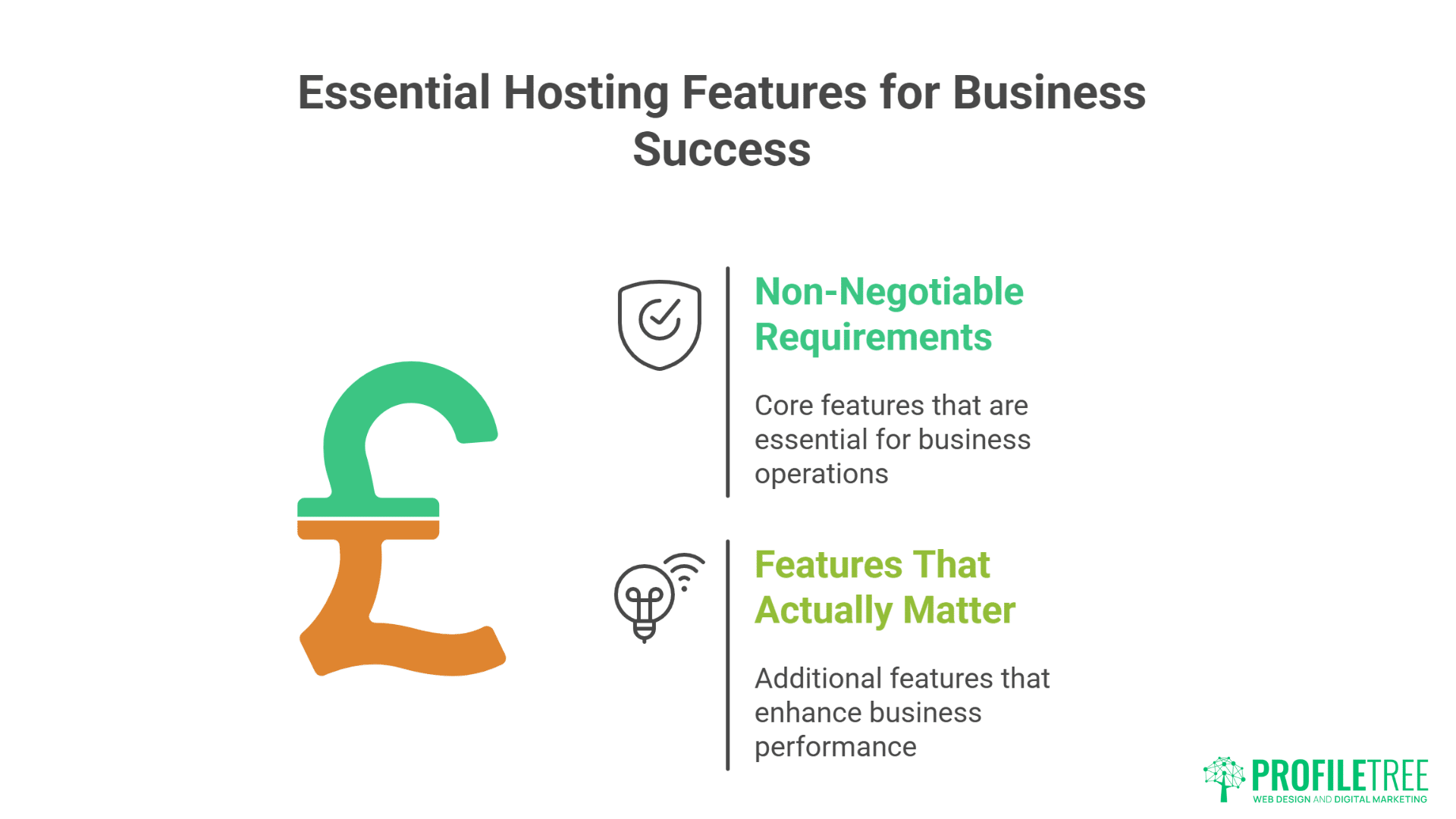
Not all hosting features matter equally. Here’s what actually impacts your business success.
Non-Negotiable Requirements
- Daily Automated Backups: When disaster strikes, backups save businesses. But most hosts charge extra for automated backups or keep only weekly copies. Daily backups should be standard, stored separately from your main server, and easily restorable without technical knowledge.
- SSL Certificates Included: Google Chrome shows “Not Secure” warnings for sites without SSL. Customers flee immediately. SSL certificates should be free, automatically installed, and renewed without intervention. Paying £49 yearly for basic SSL is daylight robbery.
- UK or EU Data Centres: Your site should load quickly for UK customers and comply with data protection laws. Servers in London, Manchester, or Dublin deliver both. Avoid hosts vague about server locations—they’re usually hiding American data centres.
- Genuine 24/7 Support: Not “ticket response within 24 hours” but actual human support when needed. Test this before committing. Email support at 10 PM asking a technical question. If you get a real answer within an hour, they’re legitimate. If you get an auto-response promising attention “within one business day,” keep looking.
- WordPress-Specific Security: Generic security scanning misses WordPress-specific threats. Your host should monitor for:
- Brute force login attempts
- Plugin vulnerabilities
- File change detection
- Malware signatures
- DDoS protection
Features That Actually Matter
Staging Environments: Test changes before breaking your live site. One-click staging creation lets you experiment safely. Professional hosts include staging; amateurs make you pay extra or figure it out yourself.
Performance Optimisation: WordPress needs specific optimisation:
- PHP 8.0 or higher
- MySQL tuning for WordPress queries
- Object caching (Redis/Memcached)
- CDN integration
- Image optimisation
Hosts advertising “blazing fast speeds” without explaining how achieve it are usually lying.
Scalability Options: Your needs change as business grows. Can you upgrade without migrating? Handle traffic spikes? Add resources temporarily for campaigns? Scalability shouldn’t require technical expertise or service interruption.
Email Hosting Integration: Most businesses want email@yourdomain.com addresses. Quality hosts include email or integrate seamlessly with professional email services. Beware hosts charging per mailbox—email should be unlimited or reasonably included.
Features to Ignore
- Unlimited Everything: Physics exists. “Unlimited” hosting always includes fair usage policies buried in terms. They’re betting you won’t use much, then throttle or suspend accounts that do. Honest hosts specify actual resources.
- Free Domains: That “free” domain costs £10 elsewhere but locks you into expensive hosting. Domain registration should stay separate from hosting—it’s safer and usually cheaper long-term.
- Website Builders: If you’re using WordPress, ignore integrated website builders. They’re usually terrible and lock you into proprietary systems. WordPress itself is your website builder.
- 99.99% Uptime Guarantees: Every host promises this. Few deliver. More importantly, what happens when they fail? Credit for downtime? Automatic compensation? Or just “sorry about that”? The guarantee’s enforcement matters more than the percentage.
Making the Switch: Migration Without Mayhem
Fear of migration keeps businesses trapped with terrible hosting. “What if something breaks?” becomes an expensive prison. Professional migration eliminates these risks.
Pre-Migration Checklist
Document Everything Current:
- All email accounts and passwords
- FTP/SFTP credentials
- Database details
- Custom configurations
- Cron jobs or scheduled tasks
- DNS settings
- SSL certificate details
Prepare for Success:
- Full backup stored locally
- List of all plugins and versions
- Test forms and functionality
- Note traffic patterns
- Document integrated services
- Inform key stakeholders
The Professional Migration Process
Step 1: Set Up New Hosting Create your new hosting account but don’t point your domain yet. This becomes your testing ground.
Step 2: Copy Your Website Professional hosts handle this, or your developer can. The site gets duplicated exactly, including database and all files.
Step 3: Test Everything Access via temporary URL and test:
- All pages load correctly
- Forms submit properly
- Payment processing works
- Admin area functions
- Speed improvements visible
Step 4: Update DNS Change nameservers or A records to point to new hosting. This is the “switch” moment.
Step 5: Monitor Carefully Watch for 48 hours as DNS propagates globally. Keep old hosting active for 30 days as insurance.
Common Migration Problems Solved
- Email Disruption: The biggest migration fear. Solution: Migrate email separately from website, or ensure new host perfectly replicates email settings. Never assume email “just works.”
- SSL Certificate Errors: Moving hosting can break SSL, showing security warnings. Solution: Install SSL on new hosting before switching DNS. Let it propagate fully.
- Database Connection Failures: Different hosts use different database setups. Solution: Update wp-config.php properly and test database connections thoroughly.
- Broken Images or Links: Hardcoded URLs cause problems. Solution: Use proper migration tools that update URLs throughout the database.
ProfileTree handles migrations free for new hosting clients. We’ve moved hundreds of sites without data loss or significant downtime. The key? Preparation, testing, and experience.
Security Considerations for UK Businesses
WordPress powers 43% of the internet, making it a massive target. But WordPress isn’t insecure—poor hosting and maintenance create vulnerabilities.
Real Threats to UK Businesses
- Ransomware Attacks: Criminals encrypt your site, demanding Bitcoin for restoration. UK businesses are particularly targeted because they pay. One Manchester manufacturer paid £15,000 to recover their site. Proper hosting with isolated backups prevents this entirely.
- SEO Spam Injection: Hackers insert hidden links to dodgy pharmacies and casinos. Google penalises your site, destroying rankings built over years. Recovery takes months. Prevention through proper hosting takes minutes.
- Customer Data Theft: GDPR fines for data breaches reach £17.5 million or 4% of annual turnover. Even small breaches require notification, damaging reputation irreparably. Secure hosting isn’t optional—it’s legally required.
- Defacement Attacks: Imagine customers finding political propaganda or offensive content replacing your homepage. The brand damage lasts years after fixing the technical issue.
Security Your Hosting Must Provide
- Web Application Firewall (WAF): Blocks malicious traffic before reaching your site. Like a bouncer checking IDs at the door—troublemakers never get inside.
- Brute Force Protection: Limits login attempts and blocks IPs after failures. Without this, hackers try thousands of password combinations until succeeding.
- Malware Scanning: Daily automated scans detecting infections immediately. Early detection prevents spread and minimises damage.
- File Integrity Monitoring: Alerts when core files change unexpectedly. Legitimate updates are expected; mysterious changes indicate compromise.
- Isolated Backups: Backups stored separately from main server. If hackers compromise your server, they can’t destroy backups too.
- Security Headers: Proper configuration prevents XSS attacks, clickjacking, and other modern threats. Most cheap hosts ignore these entirely.
What Happens When Things Go Wrong?
Even excellent security can’t prevent everything. What matters is response when incidents occur.
Quality Host Response:
- Immediate isolation to prevent spread
- Forensic analysis identifying breach method
- Complete malware removal
- Vulnerability patching
- Restoration from clean backups
- Detailed incident report
- Preventive measures implemented
Budget Host Response: “Your site appears compromised. We’ve suspended your account for network safety. Please clean your site and contact us when resolved. Consider our malware removal service for £199.”
The difference? One treats you as a valued client; the other as a problem.
Performance Optimisation for UK Audiences
Speed sells. Amazon found every 100ms of delay costs 1% in sales. For UK businesses competing globally, performance isn’t optional—it’s survival.
Why UK Sites Run Slowly
- Geographic Distance: Hosting in America adds 100-150ms latency for UK visitors. That’s before loading anything—just establishing connection. Multiply by dozens of resources, and you’ve added seconds.
- Oversold Servers: Budget hosts pack hundreds of sites per server. Like cramming 500 people on a bus meant for 50—nobody moves quickly.
- Outdated Technology: Many UK hosts run ancient PHP versions and MySQL configurations. It’s like running Windows 95 in 2025—technically functional but painfully slow.
- No Caching Strategy: WordPress generates pages dynamically for each visitor. Without caching, your server rebuilds identical pages thousands of times daily.
Speed Solutions That Work
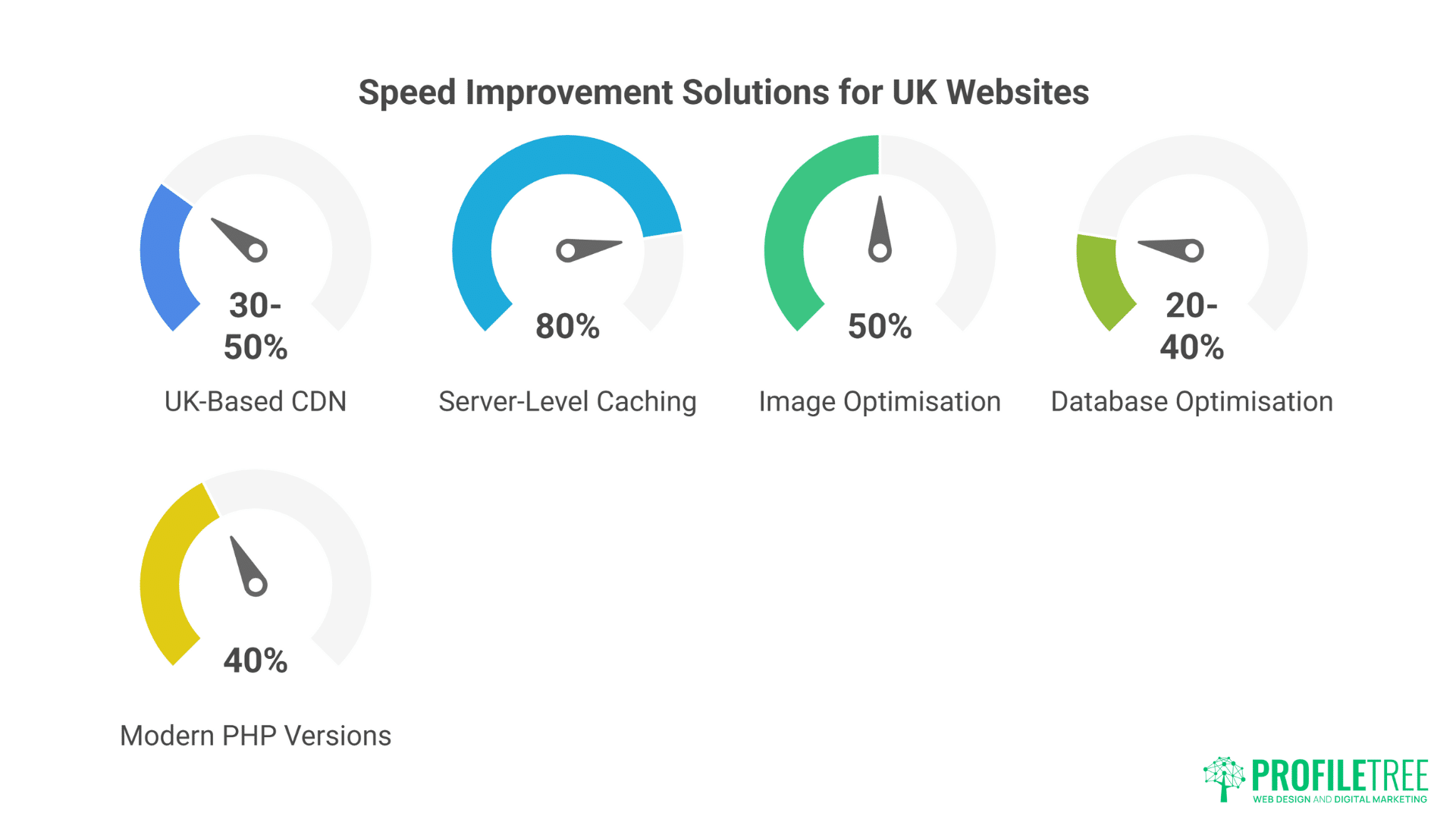
UK-Based CDN: Content Delivery Networks store your files in multiple locations. UK visitors get files from Manchester or London, not California. Speed improvement: 30-50%.
Server-Level Caching
- Redis object caching
- Varnish page caching
- OpCache for PHP
- Browser caching headers
Proper caching reduces server load by 80%, improving speed dramatically.
- Image Optimisation: Images comprise 60% of page weight typically. Automatic optimisation, WebP conversion, and lazy loading can cut load times in half.
- Database Optimisation: WordPress databases accumulate junk—post revisions, spam comments, transient data. Regular cleaning improves query speed by 20-40%.
- Modern PHP Versions: PHP 8.2 performs 40% better than PHP 7.4. Yet most UK hosts default to older versions for “compatibility.” Quality hosts run modern PHP with fallback options.
Measuring What Matters
Forget theoretical metrics. These measurements impact business:
Core Web Vitals: Google’s ranking factors:
- Largest Contentful Paint (LCP): Under 2.5 seconds
- First Input Delay (FID): Under 100ms
- Cumulative Layout Shift (CLS): Under 0.1
Sites failing these metrics lose rankings. ProfileTree’s SEO team regularly sees 20-30% traffic improvements just from fixing hosting-related speed issues.
Real User Monitoring Synthetic tests don’t reflect reality. Monitor actual visitor experience:
- Page load time by device
- Geographic performance variations
- Conversion rate by speed
- Bounce rate correlation
This data justifies hosting investment by showing revenue impact.
Scaling Your WordPress Hosting as You Grow
Success brings challenges. Your hosting needs at £10,000 annual revenue differ vastly from £1 million. Planning for growth prevents painful emergency migrations.
The Growth Journey
Starting Out (0-1,000 monthly visitors): Basic quality hosting suffices. Focus on reliability over advanced features. Budget: £20-40 monthly.
Requirements:
- Daily backups
- SSL certificate
- UK data centre
- Email included
- Basic support
Growing Business (1,000-10,000 monthly visitors): Performance becomes critical. Slow sites lose customers to faster competitors. Budget: £40-100 monthly.
Requirements:
- CDN integration
- Staging environment
- Advanced caching
- Priority support
- Performance monitoring
Established Business (10,000-50,000 monthly visitors): Reliability is non-negotiable. Downtime costs thousands. Budget: £100-300 monthly.
Requirements:
- Redundant infrastructure
- Advanced security
- Dedicated resources
- SLA guarantees
- Account management
Enterprise Scale (50,000+ monthly visitors): Custom solutions required. Off-the-shelf hosting constrains growth. Budget: £300+ monthly.
Requirements:
- Custom infrastructure
- Multi-server architecture
- Load balancing
- 24/7 monitoring
- Dedicated support team
Signs You’ve Outgrown Current Hosting
Performance Indicators:
- Admin panel sluggish
- Customer complaints about speed
- Timeout errors increasing
- Database errors appearing
Business Indicators:
- Launching major marketing campaigns
- Adding e-commerce functionality
- Expanding internationally
- Increasing publishing frequency
Technical Indicators:
- Developer complaints about limitations
- Need for custom configurations
- Multiple sites required
- Advanced functionality needed
When two or more indicators appear, upgrade proactively. Reactive upgrades during crisis cost more and risk revenue.
Choosing Your Growth Path
Vertical Scaling: Upgrading to larger servers with more resources. Simple but has limits.
Pros:
- Minimal technical changes
- Quick implementation
- Maintains current setup
Cons:
- Physical limitations exist
- Single point of failure
- Cost increases exponentially
Horizontal Scaling: Adding multiple servers working together. Complex but infinitely scalable.
Pros:
- Unlimited growth potential
- Redundancy built-in
- Better resource utilisation
Cons:
- Technical complexity
- Higher base cost
- Requires expertise
Most UK SMEs need vertical scaling until £1 million revenue, then consider horizontal approaches. ProfileTree’s development team helps businesses architect scalable solutions from day one, preventing expensive restructuring later.
Working with Your WordPress Host
The relationship with your hosting provider impacts business success more than most realise. Here’s how to maximise that relationship.
Setting Expectations
Document Service Levels:
- Expected response times
- Support hours
- Escalation procedures
- Maintenance windows
- Communication preferences
Assumptions cause problems. Clear documentation prevents disappointment.
- Understand Boundaries: What’s included versus billable? Most hosts handle server issues but not WordPress problems. Knowing boundaries prevents surprise invoices.
- Communication Protocols: How do you prefer contact? Email? Phone? Tickets? Establish preferences early. Also determine emergency procedures—who to call when everything’s burning.
Getting the Most from Support
Provide Complete Information: “Site is broken” wastes everyone’s time. Include:
- What you were doing
- What happened
- Error messages
- Screenshots
- Timeline
Complete information gets faster resolution.
Learn Basic Terminology: Understanding basics helps communication:
- DNS: Domain Name System (converts domain names to IP addresses)
- SSL: Secure Sockets Layer (encryption certificate)
- CDN: Content Delivery Network (speeds up global delivery)
- Cache: Stored version to reduce loading
- Propagation: DNS changes spreading globally
You don’t need expertise, just vocabulary.
Build Relationships: Hosting support aren’t robots (usually). Learn names, be respectful, acknowledge good service. When crisis hits, relationships matter.
When to Change Hosts
Red Flags Requiring Immediate Action:
- Multiple outages monthly
- Support tickets ignored
- Security breaches handled poorly
- Surprise price increases
- Company acquisition by known bad actors
Warning Signs to Monitor:
- Degrading performance
- Support quality declining
- Feature stagnation
- Competitive offerings emerging
- Business needs changing
Don’t wait for a catastrophe. Plan migrations during quiet periods, not crises.
FAQs
How much should a UK SME budget for WordPress hosting?
Quality WordPress hosting costs £30-100 monthly for most SMEs. This includes essentials like SSL, backups, and support. Budget hosting seems cheaper but hidden costs and lost revenue make it more expensive. Consider hosting as investment, not expense—good hosting pays for itself through better performance and reliability.
What’s the difference between WordPress.com and WordPress hosting?
WordPress.com is a hosted platform with limitations—like renting a furnished flat where you can’t paint walls. WordPress hosting lets you install WordPress.org software on your own hosting—like owning your house with complete control. Business sites need proper WordPress hosting for flexibility and growth.
Can I host WordPress on my existing web hosting?
Technically yes, but generic web hosting lacks WordPress optimisation. It’s like using a butter knife as a screwdriver—possible but not ideal. WordPress-specific hosting delivers better performance, security, and support for similar prices.
Should I keep domains and hosting separate?
Absolutely. Separating domains from hosting prevents vendor lock-in and simplifies changes. Register domains with dedicated registrars, host with specialists. It’s slightly more complex but much safer long-term.
How long does WordPress hosting migration take?
Professional migration completes within 24-48 hours with zero downtime. DIY migration takes longer and risks problems. The key is preparation—rushed migrations cause problems; planned migrations don’t.
Is managed WordPress hosting worth the extra cost?
For businesses dependent on their website, absolutely. Managed hosting includes updates, security, optimisation, and expert support. The time saved and problems prevented justify the cost immediately. One prevented hack or recovered crash pays for years of managed hosting.
What makes ProfileTree’s hosting different?
We’re WordPress specialists based in Belfast, serving UK businesses since 2010. Unlike faceless corporations, you’ll speak with the same team that builds and optimises WordPress sites daily. Our hosting includes everything discussed here—security, performance, backups—plus local expertise and genuine partnership. We understand UK business because we are one.
Stop letting poor hosting sabotage your business success. Whether you’re launching a new WordPress site or rescuing an existing one from budget hosting, quality hosting provides the foundation for sustainable growth.
ProfileTree offers WordPress hosting designed specifically for UK businesses. From £35 monthly, get everything covered in this guide—performance, security, support—plus local expertise from our Belfast team.
Contact us today for a free hosting assessment. We’ll analyse your current setup, identify constraints, and recommend solutions aligned with your business goals, not our sales targets. Because your success is our success.