
Secondary keywords: what they are and how to use them
Table of Contents
Secondary keywords are the related terms and subtopics that support the main search term of a page and show how fully that page covers its subject. ProfileTree plans every SEO page around them: one primary keyword sets the topic, and a short list of supporting terms shapes the headings and the body copy.
How secondary keywords differ from primary keywords
A primary keyword names the one topic a page competes for, and the secondary terms prove the page covers that topic in depth. Search engines stopped matching a single phrase to a single page some time ago. They read the vocabulary across the whole page to judge whether it answers the searcher fully, and the SEO starter guide from Google notes that people with different levels of knowledge search with different words. That is the practical reason one page needs more than one term.
Primary keywords set the topic of a page
Each page targets one primary keyword. It belongs in the title tag (the clickable headline shown in search results), the H1 heading, the URL, and the opening paragraph, and after that it appears in the body only where a sentence needs it. Choosing it is the first decision in every ProfileTree SEO Belfast project, because two pages built around the same primary keyword end up competing with each other.
Supporting terms add depth and context
These are the variations and related phrases a reader might use for the same need. Take a page for an accountancy firm built around “VAT returns for small businesses”. Its secondary terms might include “Making Tax Digital for VAT”, “VAT return deadlines”, “quarterly VAT filing” and “VAT registration threshold”, because each is a different way a business owner describes the same problem.
Long-tail terms (longer, more specific phrases that fewer people search for) work well as subheadings. A heading that matches a specific question gives Google and AI assistants a clear passage to show when someone asks it.
Tertiary keywords and the wider topic
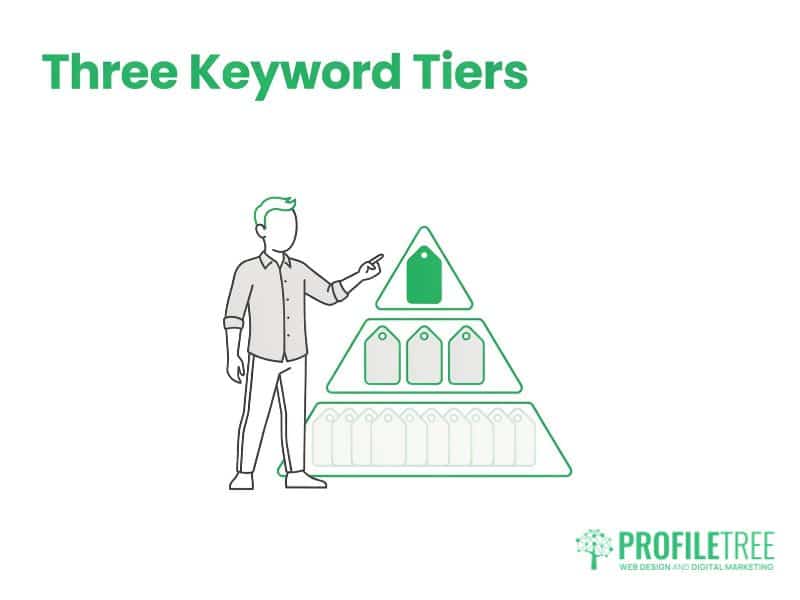
Tertiary keywords are broader terms from the field around a subject, which a page mentions in passing to show that it understands the context. The label is used loosely in SEO, and many guides stop at two tiers. A third tier is still useful at the planning stage, because it separates the terms a page must cover from the ones it should simply touch on.
On the VAT page above, tertiary terms might include “bookkeeping software”, “HMRC” and “cash flow”. None of them deserves its own section, and each appears only where the explanation naturally reaches it. Trying to rank the page for them would pull it away from its main subject.
A three-tier keyword example for one service page
| Tier | What it does | How many per page | Example for “SEO Belfast” |
|---|---|---|---|
| Primary | Names the topic the page competes for | One | SEO Belfast |
| Secondary | Shows depth and catches the different ways people search | Four to eight | Local SEO Northern Ireland, technical SEO audit |
| Tertiary | Places the page within its wider subject | No fixed number, used where natural | Web analytics, conversion rate |
The example uses a ProfileTree service, but the structure works for any page. List the tiers before you write, and the secondary column gives you most of the outline.
Why supporting terms matter in AI search
AI assistants answer questions by finding passages that closely match the question, so the specific vocabulary in a section decides whether it can be picked up and quoted. A passage built around one repeated phrase gives the system very little to match against. A section headed with a precise related term, and answered fully underneath, gives it a clear passage to use.
Google’s guidance on AI features and your website says that site owners need no extra steps or special markup to appear in AI Overviews or AI Mode, and that standard SEO practice still applies. Well-chosen variations fit that advice, because they are ordinary good writing applied with a plan.
How AI answers choose the passages they quote
A person asking an assistant a detailed question uses the words of their own situation. Someone asking about a first mortgage might mention an agreement in principle, stamp duty, or a loan-to-value ratio, and a page that only repeats “cheap mortgages” has nothing that matches those words.
The test we use when auditing pages is to read each H2 section on its own and ask whether it answers one question completely, in the language a customer would use. If it does, the section can stand alone in an AI answer. If it leans on the paragraphs around it, it needs rewriting, and our guide on how to appear in Google AI Overviews covers the wider set of changes.
How to find secondary keywords without paid tools
The best free source of related terms is the data you already own, and the Google results page fills most of the gaps. Automated lists help with volume, but a person still has to judge whether each term matches what the business sells.
Start with your Search Console queries
Google Search Console (the free Google service that reports how a site performs in search) shows the searches a page already appears for. Open the Performance report, filter to the page you want to improve, and sort the queries by impressions, which is the number of times the page was shown in results. The Google help page on impressions, position, and clicks explains that average position takes the highest place the page held in each search and averages it, so read the figure as a guide to where you stand.
Look for queries with steady impressions and an average position between 11 and 50. Google already connects those terms with the page, but it does not yet trust the page to answer them. A query with hundreds of impressions, a position in the forties, and no clicks points to a gap in coverage, and a new section usually closes it faster than any technical change. This page is an example: in the three months to mid-November 2026, UK searches for “tertiary keywords” showed it on the first page while the main term sat far lower, which is why the tertiary tier now has its own section.
Write one section for each cluster of these queries, with the term in the subheading and a direct answer in its first sentence. Our guide to keyword research sets out the wider process for deciding which terms are worth pursuing.
Use Google’s own search suggestions
Ten minutes on the results page produces a working list of candidates.
- Type the primary keyword into the search box and note every autocomplete suggestion.
- Open several “People also ask” boxes, then open the new questions that appear beneath them.
- Scroll to the related searches at the foot of the page for other phrasings.
- Repeat the search with a town name added to see how local customers word the same need.
The routine costs nothing, and an in-house marketing team can repeat it every month.
When a paid keyword tool is worth the cost
Paid keyword tools earn their place when you need estimated search volumes, difficulty scores, or a comparison with competing sites. Google Keyword Planner is free with a Google Ads account and gives UK figures once the location is set to the United Kingdom, although it can show broad volume ranges in place of exact numbers. Subscription platforms add question reports that convert easily into subheadings, plus filters for search intent (what the person searching wants to do). Treat every figure from these tools as an estimate, because only Search Console shows what happened on your own site.
Use the words UK customers actually search with
UK searchers use different words from American ones, and a page written in the wrong variety reads as if it was meant for someone else. A property site needs “flat” as well as “apartment”, a recruitment page needs “CV” where a US site would say “resume”, and a finance page needs terms such as “ISA” and “HMRC”.
Spelling works the same way. “Optimisation” and “colour” are the UK forms and “optimization” and “color” are the US ones, so a business selling seriously into both markets may need a separate page for each, written in its readers’ own spelling. For most firms in Northern Ireland, UK spelling suits every market they sell into from home. Place names matter as well: content for the north west often needs both “Derry” and “Londonderry”, because customers search with both.
Where to place supporting terms on a page
Placement decides how much work each term does. The aim is a clear structure and never density, so put each variation where it describes what a section is about, and readers and search engines both get an accurate map of the page.
Subheadings
The most important secondary terms belong in H2 headings, with narrower variations in the H3s beneath them. A Belfast web design service page might be laid out like this:
- H1: Web design Belfast for growing businesses
- H2: WordPress websites for Belfast firms
- H3: Custom themes and page layouts
- H3: Setting up WordPress for search
- H2: Ecommerce websites
- H3: Shopify stores
- H3: WooCommerce shops
Each heading tells the reader what the section answers before they start reading it.
Body copy
Write for the reader first, then check the draft against your list of terms. The Google starter guide points out that its language systems recognise variations of a word, so you do not need to include every version, and exact repetition adds nothing once a term has appeared in context. If a term will not sit naturally in a paragraph, that tells you something useful: either the wording is wrong for the page, or the term belongs on a different one.
Image alt text and meta descriptions
Alt text (the written description of an image, read aloud by screen readers and used by Google) can include a related term when the term describes what the image shows. A meta description, the short summary under the title in search results, has room for one or two variations, which widens the range of searches the snippet matches.
Internal link anchor text
Anchor text is the clickable wording of a link. Using a related term as the anchor when you link between pages tells search engines what the destination covers. Vary the anchors across the site so that one phrase does not carry every link, and avoid “click here”, which tells the reader nothing.
How many keywords should a page have?
One primary keyword and four to eight secondary keywords suit most pages. Beyond about ten, the focus starts to blur and the page becomes harder for Google and readers alike to place. Tertiary terms have no fixed limit, because they appear only where the explanation reaches them.
Length makes a difference. A 600-word service page might carry four variations comfortably, while a 2,500-word guide can give eight of them their own sections. As a rough check, a single term that appears more than two or three times in a 500-word section is probably being forced, and the starter guide is clear that keyword stuffing (packing a page with repeated search terms) breaks Google’s spam policies.
Mapping keywords across your site
A keyword map decides which page owns which terms, so that pages on the same site do not compete with each other. List every page, give each one a primary keyword, then assign its secondary terms beneath it. For a small site, the job takes an afternoon, and it saves months of pages pulling against each other.
One page for each search intent
Search intent is the reason behind a search. “SEO services Belfast” is a buying search, while “what is SEO” and “how does SEO work” come from people learning about the subject, and the two groups belong on different pages. Where a term fits both, one page keeps it and the other links across with that wording. Our guide to keyword cannibalisation explains how to spot and fix pages that already overlap.
“When two pages chase the same search terms, they do more harm than one page that is not quite right,” says Ciaran Connolly, founder of ProfileTree. “Pick the page that should win, give the other one a different job, and link them. It is unglamorous SEO work, and in ProfileTree’s experience with Northern Ireland businesses it moves rankings faster than anything else I know.”
Terms that pull a page off topic
Some words confuse search engines about what a page covers. A commercial cleaning company that borrows domestic cleaning vocabulary will start appearing for house cleaning searches it cannot serve. Decide what each page is not about and keep that language off it, and see our explainer on semantic SEO for how Google connects related topics across a site.
Common mistakes and how to fix them
Most problems with related terms show up in Search Console before anyone notices them on the page. The table pairs each symptom with its likely cause and the fix.
| Symptom | Likely cause | Fix |
|---|---|---|
| Pages swap positions for one search | Both pages use the same terms | Give each term to one page and link between them |
| Impressions rise but clicks stay flat | The terms match, but the page does not answer the question | Add a section with a direct answer under a matching heading |
| The page appears for unrelated searches | Off-topic vocabulary on the page | Remove the words that describe a different service |
| A section reads awkwardly | One term repeated too often | Use it once or twice and let variations carry the rest |
Search volume matters too. A term nobody searches for earns space on the page only if it answers a question customers really ask, and a term dominated by national brands will rarely repay the effort for a local firm. For most local businesses, the terms most worth pursuing have modest but steady demand.
Turn your keyword research into rankings
Start with one page that collects impressions without clicks. Export its queries from Search Console, group the ones sitting between positions 11 and 50 into a handful of themes, and write a part of the page for each with the term in the heading. Check that no other page already owns those terms, update the meta description and the anchors pointing to the page, then compare position and clicks after six to eight weeks.
ProfileTree is a Belfast web design and digital marketing agency, founded in 2011 and based at the McSweeney Centre, and has more than 500 Google reviews with a 5.0 rating. If you would like a team to plan and write the terms for your own pages, our search engine optimisation services cover the work from the first audit to the finished copy, with SEO from £500 a month plus VAT.
FAQs
1. What is the difference between a primary and a supporting keyword?
A primary keyword is the single subject a page is built to rank for, and each page has one. Supporting keywords are the variations and related subtopics that show the page covers that topic fully, usually four to eight on a page.
2. Can two pages target the same supporting term?
It is best avoided. When two pages use the same terms, Google struggles to choose between them and both tend to rank lower. Give each term to one page, and link to it from the other page using that term as the anchor text.
3. What are tertiary keywords?
Tertiary keywords are broader terms from the wider subject that a page mentions in passing. They show that the page understands the field around its topic, but they do not get their own sections, and the page is not built to rank for them.
4. Are LSI keywords the same thing as supporting terms?
People often use the two labels for the same idea, but LSI is a misleading name. It stands for latent semantic indexing, a method for finding related words in a fixed collection of documents that dates from the late 1980s, and it does not describe how Google ranks pages today. “Secondary keywords” or “related terms” is the more accurate name.
5. Do supporting terms help a page appear in AI Overviews?
Yes, because AI systems look for passages that closely match a question, and a passage headed with a precise term and answered directly beneath it is easier to find and quote. Google states that no special markup is needed for its AI features, so the work comes down to clear structure and plain writing.