
Email Marketing Automation: A Practical Guide for SMEs
Table of Contents
Email marketing automation is the process of sending pre-built, trigger-based emails to your audience without manual intervention for each send. For a small or medium-sized business, that means you can follow up with a new subscriber, recover an abandoned cart, or re-engage a lapsed customer at exactly the right moment, whether you have a dedicated marketing team or not.
The appeal is straightforward: you set up the workflow once, connect it to your customer data, and let the system handle the timing and sequencing. Done properly, automation increases open rates, reduces workload, and creates a more consistent experience for every person who interacts with your brand.
This guide covers the core principles, the mechanics behind effective workflows, and the practical steps to get automation working for an SME with real budget and time constraints.
Email marketing automation uses software triggers and customer data to send targeted emails at specific points in the buyer journey, such as welcome sequences, abandoned cart reminders, and post-purchase follow-ups. Platforms including Mailchimp, Klaviyo, and HubSpot all support automation workflows. SMEs that implement basic automation typically see open rates 50-70% above standard broadcast campaigns, according to Mailchimp’s platform benchmarks.
What Email Marketing Automation Actually Does
Automation replaces one-to-many batch sends with behaviour-driven, one-to-one messaging. Instead of sending the same email to your entire list on a Tuesday, the system responds to what individual subscribers do: joining your list, clicking a link, visiting a product page, or going silent for 60 days.
Trigger-based emails vs broadcast emails
A broadcast email goes to a segment or your whole list at a scheduled time. A triggered email fires when a specific condition is met. The difference in performance is significant: triggered emails generate, on average, four times higher open rates and five times higher click-through rates than standard newsletters, according to data published by Campaign Monitor. The reason is simple: the message is directly relevant to something the recipient just did.
The role of customer data
Automation is only as useful as the data feeding it. At a minimum, you need an email address and a timestamp for when someone joined your list. To build more targeted workflows, you need behavioural data: page visits, purchase history, link clicks, and engagement patterns. Most email platforms pull this data automatically once you install a tracking pixel or connect your e-commerce platform.
How automation sits within a broader digital strategy
Email automation does not work in isolation. It connects to your digital marketing strategy, feeds from your website activity, and supports your content marketing by distributing articles and guides to the right audience at the right time. An SME treating email as a standalone channel will get limited results; one treating it as part of a connected system will get significantly more.
Core Email Automation Workflows Every SME Should Have
You do not need dozens of automations to see results. Most SMEs benefit most from four or five well-built sequences rather than many poorly maintained ones.
Welcome sequences
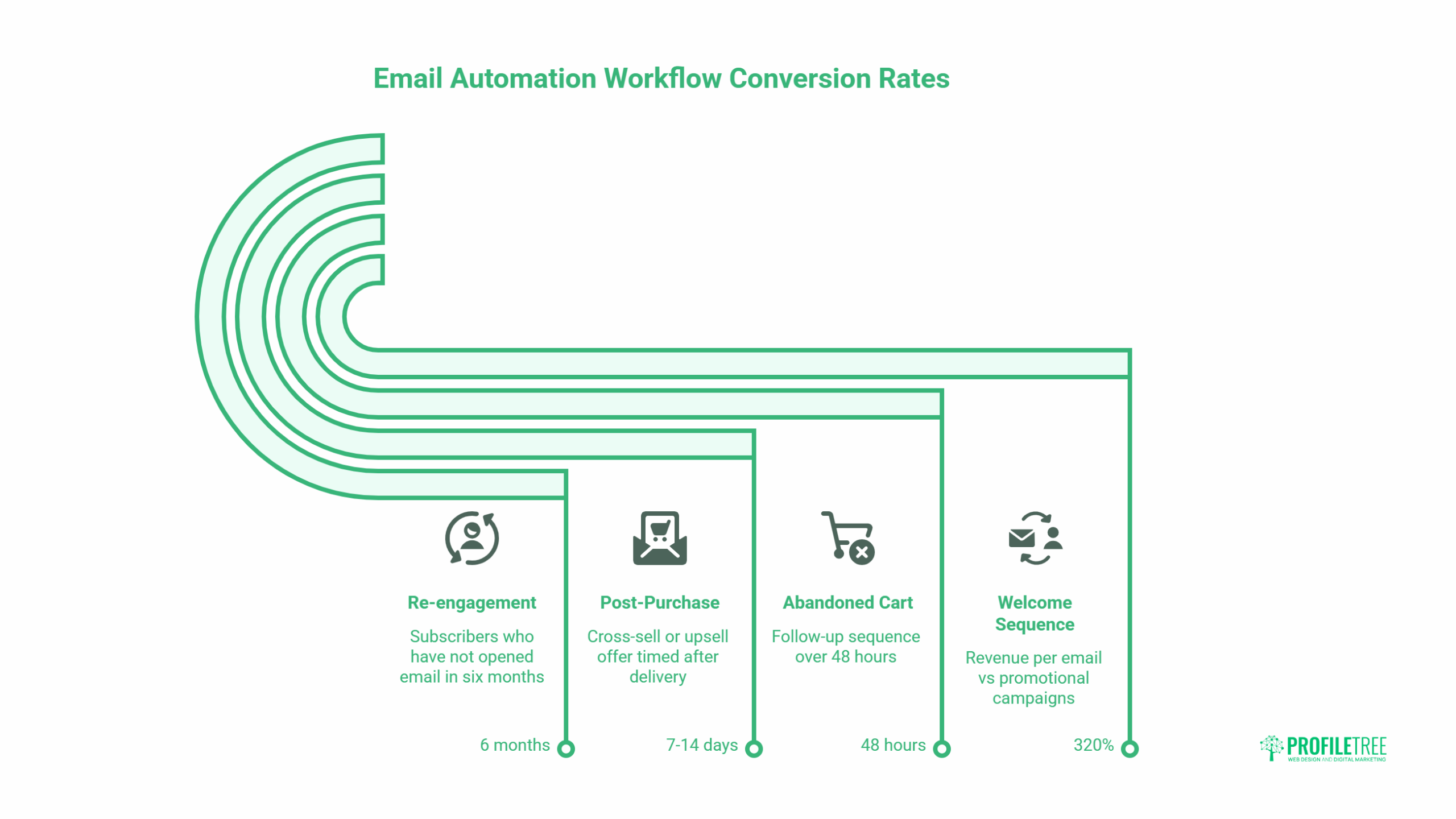
A welcome series is the highest-ROI automation most businesses can set up. When someone joins your list, their interest is at its peak. A sequence of three to five emails over the first two weeks can introduce your brand, highlight your most useful content or offers, and move subscribers toward a first purchase or enquiry. Welcome emails generate, on average, 320% more revenue per email than promotional campaigns, according to Invesp research.
A simple structure: email one delivers whatever you promised (a guide, a discount, a free resource); email two introduces your story and what makes your approach different; email three highlights a relevant service or product with a soft call to action.
Abandoned cart and browse abandonment
For businesses with an e-commerce component, abandoned cart emails are among the most direct revenue-recovery tools available. Someone adds a product to their cart, leaves without buying, and receives an automated reminder within an hour. A follow-up sequence of two to three emails over 48 hours can recover a meaningful percentage of those lost transactions.
Browse abandonment works similarly: if a visitor spends time on a product page but does not add to cart, a triggered email referencing that product can bring them back. This requires your email platform to be integrated with your website, which platforms like Klaviyo and ActiveCampaign handle with straightforward integrations. For businesses running WooCommerce, connecting automation to your store is a standard part of website development planning.
Post-purchase sequences
A customer who just bought from you is the most receptive audience you have. A post-purchase sequence serves two purposes: it builds confidence in the decision (reducing returns and complaints) and it creates the conditions for a second purchase. A simple three-email sequence can cover order confirmation, product tips or onboarding, and a relevant cross-sell or upsell offer timed seven to fourteen days after delivery.
Re-engagement campaigns
List hygiene matters. Subscribers who have not opened an email in six months are dragging down your deliverability rates and skewing your performance data. A re-engagement sequence offers a clear reason to stay: a special offer, a content round-up, or a direct question asking whether they still want to hear from you. Those who do not respond can be removed from your active list, which typically improves deliverability and open rates for everyone who remains.
Lead nurture sequences
If your business generates leads rather than direct e-commerce sales, a nurture sequence moves prospects from initial interest toward a conversation or consultation. This is where content-based emails work well: sharing relevant guides, case studies, or practical tips over several weeks builds trust before a sales conversation starts. Connecting this to your content marketing strategy gives you a steady supply of material to share.
Personalisation: Beyond Using Someone’s First Name
Most email platforms can insert a subscriber’s first name into a subject line. That is the floor, not the ceiling, of personalisation. Effective personalisation changes the content, offers, and timing of emails based on what you know about individual subscribers.
Segmentation as the foundation
Segmentation divides your list into groups that share a meaningful characteristic. Geography, purchase history, product interest, engagement level, or industry are all valid segmentation variables. A business selling to both B2B and B2C audiences should be running separate sequences for each; the buying process, language, and decision timeline are completely different.
Start with two or three segments. You do not need perfect data to begin; you need enough to send a more relevant message than a blanket broadcast. Most platforms make this straightforward once your list has a few hundred subscribers with some behavioural data attached.
Dynamic content blocks
Some platforms allow you to build a single email template where certain blocks change based on the recipient’s segment or behaviour. A retailer might show different product recommendations to customers who bought in the last 30 days versus those who have not bought in six months, all within the same campaign. This requires slightly more setup but scales well once the logic is in place.
Predictive send timing
Send time is a form of personalisation. Platforms including Klaviyo, Mailchimp, and ActiveCampaign offer predictive send timing: the system analyses when each individual subscriber historically opens emails and delivers accordingly. For lists above a few thousand subscribers, this tends to lift open rates by three to six percentage points without any change to content.
Integrating AI tools
AI is now embedded in most mid-market email platforms, handling subject line suggestions, optimal send time predictions, and content recommendations based on subscriber behaviour. For SMEs building their digital capability, understanding how AI can enhance marketing performance is increasingly practical rather than theoretical. The starting point is usually your existing email platform rather than a separate AI tool.
“Email automation works because it meets people where they already are, in their inbox, at the moment they are most likely to act,” says Ciaran Connolly, founder of ProfileTree. “For SMEs, the biggest gain is not the technology; it is deciding what you actually want each email to do, and building the sequence around that intention.”
Choosing the Right Email Automation Platform
The right platform depends on the size of your list, your technical setup, and whether you are running e-commerce, lead generation, or a combination of both.
Platforms for small lists and simple workflows
Mailchimp remains the most accessible starting point for businesses sending fewer than 1,000 emails a month with basic segmentation needs. Its free tier includes automations for welcome emails and abandoned cart (with an e-commerce integration). The interface is straightforward, and the documentation is extensive. The limitation is that more advanced segmentation and multi-step workflows require a paid plan.
Platforms for growing e-commerce businesses
Klaviyo is built specifically for e-commerce and integrates natively with Shopify, WooCommerce, and Magento. Its segmentation capabilities are more granular than Mailchimp, and its reporting connects email performance directly to revenue. It is more expensive and takes longer to set up properly, but businesses processing more than a few dozen orders per week will typically see a clear return on that investment.
Platforms for B2B and lead generation
ActiveCampaign and HubSpot are both strong choices for businesses where the goal is nurturing leads toward a sales conversation rather than a direct purchase. Both offer CRM integration, lead scoring, and multi-step workflows that can trigger based on sales pipeline stage as well as email behaviour. HubSpot’s free CRM tier is a practical starting point for smaller teams. For businesses thinking about AI training and digital capability building, these platforms also offer AI-assisted features worth exploring.
Integration with your website and CRM
Whatever platform you choose, it needs to connect to your website. At minimum, this means a signup form and a tracking pixel. If you are running a WordPress site, most major email platforms have official plugins. Getting this integration right from the start saves significant rework later, and it is worth building into your website design brief from the outset.
Measuring Email Automation Performance
Every automation sequence should have a defined goal and a small set of metrics that measure progress toward it. Tracking everything produces noise; tracking the right things produces decisions.
Open rate and click-through rate
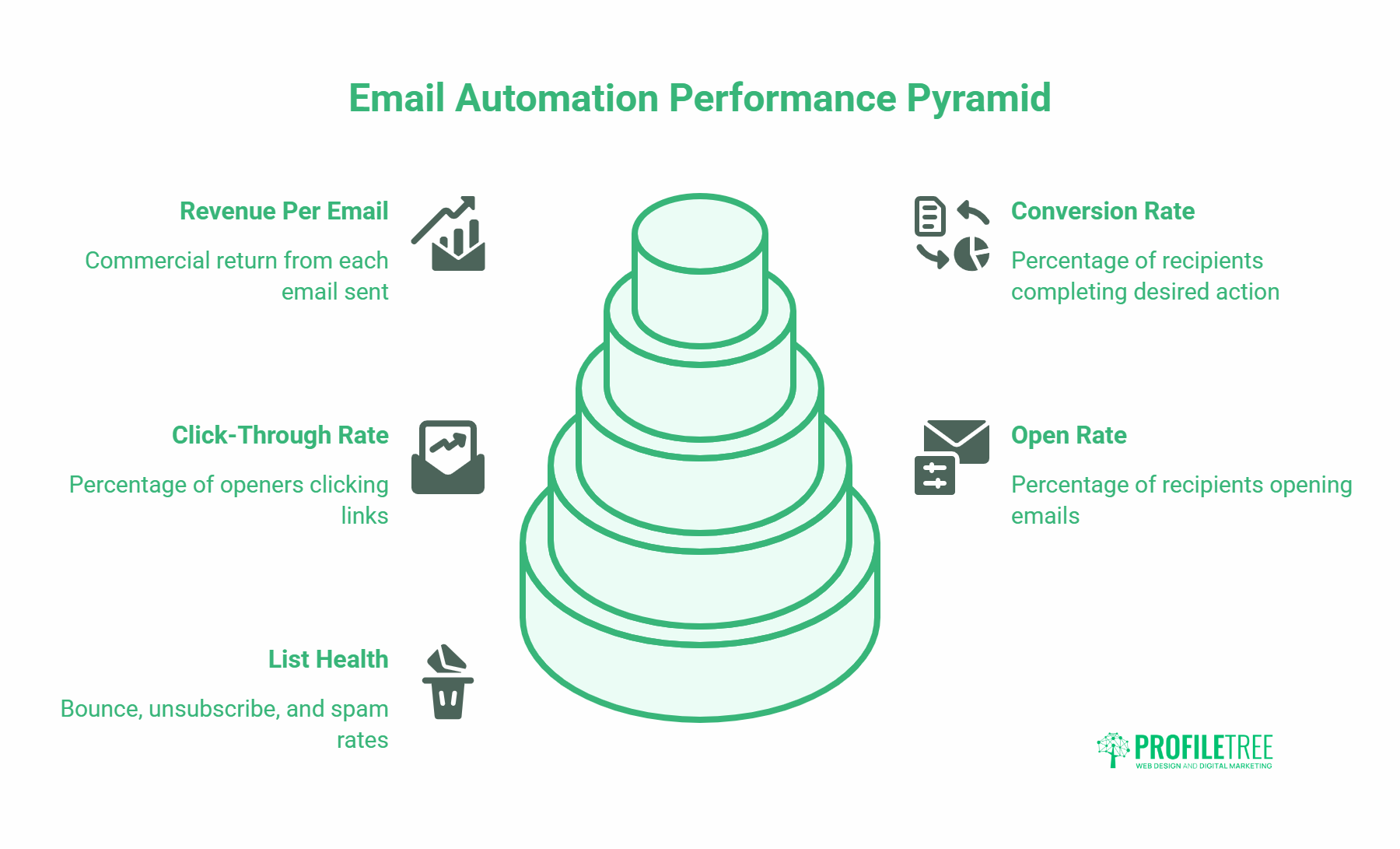
Open rate measures how many recipients open a given email. Industry averages vary considerably by sector, but for automated emails, 35-50% is achievable for well-segmented lists. Click-through rate (CTR) measures how many openers click at least one link. A 2-5% CTR on a broadcast email is reasonable; automated, triggered emails should outperform that meaningfully.
Note that Apple’s Mail Privacy Protection has made open rate data less reliable since 2021. Many platforms now report inflated open rates for subscribers using Apple Mail. CTR and conversion data are more trustworthy indicators of genuine engagement.
Conversion rate
For e-commerce automations, conversion rate is the number of recipients who complete a purchase divided by the number who received the email. For lead generation sequences, it might be the number who book a call or complete a form. Define this for each sequence before you build it, and review it at least monthly.
Revenue per email
For businesses with trackable transactions, revenue per email gives a direct picture of commercial return. An abandoned cart sequence recovering £500 from 100 emails sent gives a revenue per email of £5. That figure can be benchmarked against your cost per send and used to justify investment in list growth or improved segmentation.
List health metrics
Bounce rate (hard and soft), unsubscribe rate, and spam complaint rate all affect deliverability. Keep hard bounce rate below 2%, unsubscribe rate below 0.5% per send, and spam complaint rate below 0.1%. If any of these climb, investigate the cause before sending more volume. Understanding email marketing fundamentals, including deliverability, is essential before scaling any automation programme.
Common Mistakes in Email Marketing Automation
Most automation failures come from the same small set of problems. Knowing them in advance saves considerable time.
Building automations before understanding your audience
A common pattern is setting up a sophisticated welcome sequence before knowing whether the people joining the list actually want what that sequence offers. Before automating at scale, send a handful of manually crafted emails to small segments and measure the response. The data you collect will inform every automation decision that follows.
Over-automating and under-personalising
Automation can create the illusion of activity while producing little value. Sending 12 automated emails in a subscriber’s first month is more likely to generate unsubscribes than purchases if the content is not closely matched to what that subscriber needs. Start with fewer, better-targeted sequences and expand once you have performance data to justify it.
Ignoring list hygiene
Many businesses add subscribers continuously without removing those who have disengaged. Over time, this inflates list size while reducing effective reach. A quarterly hygiene pass, removing subscribers who have not engaged in six months after a re-engagement attempt, maintains deliverability and gives you cleaner data to work from.
Treating automation as a replacement for strategy
Automation handles the execution. It does not create the strategy. If you do not know what you want a subscriber to do after receiving each email, and why that matters to your business, the automation will not figure that out for you. Connecting your email programme to a broader digital strategy is what turns a series of emails into a commercial asset.
Getting Started: A Practical First Step Plan
If you currently have an email list but no automation in place, this sequence will get you to a working system within four weeks without requiring significant technical resources.
Week one: audit and connect
Check what platform you are using and whether it connects to your website and any e-commerce or CRM tools. If not, this is the week to resolve that. Install a tracking pixel and verify it is recording page views. Export your existing list and identify which subscribers have engaged in the last 90 days versus those who have not. This gives you a clean starting point.
Week two: build one welcome sequence
Write three emails for new subscribers. Email one: deliver what you promised and introduce the brand briefly. Email two: share your most useful piece of content or a case study. Email three: present a relevant offer or invitation with a clear call to action. Set up the sequence in your platform with one-day and four-day delays. Activate it for all new subscribers going forward.
Week three: add one trigger automation
If you run e-commerce, set up an abandoned cart email. If not, create a simple lead magnet follow-up: anyone who downloads a resource gets a three-email sequence over 10 days. Keep the copy short. One clear point per email, one clear action.
Week four: review and adjust
Check the performance data from week two’s welcome sequence. Are open rates above 30%? Is the third email generating clicks? If not, test a different subject line or restructure the call to action. Do not redesign the entire sequence on four days of data; give it two to three weeks before drawing conclusions.
For businesses that want support setting up these systems or integrating automation with their wider social media marketing and content channels, ProfileTree’s digital training programmes cover the practical skills needed to build and manage these workflows in-house.
Conclusion
Email marketing automation gives SMEs a way to maintain consistent, relevant communication with their audience without the manual effort that holds most businesses back. Starting with a welcome sequence and one trigger-based workflow is enough to see measurable results. From there, adding segmentation, personalisation, and more targeted sequences builds a programme that compounds over time. If you want help connecting your email strategy to a broader digital plan, speak to ProfileTree’s digital marketing team.
Frequently Asked Questions
What is email marketing automation?
Email marketing automation is the use of software to send emails automatically based on predefined triggers or schedules. Rather than manually sending individual emails, the system responds to subscriber behaviour, such as joining a list, making a purchase, or abandoning a cart, and delivers the appropriate message at the appropriate time. This allows businesses to maintain consistent communication with their audience without manual effort for each send.
What is the difference between an automated email and a newsletter?
A newsletter is a broadcast: it goes to a segment or your whole list at a scheduled time, regardless of individual behaviour. An automated email fires when a specific condition is met for a specific subscriber. Automated emails are typically more relevant to the individual because they are triggered by something that person did, which is why they consistently outperform broadcast campaigns on open rate, click rate, and conversion.
Which email automation platform is best for a small business?
For most small businesses starting out, Mailchimp offers the most accessible entry point, with a free tier that includes basic automation for welcome emails and simple sequences. Businesses running e-commerce on Shopify or WooCommerce often find Klaviyo worth the additional cost due to its native integrations and revenue reporting. B2B businesses focused on lead nurturing tend to get more from ActiveCampaign or the free tier of HubSpot. The right choice depends on your list size, budget, and whether you are selling products or services.
How many emails should a welcome sequence contain?
Three to five emails over the first 10 to 14 days is a practical starting point for most SMEs. The first email should deliver whatever prompted the signup. The second can introduce your brand’s approach and share useful content. The third can present a relevant offer or invitation to take a next step. More emails are justified if you have enough valuable content to share, but the sequence should not pad out just to extend contact. Each email needs a purpose.
How do I improve open rates in automated emails?
Subject line is the biggest single lever for open rate. Specific, curiosity-driven, or benefit-led subject lines consistently outperform generic ones. Sender name also matters: emails from a named individual (e.g. “Ciaran from ProfileTree”) typically see higher open rates than those from a brand name alone. Preview text, which appears beside the subject line in most email clients, should add information rather than repeat the subject line. For automated sequences, segment your list and time sends based on subscriber behaviour data wherever your platform supports it.
What is the best way to measure whether email automation is working?
Define a goal for each sequence before building it. For a welcome series, the goal might be a first purchase or a consultation booking. For an abandoned cart sequence, it is recovered revenue. For a re-engagement campaign, it is the number of subscribers who return to active status. Track open rate, click-through rate, and conversion rate for each sequence, and review the data at least monthly. Avoid drawing conclusions from fewer than 100 sends; small sample sizes produce unreliable averages.