
GDPR Compliant Web Design: A Privacy-First UX Guide
Table of Contents
The General Data Protection Regulation reshaped how websites are built and managed across the UK and Ireland. For business owners and web designers alike, GDPR compliance is not a one-time legal task; it is an ongoing design responsibility that touches every form, cookie banner, and data flow on your site.
Getting it wrong carries serious consequences: fines from the ICO in Great Britain or the Data Protection Commission in Ireland, reputational damage, and lost user trust. Getting it right, though, does more than keep regulators satisfied. A privacy-first design signals to visitors that their information is being handled with care, and that reassurance directly affects whether they complete a contact form, make a purchase, or return at all.
This guide on GDPR compliant web design covers the seven core principles of GDPR as they apply to web design, a practical 12-step compliance checklist, privacy-first UX techniques, the specific cross-border considerations for businesses operating in Northern Ireland and the Republic of Ireland, and the common mistakes that compliance plugins alone will never fix.
The 7 Core Principles of GDPR for Web Designers
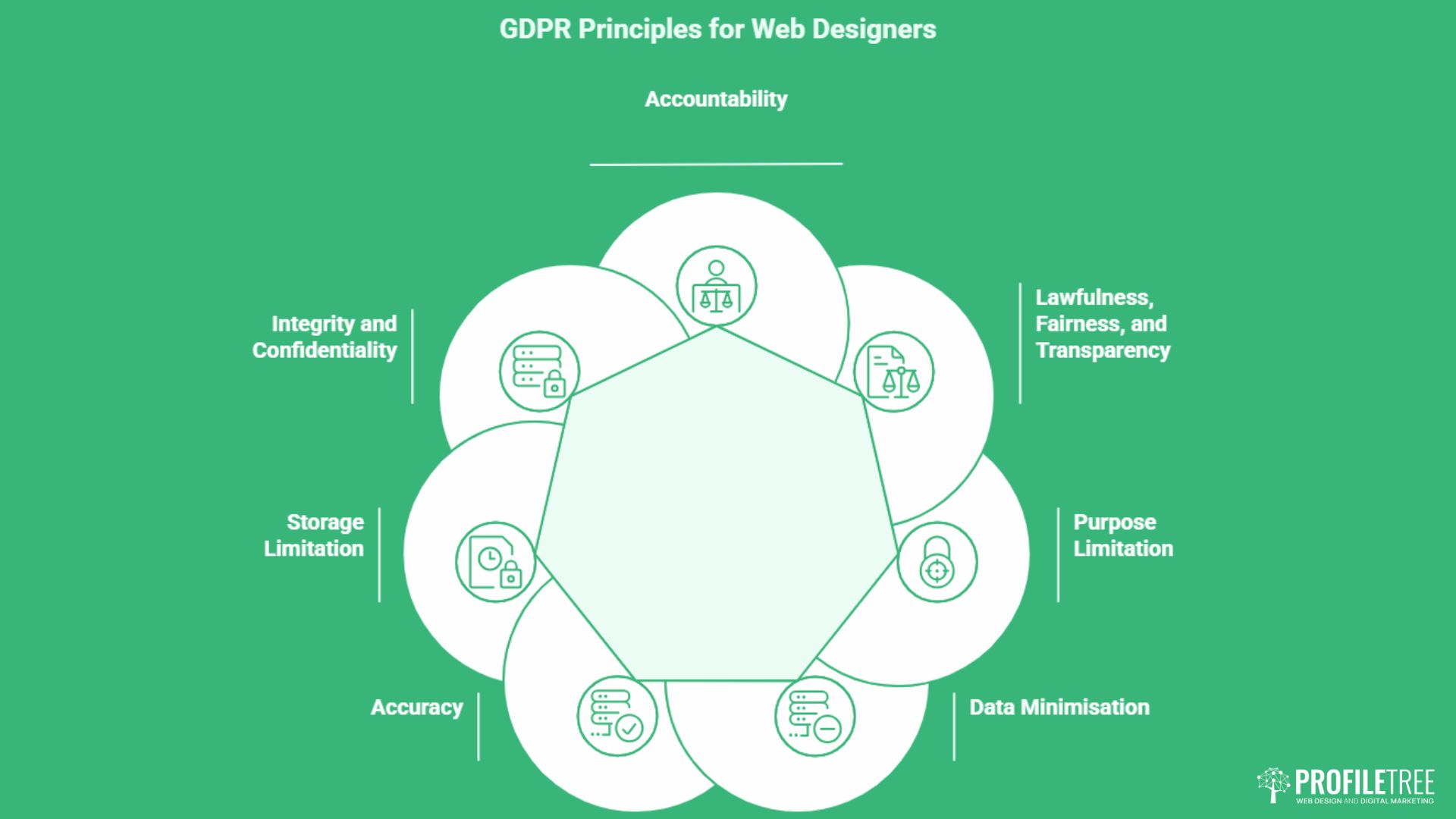
GDPR is built around seven principles that govern how personal data must be collected, handled, and stored. For web designers and business owners, each one has a direct practical consequence for how a site is built. Understanding what each principle requires, and what it means for your specific design decisions, is where compliance actually starts.
Principle 1: Lawfulness, Fairness, and Transparency
What it means: Every piece of personal data your website collects must have a lawful basis. For most SME sites, that is either consent (the user actively agrees before data is collected) or legitimate interests (you have a genuine business reason that does not outweigh the user’s rights).
What it means for your design: You cannot hide the reason for data collection in a footer privacy policy. The purpose must be communicated clearly, in plain language, at the point of collection: next to the form, the cookie banner, or the sign-up field. If a user cannot easily understand why their data is being collected before they submit it, this principle is not satisfied.
Principle 2: Purpose Limitation
What it means: Data can only be used for the specific reason it was collected. An email address gathered for a newsletter cannot later be used for a sales campaign without separate consent. A phone number submitted through a support form cannot be added to a cold-calling list.
What it means for your design: Every data collection point needs a single, clearly stated purpose. If you want to use the same contact details for multiple purposes, you need separate opt-in checkboxes for each one. Combining purposes into a single catch-all consent is not valid. The design of GDPR-compliant web forms depends on getting this right before the form is built, not after.
Principle 3: Data Minimisation
What it means: Collect only what is genuinely necessary for the stated purpose. Collecting more than you need is itself a GDPR violation, regardless of whether you ever misuse it.
What it means for your design: Audit every field in every form on your site. For each one, ask: would the purpose fail without this field? If the answer is no, remove it. A contact form asking for a visitor’s job title, company size, and annual turnover before answering a basic enquiry is almost certainly over-collecting. Shorter forms are not just better for compliance; they convert better, too.
Principle 4: Accuracy
What it means: Personal data must be kept accurate and up to date. If you hold information about a user that is wrong or out of date, you are responsible for correcting it promptly.
What it means for your design: Sites with user accounts need a self-service area where people can update their own details. For simpler sites, your privacy policy must explain how users can request a correction, with a practical route for doing so. For a broader view of how accuracy obligations work alongside other data responsibilities, data privacy in e-commerce covers this well.
Principle 5: Storage Limitation
What it means: Personal data must not be kept for longer than necessary. You need a defined retention period for every type of data you collect, and that period must be enforced in practice, not just stated in a policy document.
What it means for your design: Your privacy policy must state how long each category of data is held. Your back-end systems or CRM must have a process for deleting or anonymising data once that period expires. A contact form submission sitting in a database for five years with no deletion process is a storage limitation violation, even if the data was never misused.
Principle 6: Integrity and Confidentiality
What it means: Personal data must be protected against unauthorised access, accidental loss, destruction, or damage. This covers both your technical infrastructure and the way your team handles data day to day.
What it means for your design: Your site must use HTTPS throughout, not just on checkout pages. Your hosting provider must have adequate security. Every third-party tool connected to your site (CRM, analytics, live chat, email marketing) must be assessed for its own compliance. A plugin that forwards contact form data to an external server without encryption fails this principle regardless of how well the rest of the site is built.
Principle 7: Accountability
What it means: It is not enough to comply with GDPR. You must be able to prove that you comply. This means maintaining records of your data processing activities, your lawful bases, your retention periods, and your security measures.
What it means for your design: Accountability is the principle that makes all the others enforceable. If the ICO ever investigates, you need documentation: a Record of Processing Activities, a privacy policy that accurately reflects what your site does, and evidence that staff know how to handle data requests and breaches. GDPR training for teams is a step many growing businesses skip until a compliance gap becomes a formal complaint.
The 12-Step GDPR Compliance Checklist for Web Design
Translating regulation into a working website requires a structured process. The following steps cover the areas where most non-compliant sites fall short, moving from the foundational technical requirements through to ongoing maintenance.
1. SSL Encryption and Hosting Location
HTTPS is the baseline. Any website that collects personal data, including a simple contact form, must encrypt data in transit using a valid SSL certificate. Beyond that, your choice of hosting provider matters. If your server is located outside the UK or EU, data transferred to it may trigger additional GDPR obligations around international transfers. For most UK and Irish businesses, choosing a European or UK-based hosting provider removes this complexity entirely.
2. Data Minimisation in Web Forms
Audit every form on your site. For each field, ask: do we genuinely need this to fulfil the purpose? If the answer is no, remove it. Pre-filled fields that default to sharing more data than necessary also violate the data minimisation principle. This is not just a legal point; shorter forms typically convert better.
3. Active Opt-Ins and Pre-Ticked Boxes
GDPR is unambiguous: consent must be a clear, affirmative action. Pre-ticked boxes for newsletter subscriptions, marketing communications, or data sharing are not valid consent mechanisms and have been directly cited in ICO enforcement actions. Every opt-in checkbox must be unticked by default, accompanied by a plain-language explanation of what the user is agreeing to. The ethics of digital marketing extend into every form of interaction on your site.
4. Cookie Consent and Google Consent Mode v2
Cookie banners are the most visible part of GDPR compliance and among the least well implemented. A valid cookie consent mechanism must allow users to accept or decline non-essential cookies before those cookies fire, not after. Consent must be granular (analytics cookies separate from advertising cookies) and as easy to withdraw as it was to give.
Google Consent Mode v2 adds technical requirements for any site using Google Analytics 4 or Google Ads. When a user declines cookies, Consent Mode v2 signals that decline to Google’s tracking infrastructure, allowing GA4 to model conversions without storing personal data. Without Consent Mode v2 in place, running Google Ads campaigns targeting EU or UK audiences may violate both GDPR and Google’s own policies.
This is one of the most important technical updates for websites built or redesigned before 2024, and it is missing from a significant proportion of live sites.
When selecting a Consent Management Platform (CMP), consider how it affects your site’s performance. Heavy CMP scripts that delay page rendering will damage your Core Web Vitals scores, which in turn affects search rankings. A well-configured CMP should load asynchronously and add no more than 50-100ms to your Largest Contentful Paint. Tools such as CookieYes, Complianz, and CookieBot all offer varying trade-offs between design flexibility, technical performance, and price.
5. Privacy Policy Placement and Readability
A privacy policy link must appear in your website’s footer on every page. It should also appear at any point of data collection: near contact forms, newsletter sign-ups, and checkout pages. The policy itself must be written in plain language. A document that reads like it was drafted by a solicitor and never reviewed by a human fails the transparency test, regardless of its legal accuracy.
6. Right to Erasure and Data Deletion Workflows
Users have the right to request deletion of their personal data. Your website design needs to support this practically. For most SMEs, that means a clearly signposted contact route (an email address is sufficient for smaller operations), a documented internal process for handling requests, and a defined timeframe for completing them. The ICO requires organisations to respond within one calendar month.
If your site includes user accounts, consider building a self-service data deletion option into the account settings. This reduces the manual workload and demonstrates accountability. The wider topic of protecting user data covers the technical side of secure storage and deletion in detail.
7. Third-Party Service Audits
Every third-party tool embedded in your website (analytics platforms, live chat widgets, CRM integrations, social media share buttons, embedded maps) potentially processes personal data. Each must be reviewed against GDPR requirements, and your privacy policy must disclose what tools you use and what data they collect.
Social media share buttons that load third-party scripts on page load are particularly problematic: they may transfer data to Facebook, Twitter, or other platforms before the user has given consent. The solution is to use static placeholder buttons that only load the third-party script after the user actively clicks to share.
8. Subject Access Request Procedures
Beyond deletion, users have the right to access the personal data you hold about them. Your website should include a clear, accessible route for submitting a Subject Access Request (SAR). For smaller sites, a dedicated email address and a short explanation of the process are adequate. For sites with larger user databases, a self-service portal is the more scalable approach.
9. Data Breach Response Planning
GDPR requires that data breaches affecting personal data be reported to the relevant supervisory authority within 72 hours of becoming aware of them. If the breach is likely to result in a high risk to individuals, those individuals must also be notified. Your web design project should document who is responsible for identifying breaches, who makes the notification, and what information needs to be recorded. This is a process design question as much as a technical one.
10. Privacy Impact Assessments for High-Risk Processing
Data Protection Impact Assessments (DPIAs) are required where data processing is likely to result in a high risk to individuals. For web design, this typically applies to sites that profile users, process special category data (health, financial, or biometric information), or operate at a significant scale. A DPIA is not bureaucracy for its own sake; it is a structured way of identifying risks before a site launches, rather than after a complaint is filed.
11. Internal Staff Training and Records
Accountability under GDPR extends to your team. Anyone who handles personal data collected through your website, from a developer who has database access to a marketing manager who exports email lists, needs to understand their obligations. The ICO has made clear that data breaches caused by untrained staff do not attract leniency. Team GDPR training should be documented and repeated whenever your data practices change.
12. Regular Compliance Audits
GDPR compliance is not a one-time sign-off at launch. Every time you add a new plugin, a new analytics tool, a new form, or a new marketing integration, you need to revisit your compliance position. Build a six-monthly audit into your website maintenance calendar. This is especially important for WordPress sites, where plugin updates can change how data is processed in ways the site owner is not immediately aware of.
Privacy by Design: Making Compliance Look Good
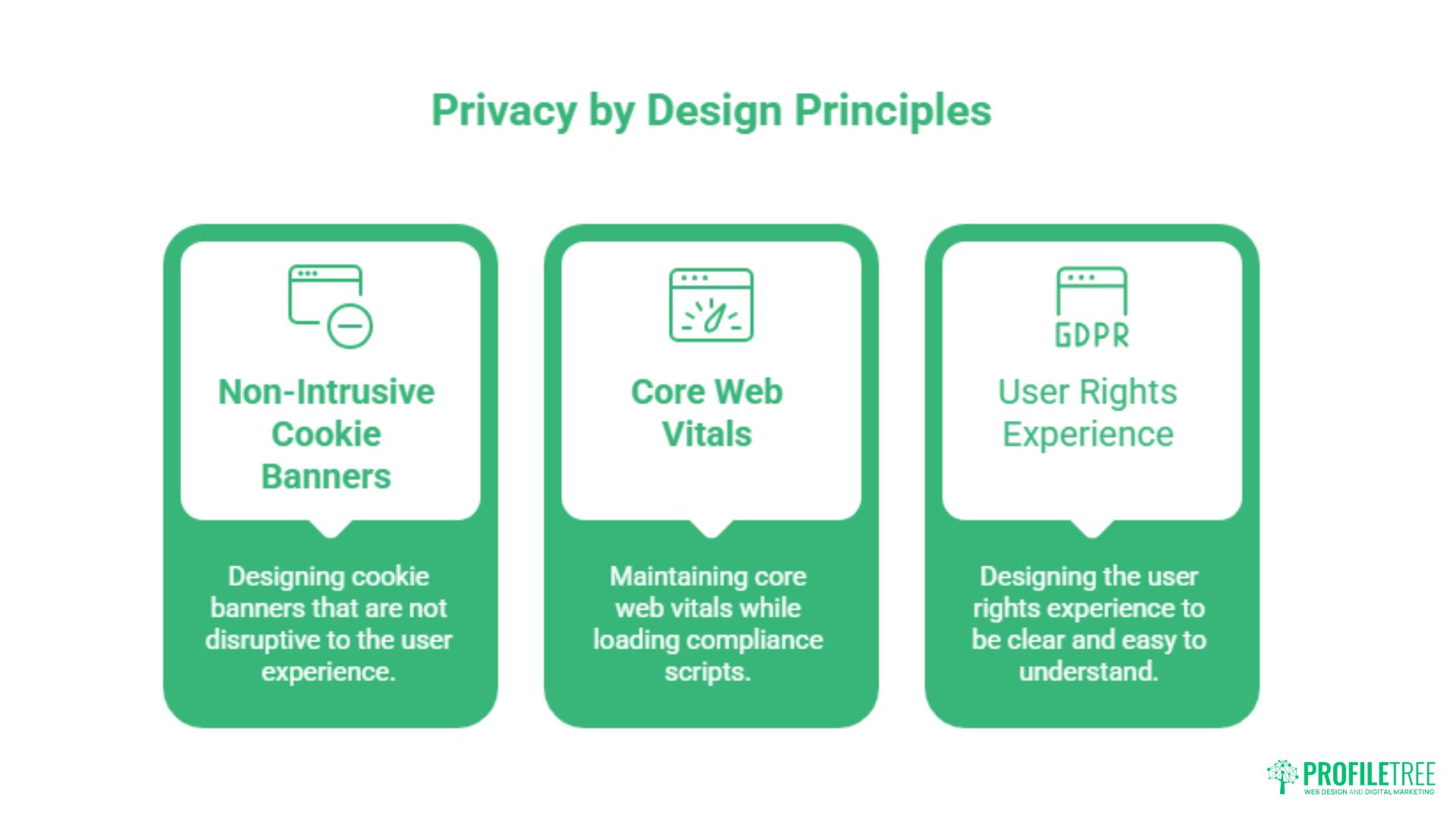
Privacy by design became a legal requirement under GDPR, not just a best practice. It requires that privacy protection be built into the architecture of a website from the start, rather than added as an afterthought once the design is complete. For web designers and business owners, the practical implication is that compliance cannot be delegated entirely to a plugin.
Designing Non-Intrusive Cookie Banners
The cookie banner has become the most visible symbol of GDPR compliance, and one of the most disliked elements of the modern web. A banner that covers the entire viewport, uses dark patterns to make “accept all” prominent while burying “decline,” or refuses to allow site access until a user consents, is not only bad UX; it may also be non-compliant. The ICO has published guidance explicitly criticising dark patterns in consent design.
Effective cookie banner design achieves compliance without sabotaging the user experience. The banner should appear at the bottom of the screen rather than as a full-screen overlay, use equal visual weight for accept and decline options, and provide a clearly labelled way to manage preferences. The language should be conversational, not legalistic. Users should be able to understand their options in five seconds without reading a paragraph of legal text.
Ciaran Connolly, founder of ProfileTree, puts it plainly: “A cookie banner that forces users into a choice before they can see the page is not a compliance solution; it is a conversion problem dressed up as one. The goal is informed consent, not coerced consent.”
Maintaining Core Web Vitals While Loading Compliance Scripts
One of the underappreciated consequences of poor consent implementation is its effect on site performance. Consent Management Platform scripts, if loaded synchronously, block page rendering and directly damage your Largest Contentful Paint and Total Blocking Time scores (two of Google’s Core Web Vitals metrics). Poor Core Web Vitals hurt both user experience and search rankings.
The solution is careful script management: load CMP scripts asynchronously, defer non-essential third-party scripts until after consent is given, and test performance regularly using tools like Google PageSpeed Insights and GTmetrix.
If you are building on WordPress, combining a well-configured CMP with a caching plugin and a performance-optimised theme significantly reduces the overhead. The interactive design considerations that affect user engagement also apply here: a site that performs well technically creates a better experience,e alongside being compliant.
Designing the User Rights Experience
Beyond consent, privacy by design means making it genuinely easy for users to exercise their rights. Access request links, data deletion options, and preference management centres should not require a user to search through a footer privacy policy to find a generic email address. Consider adding a dedicated “Your Privacy” or “Manage Your Data” section to your account area, accessible from a visible location in the navigation or footer.
The design of these interfaces matters. A preference centre with clear, descriptive toggles that explain what each data use involves is far more effective, both for compliance and for user trust, than a list of cryptic category labels. The UX skills behind effective web design are just as relevant to privacy interfaces as they are to any other part of a site.
The Northern Ireland and the Republic of Ireland Nuance
For businesses operating across the island of Ireland, GDPR compliance carries a layer of complexity that most general guides do not address. Since Brexit, the UK operates under UK GDPR, a retained version of the original EU regulation that is largely (but not identically) aligned with the EU text. Businesses with a presence in both Northern Ireland and the Republic of Ireland must work through both regimes.
Post-Brexit Data Flows Between Northern Ireland and the Republic
The UK government has designated the EU as providing an adequate level of data protection for the purposes of UK GDPR transfers, meaning that data can flow from a UK-based organisation to an EU recipient without additional safeguards. The EU has reciprocated with an adequacy decision for the UK, though this decision is subject to periodic review.
In practical terms, a Belfast-based business with customers in Dublin, or a Dublin-based business with a warehouse operation in Derry, can transfer personal data between those locations without needing to implement Standard Contractual Clauses or Binding Corporate Rules: provided the adequacy decisions remain in place. Monitoring the status of the UK-EU adequacy arrangement is worth building into your annual compliance review, given the political sensitivity of the relationship. The Brexit impact on digital marketing in the UK covers the broader regulatory landscape for businesses in this position.
Northern Ireland occupies a particularly distinctive position. Under the Windsor Framework, Northern Ireland remains closely aligned with EU single market rules for goods, but not for services or data. For most website operators, UK GDPR is the applicable framework, with the ICO as the relevant supervisory authority. However, businesses that market directly to consumers in the Republic of Ireland, or that process data of Irish residents, must also satisfy EU GDPR requirements, in which case the Irish DPC becomes relevant.
Northern Ireland and the island of Ireland as a whole are regions where local context matters enormously: whether that is understanding cultural differences in user behaviour, the specifics of the cross-border regulatory environment, or the practical realities of running a business across two separate jurisdictions.
UK GDPR vs EU GDPR for Cross-Border Businesses
The substantive difference between UK GDPR and EU GDPR is currently small. Both share the same seven principles, the same lawful bases for processing, and the same individual rights. The divergence lies in procedural and institutional areas: the ICO administers UK GDPR, while EU GDPR is enforced by member state Data Protection Authorities (in Ireland, the DPC). Fines under both regimes can be significant.
For cross-border businesses, the key practical point is identifying which supervisory authority is your “lead regulator.” If your main establishment is in the UK, the ICO leads. If your main establishment is in an EU member state, the relevant DPA leads. Where you have operations in multiple countries, this question becomes more complex and may warrant specific legal advice.
From a web design perspective, the most important consequence of this dual-regime environment is that your privacy policy must be accurate about which regulation applies to which users. A privacy policy that references “GDPR” generically without specifying whether it means UK GDPR, EU GDPR, or both can itself become a transparency problem.
This is a particular risk for businesses using off-the-shelf privacy policy templates that have not been reviewed for the UK/Ireland cross-border context. UK digital compliance for online businesses is a broader topic, and our guide to UK digital compliance provides additional context for e-commerce operations.
Email Marketing Across the Border
Email marketing adds another layer of regulatory consideration for cross-border businesses. In the UK, the Privacy and Electronic Communications Regulations (PECR) govern direct electronic marketing and sit alongside UK GDPR. In Ireland and the rest of the EU, the ePrivacy Directive applies. Both require a valid opt-in for marketing emails, but the specific requirements around soft opt-in, suppression lists, and unsubscribe mechanisms differ in detail.
For businesses sending marketing communications to both UK and Irish recipients, designing your subscription forms and email preferences to meet the stricter of the two standards is the safest approach. Practically, that means explicit opt-in at the point of subscription, granular preference options, and a one-click unsubscribe mechanism in every email. The specific compliance requirements for email marketing compliance in regulated sectors add further considerations for businesses in financial services, legal, or healthcare.
Why Compliance Plugins Are Not Enough
The promise of a single plugin that makes your website fully GDPR-compliant is appealing, but it does not reflect how GDPR actually works. Plugins can automate certain technical tasks: generating a cookie banner, scanning for cookies, and adding a privacy policy link, but they cannot do your thinking for you. A compliance plugin installed on a site with pre-ticked opt-in boxes, unaudited third-party scripts, and no data retention policy in place provides a false sense of security.
What Plugins Can and Cannot Do
A well-configured CMP plugin can scan your site for cookies and categorise them, present a consent banner that fires the appropriate scripts based on user choices, maintain a record of consent, and block specific cookies until consent is given. These are genuinely useful automation tasks. What a plugin cannot do is make judgment calls about your lawful basis for processing, write an accurate privacy policy that reflects your actual data practices, audit your third-party integrations, handle Subject Access Requests, or train your team.
The ICO has been consistent in its position: compliance is a responsibility of the data controller (the business), not the software it uses. If a plugin is misconfigured, or if the plugin’s version is outdated and no longer blocks new cookie categories introduced by a CMS update, the compliance gap belongs to the site owner.
The Gap Between Technical and Organisational Compliance
GDPR has two broad categories of requirements: technical measures (encryption, access controls, cookie management) and organisational measures (policies, training, documentation, procedures). Most compliance plugins address only the technical layer. A business that installs a cookie consent tool but has never documented its data processing activities, never trained its staff on data handling, and has no process for responding to access requests has not achieved compliance; it has achieved the appearance of compliance.
The ICO’s enforcement record makes this distinction clear. Fines and reprimands have been issued for failures that no plugin could have prevented: staff sending personal data to the wrong recipient, inadequate security leading to a breach, and insufficient consent for marketing emails.
For SMEs without a dedicated DPO, building a basic compliance framework: a Record of Processing Activities, a privacy policy that reflects actual practice, and a simple SAR response process, is as important as any technical implementation. Reviewing the compliance and security requirements for online transactions illustrates how technical and organisational measures intersect.
Performing a Manual GDPR Audit
At a minimum, every website should go through a manual compliance review at launch and again after any significant change to its functionality or third-party integrations. This review should cover: a complete inventory of all data collection points and the lawful basis for each, a list of all third-party services and their GDPR compliance documentation, a review of the privacy policy for accuracy and plain-language readability, and a check that opt-in mechanisms are active rather than pre-ticked.
For businesses that lack the in-house capacity to conduct this review, working with a web design agency that builds GDPR compliance into its process from the start is significantly more effective than retrofitting a plugin after launch. ProfileTree’s web design services incorporate GDPR-compliant design as a standard part of every project, covering both the technical and the UX dimensions of privacy-first development.
Conclusion
GDPR compliant web design is not a constraint on good design; it is a standard of good design. Sites that collect only what they need, communicate clearly about how data is used, and give users genuine control over their information build the kind of trust that translates into enquiries, purchases, and long-term customer relationships. For businesses across Northern Ireland and Ireland, getting the regulatory detail right across both UK GDPR and EU GDPR is an added responsibility, but also a competitive signal that many competitors overlook.
If your website was built before Google Consent Mode v2 became mandatory, or if it has never had a formal compliance audit, now is the right time to review it. Get in touch with ProfileTree to discuss a GDPR compliance review and privacy-first web design that works for your business and your users.
FAQs
Do I need a Data Protection Officer for my small business website?
For most SMEs, a DPO is not legally required. Under the UK GDPR and the EU GDPR, a DPO is mandatory only for public authorities, organisations that carry out large-scale systematic monitoring of individuals, or organisations that process large-scale special category data. If your website collects standard contact and analytics data for a small-to-medium business, you are unlikely to meet this threshold.
Does UK GDPR differ from EU GDPR for websites?
The substantive requirements are very similar. Both share the same seven principles, the same individual rights, and the same consent standards. The key differences are institutional: the ICO administers the UK GDPR, while the EU GDPR is enforced by member-state DPAs, such as Ireland’s DPC. If your business markets to users in both the UK and the EU, you must satisfy both regimes.
Are pre-ticked opt-in boxes allowed for newsletter sign-ups?
No. Under both UK GDPR and EU GDPR, consent must be a clear, affirmative action. A pre-ticked box does not constitute valid consent, and marketing communications sent on the basis of pre-ticked opt-ins are likely to breach both GDPR and PECR in the UK or the ePrivacy Directive in the EU.
How long can I store user data from a contact form?
GDPR’s storage limitation principle requires that personal data is kept only for as long as necessary for the purpose for which it was collected. For contact form submissions, a common approach for SMEs is to retain the data for 12 months after the enquiry is resolved or, if no business relationship results, for a defined period such as 6 to 12 months.
Is a WordPress GDPR plugin enough to make my site compliant?
No. Plugins can automate specific technical tasks such as cookie consent management and privacy policy page creation, but they cannot substitute for organisational compliance: documenting your data processing activities, writing an accurate privacy policy, training your team, and implementing processes for handling Subject Access Requests and data breaches.