
Pre-Launch SEO Checklist for New Websites
Table of Contents
A website that launches without SEO in place starts at a disadvantage; it can take months to recover from. Search engines need time to crawl, index, and understand a new site. The structure, content, and technical signals you put in place before going live directly shape how quickly that happens.
This pre-launch SEO checklist covers every step that matters before you publish: from keyword research and site architecture through to metadata, mobile performance, analytics setup, and final QA checks. It’s written for SMEs preparing to launch their first site, or for businesses rebuilding an existing one.
Why a Pre-Launch SEO Checklist Matters
Most SEO problems on new websites are not discovered by the business that owns them. They’re discovered weeks or months after launch, when rankings don’t appear, traffic stays flat, or a site audit reveals pages that were accidentally blocked from indexing.
The good news is that the majority of these problems are preventable. A structured pre-launch process takes the same time whether you do it before or after launch, but doing it before means your site earns trust from search engines from day one, rather than playing catch-up.
For SMEs in Northern Ireland and across the UK, a strong launch position matters even more. Local and regional search results are competitive, and getting indexed correctly for location-specific queries from the start shortens the time to first enquiries.
What this checklist covers
This guide works through six areas: research and strategy, site structure, on-page content, technical SEO, analytics, and pre-launch testing. Each section includes specific tasks with a brief explanation of why they matter, not just what to do.
If you’re working with a developer or agency, this checklist is also useful as a brief to share before the build begins. Many of these tasks are easier to build in than to retrofit.
Research and Strategy Before You Build
SEO strategy begins before a single page is designed. The research phase shapes your URL structure, your content plan, and the way search engines will categorise your site.
Define your target audience and search intent
Start by identifying who you’re trying to reach and what they’re actually searching for. Search intent matters more than keyword volume. A phrase like “web designer Belfast” signals someone ready to hire; “what does a web designer do” signals someone still researching. Your homepage and service pages should target the former; supporting blog content can address the latter.
Spend time on People Also Ask results and Google’s related searches for your primary terms. These surface the exact questions your audience is asking, and building content around them from launch gives you an immediate structural advantage.
Keyword research and prioritisation
Identify a primary keyword for each page you plan to launch. For a service-based SME, this typically means one primary keyword per service, per location page, and per major content piece.
Avoid targeting the same keyword across multiple pages. This creates cannibalisation problems that are messy to fix after launch. Map keywords to URLs at the planning stage and keep that document updated as the site grows.
Look for terms with genuine commercial intent in your area. Broad informational terms can bring traffic, but terms like “accountant in Lisburn” or “café website design Northern Ireland” are the ones that lead to enquiries.
Competitive analysis
Check what’s ranking for your target terms before you finalise your content structure. Note the word count, heading structure, and content depth of the top three to five results. If they’re all long-form guides, a 400-word page won’t compete. If they’re all local service pages, a generic national page won’t rank for local queries.
You don’t need to copy competitors. You need to understand the baseline and build something that covers the topic with more depth, more specificity, or a more useful angle for your audience.
Website Structure and URL Architecture
How your site is structured tells search engines how pages relate to each other, which pages are most important, and how search engine crawlers move through the site efficiently. Poor structure is one of the most common reasons new sites take months to build rankings.
Build a logical site hierarchy
A clear hierarchy moves from broad to specific: homepage at the top, main category or service pages below it, and individual posts or sub-service pages beneath those. Aim for every important page to be reachable within three clicks from the homepage.
Flat architectures (where every page is one level below the homepage) work well for small sites of ten to fifteen pages. As the site grows, grouped categories help search engines understand topical relationships. A web design agency might have /web-design/ as a category with /web-design-belfast/, /wordpress-web-design/, and /ecommerce-web-design/ sitting below it.
URL structure
Each URL should describe what’s on the page using plain language. Avoid parameters, numbers, and auto-generated strings. Use hyphens between words, keep everything lowercase, and leave out stop words where they add no meaning.
Good: /seo-services-northern-ireland/ Poor: /page?id=47&cat=3
URLs set at launch should stay permanent. Changing them later requires redirects, and every redirect loses a small amount of the link equity the original page had built up.
XML sitemap
Create an XML sitemap before launch and submit it to Google Search Console and Bing Webmaster Tools on day one. The sitemap tells search engines which pages exist and when they were last updated.
Most CMS platforms, including WordPress, generate sitemaps automatically via plugins like Yoast SEO or Rank Math. Verify the sitemap is accessible at /sitemap.xml or /sitemap_index.xml and that it only includes pages you want indexed: no admin pages, no duplicate URLs, no staging content.
Robots.txt file
The robots.txt file controls which parts of your site search engine crawlers can access. Before launch, confirm the file exists at /robots.txt and that it doesn’t accidentally block crawlers from your main content.
The most common pre-launch mistake is launching with a “noindex” or “disallow all” setting left over from the development or staging environment. Check this manually before you go live.
Internal linking plan
Internal links pass authority between pages and help search engines understand your site structure. Plan your internal link strategy before launch rather than adding links randomly as you write.
Each page should link to its parent section and to two to four related pages. Service pages should link to relevant case studies or supporting articles. Blog posts should link to the service pages most relevant to the topic. Map these links in a spreadsheet during the build phase.
On-Page Content and Metadata
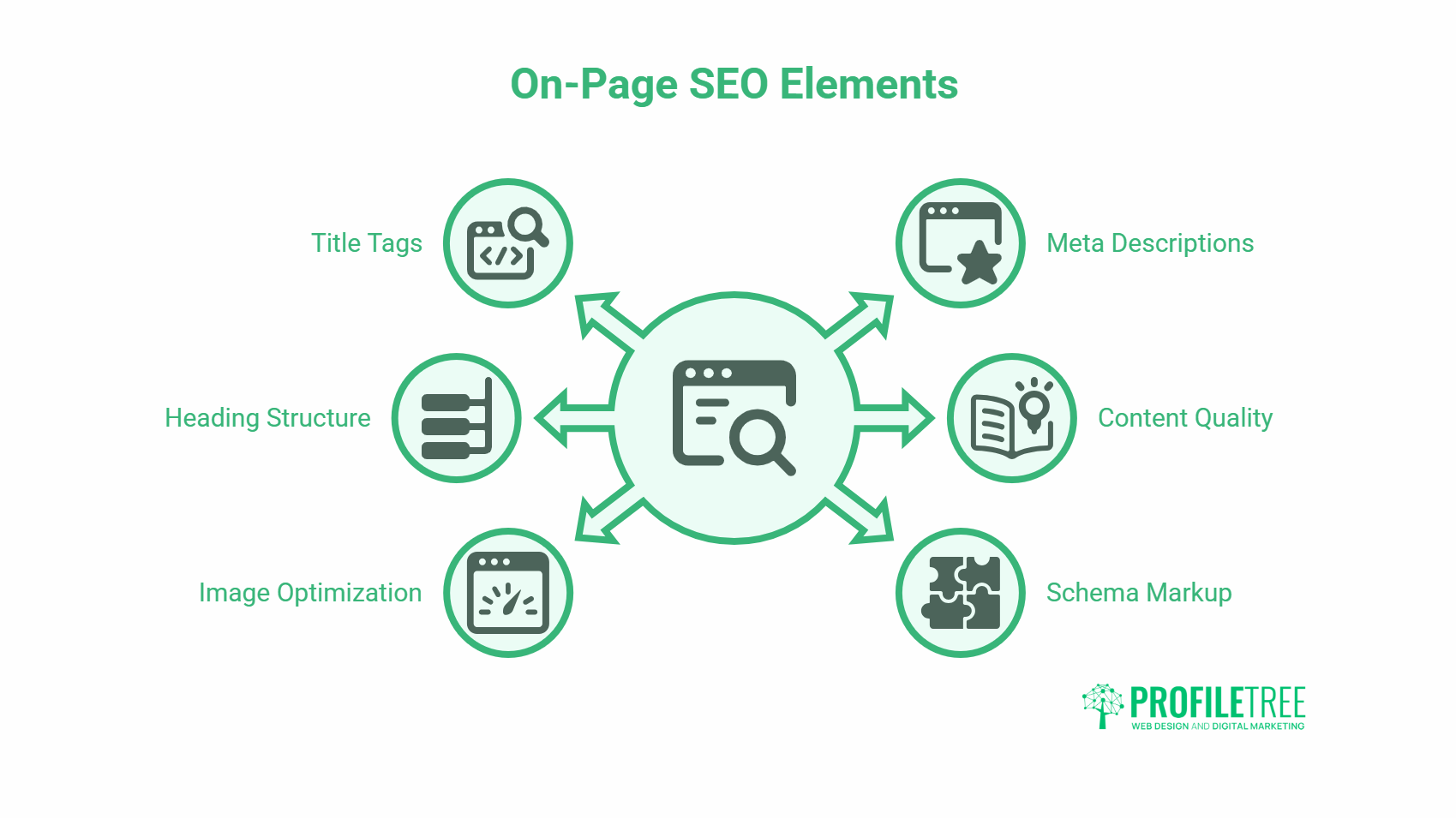
On-page SEO covers the content elements on each page that search engines read to understand what the page is about. Getting these right before launch is far more efficient than fixing them across dozens of live pages later.
Title tags and meta descriptions
Every page needs a unique title tag and meta description. Title tags appear in search results as the clickable heading; meta descriptions appear as the preview text below.
Title tags should be 50 to 60 characters, include the primary keyword near the front, and give searchers a reason to click. Meta descriptions should be 150 to 155 characters and include a clear signal of what the page offers.
Avoid duplicate title tags across pages. Search engines may rewrite them if they’re too long, too short, or if they don’t match the page content accurately.
Heading structure (H1 to H3)
Each page should have exactly one H1, which contains the primary keyword and describes the page clearly. H2s divide the main sections; H3s break down subsections within those.
Never skip heading levels; moving from H1 to H3 without an H2 creates structural inconsistencies that make pages harder to parse. Keep headings descriptive and specific; generic headings like “Introduction” or “More Information” don’t help users or search engines.
Content quality and depth
Thin content (pages with fewer than 500 words that offer little beyond surface-level information) is one of the most common reasons new sites struggle to rank. Before launch, every page that’s meant to rank should have enough depth to genuinely answer the search query it’s targeting.
For service pages, this typically means 800 to 1,200 words covering what the service includes, who it’s for, how it works, what it costs in rough terms, and what the next step is. For blog content, 1,500 to 2,500 words is the minimum for competitive informational queries.
Ciaran Connolly, founder of ProfileTree, puts it this way: “An optimised website at launch is like setting a ship’s sails to catch the right wind from the start. The structure, content, and technical signals you put in place before going live determine how search engines see you from day one, and that first impression takes a long time to change.”
Image optimisation
Every image on the site needs three things before launch: a descriptive filename (not IMG_0047.jpg), alt text that describes the image content accurately, and a file size that doesn’t slow page load times.
Use WebP format where possible. Compress all images before uploading. For a standard blog image, aim for under 100KB; for hero images, under 250KB. Tools like Squoosh or TinyPNG handle compression without visible quality loss.
Alt text should describe what’s in the image in plain language. Include the page’s primary keyword naturally where it fits, but don’t force it into every image description.
Schema markup
Schema markup is structured data that helps search engines understand your content beyond the text itself. Before launch, identify which schema types apply to your site and note them for your developer.
Common types for SMEs: LocalBusiness (includes your address, phone number, and opening hours), Article (for blog posts), FAQPage (for any page with FAQ sections), and Service. Schema doesn’t directly improve rankings, but it increases the chances of rich results appearing in search: star ratings, FAQ dropdowns, and business details in knowledge panels.
Technical SEO: The Non-Negotiables
Technical SEO is the foundation that everything else sits on. A site with excellent content and a clear structure will still struggle to rank if the technical basics are broken.
HTTPS and SSL certificate
Every website launched today should be on HTTPS, not HTTP. Google has treated HTTPS as a ranking signal since 2014, and browsers now flag HTTP sites as “not secure.” Most hosting providers include SSL certificates in their standard packages; verify yours is active and renewing automatically before launch.
Check that the site loads correctly on both www and non-www versions of the domain, and that HTTP requests redirect to HTTPS. Inconsistent URL versions create duplicate content issues.
Mobile performance
Google indexes the mobile version of your site first. If your site doesn’t load correctly on mobile, performs slowly, or has content that’s inaccessible on smaller screens, your rankings will reflect that, regardless of how well the desktop version performs.
Use Google’s mobile-friendly test before launch. Check the site on at least three different screen sizes, including a standard Android phone, an iPhone, and a tablet. Pay particular attention to navigation, form fields, and any pop-ups or overlays that may block content on mobile.
Page speed
Page speed is a confirmed ranking factor for both desktop and mobile. Use Google PageSpeed Insights to test your key pages before launch. Aim for a score above 70 on mobile; above 90 on desktop is achievable for most sites with good hosting.
Common speed issues on new sites: uncompressed images, too many plugins, no browser caching, slow server response times, and render-blocking JavaScript. Your developer should address these before the site goes live, not after.
Canonical tags
Canonical tags tell search engines which version of a URL is the preferred one when duplicate or near-duplicate content exists. These are particularly important for e-commerce sites and sites with filtering or sorting parameters.
On most CMS platforms, canonical tags are handled automatically, but verify this is the case. Check that your homepage has a canonical pointing to itself and that paginated pages point correctly.
301 redirects
If you’re launching a redesigned site rather than a brand-new one, map all existing URLs to their new equivalents before launch and set up 301 redirects. Every old URL that returns a 404 after launch is lost traffic and lost link equity.
Build a redirect map in a spreadsheet: old URL in column one, new destination in column two. Hand it to your developer before the domain switch. Test every redirect after launch.
Crawl and index verification
Before publishing, crawl your site using Screaming Frog (free for up to 500 URLs) or a similar tool. Look for broken internal links, missing title tags, duplicate metadata, pages returning non-200 status codes, and any pages with noindex tags that shouldn’t have them.
Fix everything flagged before going live. A clean crawl on launch day gives you a reliable baseline and makes future audits much easier.
Analytics and Search Console Setup
You cannot improve what you don’t measure. Setting up tracking before launch means you collect data from day one and have a baseline to compare against as the site grows.
Google Analytics 4
Set up a Google Analytics 4 property and install the tracking code across every page of the site before launch. Verify data is flowing correctly by using the real-time report while browsing the staging site.
Configure at least two conversions before going live: form submissions and phone number clicks. If the site has any e-commerce functionality, set up purchase tracking as well. GA4’s default event tracking covers most click and scroll behaviour automatically.
Google Search Console
Add your site to Google Search Console and verify ownership before launch. Once verified, submit your XML sitemap immediately. Search Console is where you’ll monitor indexing status, identify crawl errors, and track which queries your pages are appearing for.
Set up both the www and non-www versions of your domain as separate properties, then link them. This gives you a complete picture of search performance regardless of which version users land on.
Bing Webmaster Tools
Bing’s market share in the UK is meaningful, particularly for older demographics and users on Windows devices. Submit your sitemap to Bing Webmaster Tools at launch. Bing also provides AI citation data through its Webmaster platform, which is increasingly useful for understanding how AI-powered search tools reference your content.
Google Business Profile
If your business serves customers in a specific location, set up or claim your Google Business Profile before launch. A complete, verified profile helps your site appear in local map results, which appear above organic results for location-specific queries.
Your business name, address, and phone number in your GBP must exactly match what appears on your website. Inconsistency between these signals confuses search engines and weakens local rankings. This is part of what ProfileTree covers through digital marketing services for SMEs across Northern Ireland and the UK.
Pre-Launch Testing and Final Checks
The final stage before going live is a structured QA process. This is separate from the technical SEO checks above; it’s about confirming that everything works correctly for real users across different devices and browsers.
Cross-browser and cross-device testing
Test the site in Chrome, Firefox, Safari, and Edge. Check on at least one iOS device and one Android device. Pay attention to how forms behave, whether navigation works correctly, and whether any content is cut off or misaligned.
Browser testing takes time, but it’s non-negotiable. A site that breaks in Safari on iPhone has effectively excluded a significant share of its audience from day one.
Forms and conversion points
Every form on the site should be tested end-to-end before launch. Fill out each form, submit it, and confirm the submission is received in the right inbox or CRM. Check that confirmation messages appear, that required field validation works, and that the form behaves correctly on mobile.
A contact form that silently fails on launch day is a serious problem that may go undetected for weeks.
Content review
Read every page on the site before publishing. Check for typos, broken formatting, placeholder text that wasn’t replaced, and any content that references a future date or an unfinished section. Ask someone who wasn’t involved in the build to do a final read, as they’ll catch things the team has stopped seeing.
Duplicate content check
Before launch, check for any duplicate or near-duplicate content across pages. Common sources: service pages built from a template where the location name was swapped but little else changed, product descriptions copied from manufacturer sites, or blog posts republished from other sources without canonicalisation.
Duplicate content doesn’t lead to penalties in most cases, but it does dilute the authority of each page and can result in search engines indexing the wrong version. Our content marketing services include content auditing as a standard part of any new site project.
Final SEO QA checklist
Before you hit publish, confirm the following:
- Robots.txt allows crawling of all public-facing content
- XML sitemap is live and accessible
- Google Analytics and Search Console are installed and verified
- HTTPS is active, and all HTTP requests redirect correctly
- All pages have unique title tags and meta descriptions
- Every image has alt text
- No pages have accidental noindex tags
- All internal links resolve correctly
- 301 redirects are in place for any changed or retired URLs
- Schema markup has been implemented and noted for the dev team
Working with an Agency on Pre-Launch SEO
For many SMEs, the pre-launch checklist above represents significant technical and strategic work that sits outside the day-to-day running of a business. That’s where working with a specialist digital agency makes the most practical difference.
ProfileTree handles SEO setup as part of every website build through its web design and development services. This covers site architecture, metadata, schema, Analytics setup, and Search Console verification, so the site is ready for search engines from the moment it goes live, not weeks later.
For businesses looking to go further, AI transformation services also include guidance on how AI-powered search tools index and cite your content, which is increasingly relevant as tools like ChatGPT, Perplexity, and Google AI Overviews become a meaningful source of referral traffic.
Conclusion
A pre-launch SEO checklist isn’t a one-time tick-box exercise; it’s the foundation that determines how quickly your site earns visibility, trust, and traffic. The steps above are ordered to reflect how they build on each other: research informs structure, structure supports content, content depends on technical health, and all of it is measured through analytics.
Most businesses that struggle with SEO after launch aren’t dealing with complex problems. They’re dealing with basic issues that could have been addressed before the site went live. Going through a structured checklist before publishing means your site starts from a position of strength, and that head start compounds over time.
If you’d like ProfileTree to review your pre-launch SEO setup or handle it as part of a new build, get in touch with our team.
FAQs
What is the most important pre-launch SEO task for a new website?
Making sure your site is crawlable and indexable is the single most important task. A site that blocks search engine crawlers (even unintentionally through a leftover noindex setting from the development environment) will not appear in search results regardless of how good the content is. Check your robots.txt file and verify there are no stray noindex tags on your key pages before going live. After that, submitting an XML sitemap to Google Search Console on launch day is the next priority, as it signals to search engines which pages exist and how they’re structured.
How long does it take for a new website to rank on Google after launch?
Most new websites take three to six months to appear consistently in search results, and six to twelve months to rank competitively for moderate-difficulty terms. This is partly because Google’s algorithm builds trust in new domains gradually, and partly because it takes time to accumulate the backlinks, user signals, and indexed content that competitive pages have built up over years. Getting the technical and on-page elements right at launch shortens this timeline by ensuring search engines can properly crawl and understand your site from day one.
Do I need to set up Google Analytics before my website goes live?
Yes. Setting up Google Analytics and Google Search Console before launch means you start collecting data from your very first visitor. If you wait until after launch to install tracking, you lose that early data permanently. This matters because the traffic patterns and queries from the first few weeks of a site’s life often reveal which content is landing well and which pages need adjustment. Launching without analytics in place is like opening a shop without any way to know how many people came in.
What is an XML sitemap and why does it matter for pre-launch SEO?
An XML sitemap is a file that lists every page on your site that you want search engines to index. It acts as a map that guides crawlers to your content, particularly helpful on new sites where there are few external links pointing in. Most CMS platforms generate sitemaps automatically. Verify yours is live at /sitemap.xml before launch and submit it to both Google Search Console and Bing Webmaster Tools. A sitemap doesn’t guarantee indexing, but it speeds up the discovery process significantly.
Should I worry about duplicate content on a new website?
Yes, but not for the reasons most people think. Duplicate content rarely leads to a penalty; it leads to diluted page authority and unpredictable indexing, where search engines choose which version to rank and it’s often not the one you’d have picked. Common sources on new sites include service pages built from a template (with only the location name changed), product descriptions copied from supplier sites, and pages accessible via both www and non-www or HTTP and HTTPS URLs. Resolve these before launch using canonical tags, unique content, and consistent URL handling.
What SEO checks should I complete the day before launch?
The day before launch, run through: crawl the site with Screaming Frog or a similar tool to catch broken links and missing metadata; test every form end to end; confirm Google Analytics and Search Console are installed and verified; check robots.txt is set to allow search engine access; verify HTTPS is active and redirects work correctly; confirm the XML sitemap is live and includes all pages you want indexed; and do a final read of every public-facing page to catch any placeholder text or incomplete sections. If you’re replacing an existing site, confirm all 301 redirects are in place before the domain switch.
Twitter Advertising for UK Small Businesses